License Installation (Option Enable)
The software option can be installed by yourself. See https://www.keysight.com/find/LicensingSupport about detailed Keysight license information.
There are two methods to license your Keysight software.
Method 1: License File Installation
Getting the license file from the Keysight Software Manager (License Server)
-
Visit http://www.keysight.com/find/softwaremanager
-
Log in or register your name if first time log-in.
-
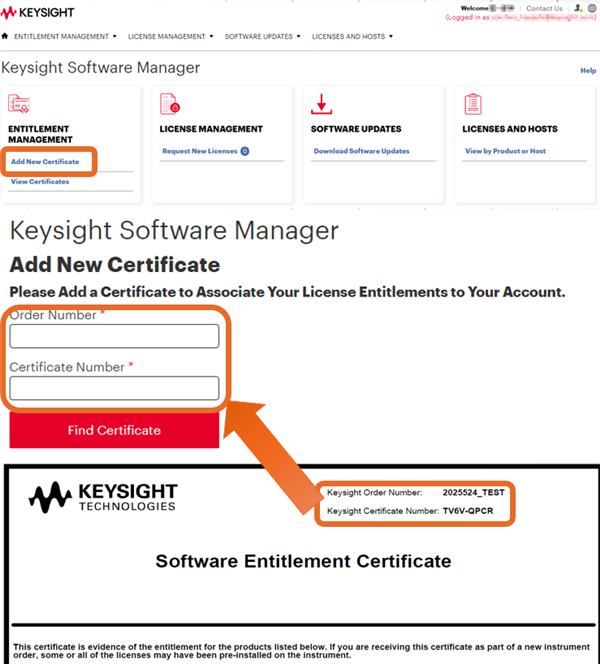
Click “Add New Certificate”
-
Locate the Software License Entitlement Certificate.
-
Enter your “Order Number” and “Certificate Number” on Software Entitlement Certificate.
-
Follow the instructions to register the ordered software licenses.
-
Select your required license (ex. S9xxxxxx)
-
Add your HOST ID.
Node-locked / Transportable / Trial Licenses
PXI VNA / S9405xB Simulator

or

Bench Top VNA
The license file can be copied to the root directory of the USB device and then connected to the VNA. The Keysight License Manager is always running, and it scans the root directory of any new drive looking for license files. When the file is found, the licenses are automatically installed, and a notification is displayed on the screen. If the licenses are not installed automatically, then the following instructions should be followed.

or

Blank for optional
USB VNA

Floating License for all VNAs and Simulator

USB Portable License for all VNAs and Simulator

Click “Assign License” at the bottom.
-
Follow the instructions.
-
The message with license file (.lic) is sent to your email address.
Installing the license file
License installation requires the Keysight Software Manager Utility (KSM-U). Make sure the latest version is installed on your PC or instrument.
Learn more and download KSM-U at keysight.com/find/KSMU.
-
Run KSM-U from Start Menu in Windows.
-
Open the KSM-U help window and refer to the "Add a License" topic.
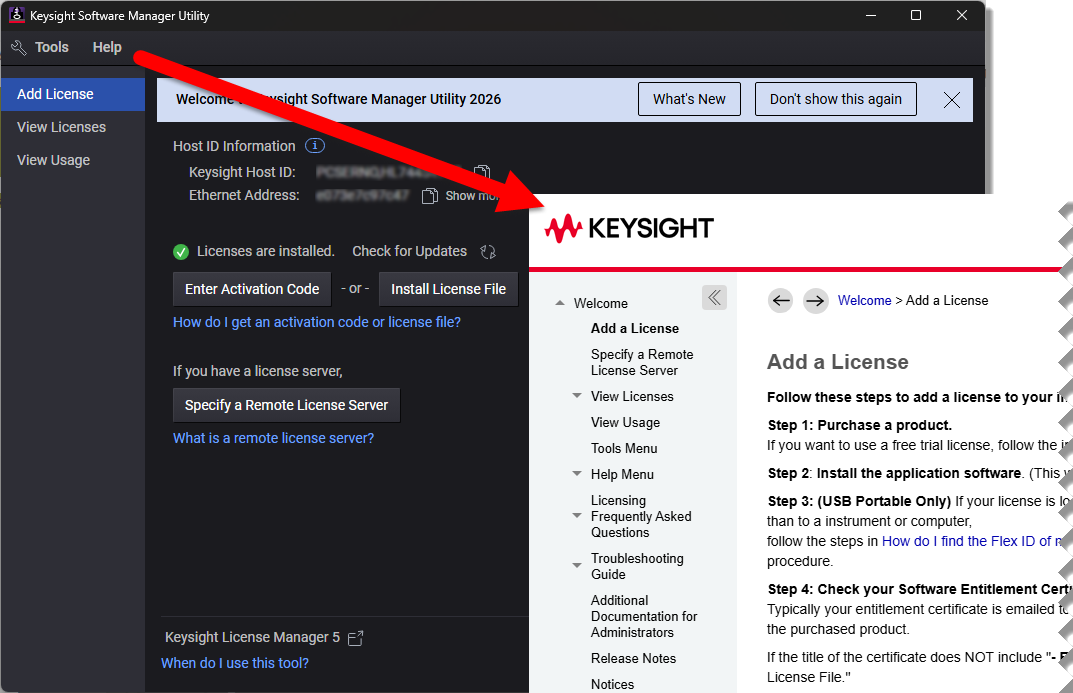
For instructions on the following licensing types, refer to the KSM-U help.
-
Node-locked licenses
-
Transportable licenses
-
Trial licenses
-
Floating licenses
-
USB Potable licenses
About HOST ID
The HOST ID will be asked when you get the license file.
HOST ID for PXI VNA, Bench Top VNA and Simulator
HOST ID is shown in the Keysight Software Manager Utility (KSM-U). KSM-U can be executed from Start Menu in Windows.
Host ID for Node-Locked, Transportable and trial licenses
The HOST ID syntax for Bench Top VNA is {Model No.},{Serial Number}, ex: E5080B,MY12345678
The HOST ID syntax for PXI VNA and S94050B/51B Simulator is PCSERNO, {two letters and eight numbers (this is nothing related with PC serial number)}
Host ID for Floating
HOST ID is Ethernet (Mac) address. If two numbers are displayed, either one should be fine.

Host ID for USB Portable
HOST ID is printed on a USB dongle.
The USB dongle can be ordered as an option of USB portable licence or Keysight P/N E8900-80036 Hardware Key-USB Port FLEX10.
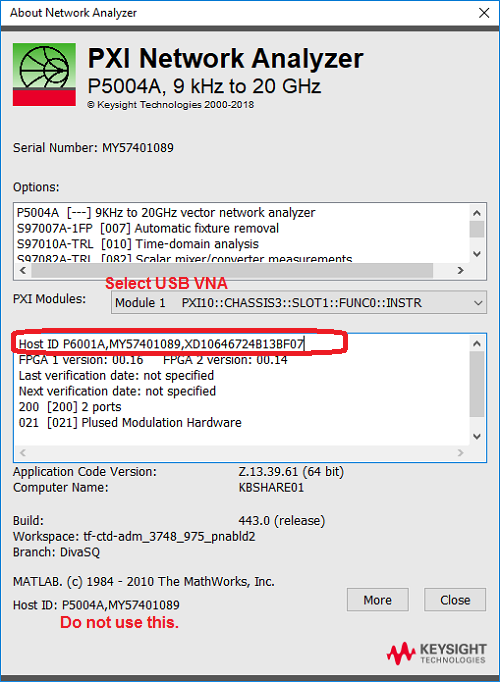
HOST ID for Streamline USB VNA and PXIe VNA
HOST ID is shown in About NA by clicking System > Help > About NA...
Only Node-Locked License is available for Streamline USB VNA and PXIe VNA.
The example image below is for Streamline, but applies to PXIe VNA, also.
Method 2: Easy Activation
Easy Activation provides a simplified licensing process.
-
After purchase, you will receive an entitlement certificate.
-
If the certificate title includes “Easy Activation,” use the provided activation code to license your software.
The entitlement certificate contains the official activation procedure and should be followed as the authoritative reference.
For detailed instructions, refer to:
Activate a License | Keysight
https://www.keysight.com/us/en/lib/resources/selection-guides/Activation.html