:MEASure:EYE:PEAK
Command Syntax
:MEASure:EYE:PEAK
Query Syntax
:MEASure:EYE:PEAK?
Description
Moves the database Peak Hits measurement to the top of the Results table. Displays the measurement if it is not already shown on the table. The query form of the command returns the measured value. The "Peak" annotation label is displayed which identifies the location of the measurement. The following picture shows the annotation which moves to reflect changes in the location of the peak hits. The database is 521 points high by 751 points wide and is used for histograms, mask testing, and color grade-gray scale displays. Behind each database point is a counter which is incremented each time a pixel is hit by data from a displayed waveform, color-grade memory, or function. Query this command to return the peak value recorded in any of the database counters. The maximum count (saturation) for each counter is unlikely to occur as it is greater than 2 giga-hits.
Use the :MEASure:EYE:PEAK:SOURce command to specify the real-time eye diagram on which to make the measurement.
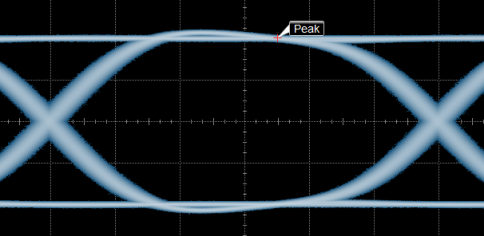
This measurement can be applied to both NRZ eye and PAM eye diagrams.
Example Command Sequence
:MEASure:EYE:PEAK:SOURce ECHannel1
:MEASure:EYE:PEAK
:MEASure:EYE:PEAK?
Measurement Ready?
To confirm that the measurement is ready to read, you can query the measurement's status:
if ('CORR' in Infiniium.query(':MEASure:EYE:PEAK:STATus?')):
	measurement = Infiniium.query(':MEASure:EYE:PEAK?')
If averaging is turned on (:ACQuire:SMODe AVERage), you can also confirm if the measurement result is ready by comparing the number of specified averages (:ACQuire:COUNt?) versus the number of measurement sweeps that have occurred (:ACQuire:COUNt?). The technique uses the :COUNt? common measurement query. For example,
if (Infiniium.query(':MEASure:EYE:PEAK:COUNt?') >= Infiniium.query(':ACQuire:COUNt?')):
	measurement = Infiniium.query(':MEASure:EYE:PEAK?')
You can also use an acquisition limit test to test that a number of waveforms or samples have completed before returning a measurement. Refer to the :LTESt:ACQuire:CTYPe command.
Querying Measurement Results and Statistics
You can query measurement results using the :MEASure:EYE:PEAK? query after making the proper instance settings.
If a measurement is installed into Results table (using the :MEASure:EYE:PEAK command) and you have made the proper instance settings, you can query statistics using common child queries.
Also, you can query measurement results and statistics directly from the Results table (without having to make the proper instance settings beforehand). See Querying Measurement Results and Statistics.