PAM-N General Thresholds
For NRZ (non-return-to-zero) signals, General and Rise/Fall threshold settings are independent. However, for PAM-N signals (where N can be 3, 4, 6, or 8), both PAM-N General and PAM-N Rise/Fall threshold settings are used, and both must be set appropriately.
In the PAM-N General subtab (where N can be 3, 4, 6, or 8), you can:
- Specify the PAM-N global threshold (and signal level) definitions.
- Specify PAM-N unique threshold (and signal level) definitions for each signal.
For each signal:
-
Select the signal under Thresholds apply to.
For a real-time eye made from another waveform in the system, select the original waveform. For a real-time eye in a color grade memory, select the color grade memory.
-
Select Track Global Threshold to use the PAM-N global threshold (and signal level) definitions for the selected signal.
Or, clear the Track Global Threshold selection to specify unique PAM-N threshold (and signal level) definitions for the selected signal. Another set of threshold (and signal level) definition controls become available.
When specifying unique PAM-N threshold definitions for a selected signal, you can click Copy From... to copy the PAM-N threshold definitions that another signal uses. If the other signal is tracking the PAM4 global threshold, the selected signal will then switch to tracking the PAM-N global threshold too.
-
Select the Threshold Method as either 50% of Levels or ± Hysteresis.
50% of Levels Threshold Method
Thresholds are set at the 50% locations between PAM levels.
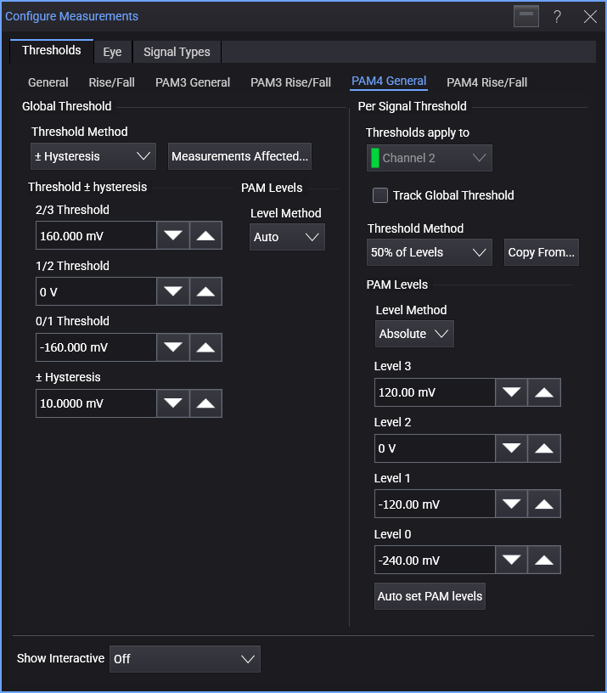
Next, you define the PAM levels. For the Level Method, you can select:
-
Auto — The PAM levels are automatically determined.
-
Absolute — You can enter level values in the Level N fields.
You can click Auto set PAM levels to cause a vertical histogram measurement to be run to determine the levels automatically. These values are copied into the fields above where you can make adjustments.
± Hysteresis Threshold Method
Custom threshold and hysteresis values are entered in the N/N Threshold and ± Hysteresis fields.
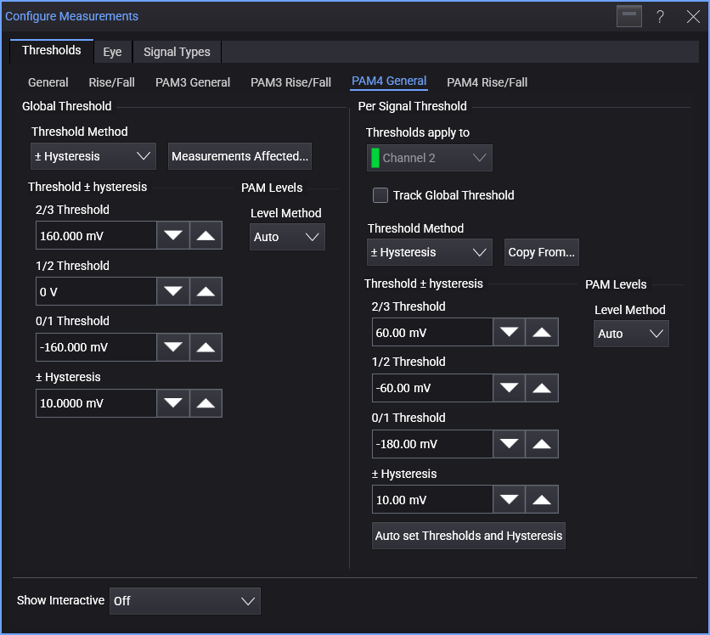
The hysteresis band is applied to all thresholds for the purpose of edge finding.
You can click Auto set Thresholds and Hysteresis to cause a vertical histogram measurement to be run to determine the thresholds and hysteresis automatically. These values are copied into the fields above where you can make adjustments.
Measurements Affected
To see a list of the measurements affected by the PAM-N general threshold and signal level definitions, click Measurements Affected....