Rise/Fall Thresholds
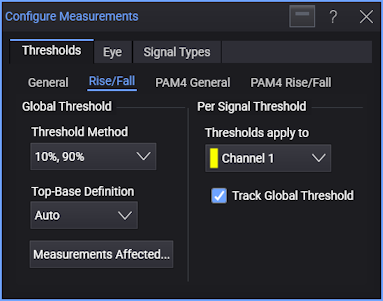
With the measurements that use these thresholds, middle thresholds are not used, and there is no ± Hysteresis method.
As with General thresholds, you can:
- Specify the global threshold (and top-base) definitions.
- Specify unique threshold (and top-base) definitions for each signal.
For each signal:
-
Select the signal under Thresholds apply to.
For a real-time eye made from another waveform in the system, select the original waveform. For a real-time eye in a color grade memory, select the color grade memory.
-
Select Track Global Threshold to use the global threshold (and top-base) definitions for the selected signal.
Or, clear the Track Global Threshold selection to specify unique threshold (and top-base) definitions for the selected signal. Another set of threshold (and top-base) definition controls become available.
When specifying unique threshold definitions for a selected signal, you can click Copy From... to copy the threshold definitions that another signal uses. If the other signal is tracking the global threshold, the selected signal will then switch to tracking the global threshold too.
Threshold Definitions
The 10% , 90% selection is often used for single-valued waveforms. The percentage level is based on the measured or user-defined values for Vtop and Vbase.
The types of threshold definitions are:
-
10%, 90% for typical waveforms (standard IEEE definition).
-
20%, 80% for waveforms with excessive ringing or overshoot (often used for eye diagrams, also a standard IEEE definition).
-
Custom Percent (%) is similar to the standard IEEE threshold definitions except you define the lower and upper percentages.
-
Absolute lets you assign specific amplitudes to the threshold levels. Ensure the thresholds are within the limits of the top-base levels. If the thresholds are outside the top-base boundaries, the measurement results will report which threshold level is in question. You will then have to redefine the threshold levels and repeat the measurement.
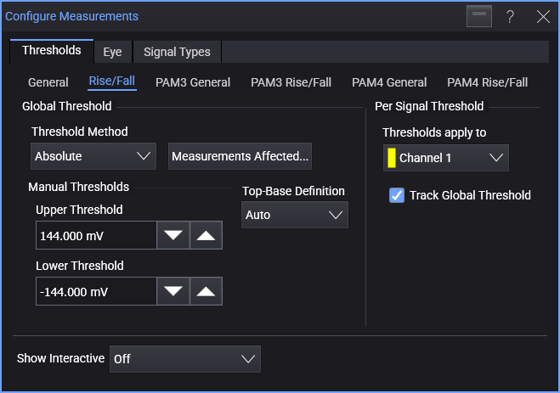
When threshold levels are set to absolute voltages, top-base levels are not used in the fall time calculation.
The Absolute option is not recommended when measuring eye diagrams.
Setting Custom Percent (%) thresholds causes the measurement results table to display the text "* user defined".
Top-Base Definitions (for Percent Thresholds)
Top-Base definition values also affect Mask Test Alignment.
When percent threshold definitions are selected, use the Top-Base Definition control to select:
-
Auto (default) determines the top (100%) and base (0%) levels using histograms of the signal's amplitude.
-
Absolute lets you enter absolute values for the top-base levels. Setting custom thresholds causes the measurement results table to display the text "user defined".
The Absolute option is not recommended when measuring eye diagrams.
Measurements Affected
To see a list of the measurements affected by the threshold and top-base definitions, click Measurements Affected....