Eye
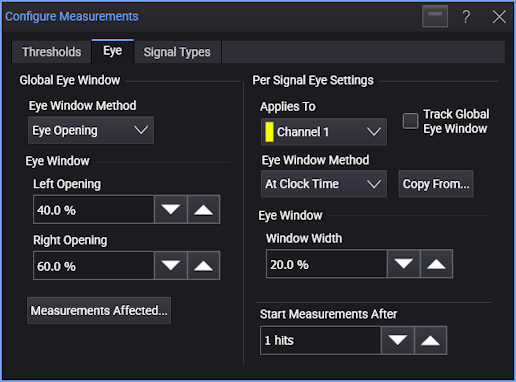
Use the Eye tab of the Configure Measurements dialog box to set the time for the eye boundaries. This setting determines what portion of the eye is used to generate histograms for eye diagram amplitude measurements.
For each signal:
-
Select the signal under Applies To.
-
Select Track Global Eye Window to use the global eye window definitions for the selected signal.
Or, clear the Track Global Eye Window selection to specify unique eye window definitions for the selected signal. Another set of controls become available.
When specifying unique eye window definitions for a selected signal, you can click Copy From... to copy the eye window definitions that another signal uses. If the other signal is tracking the global eye window, the selected signal will then switch to tracking the global threshold too.
The Eye Window Method specifies how the eye window used for measurements is determined. You can choose between:
-
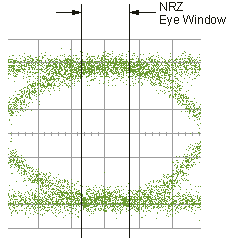
Eye Opening — Measures within an eye window defined by left and right opening locations using these Eye Window controls:
-
Left Opening — Sets the horizontal starting point for the eye window. The default value is 40%. Because the Right Opening default is 60%, the middle 20% of the eye waveform data is used for the measurements.
-
Right Opening — Sets the horizontal stopping point for the eye window. The default value is 60%. Because the Left Opening default is 40%, the middle 20% of the eye waveform data is used for the measurements.
-
-
At Clock Time — Measures within an eye window that is a width percentage at the location of the recovered clock edge using this Eye Window control:
-
Window Width — Lets you specify a UI percentage width about the recovered clock location. A zero percent in this field means only the recovered clock location is used.
-
The following controls are available regardless of the eye window method selected or whether tracking the global eye window definition is on:
-
Measurements Affected... — Click to view a list of measurements in which the measurement algorithm is affected by Eye Window definition changes.
-
Start Measurements After — This control sets the minimum highest hit count in the color grade/gray scale database required before making eye measurements. Increasing this value causes more waveforms to be collected and increases the accuracy of measurements.