Measurement Annotation
To see how Infiniium interprets a waveform to calculate the measurement result, click on the measurement listed in the Results table.
When Annotations are enabled (lower-right of Results table), annotations for the selected measurement in the Results table are placed on the waveform at the level or coordinate used to calculate the final result. Annotation labels are placed on valid measurement results only.
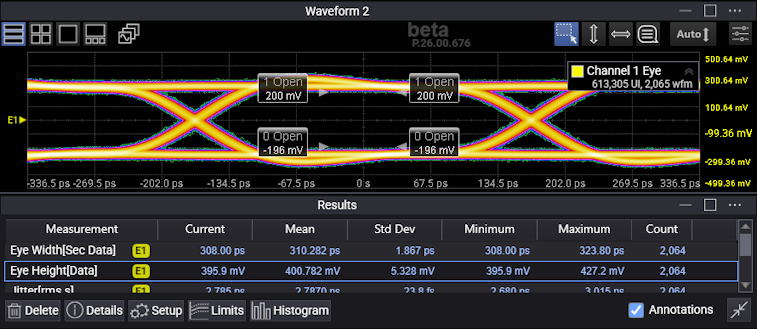
There are two types of annotation labels, level and coordinate:
- With level labels, the annotation is placed on the horizontal axis. This annotation point is a vertical result that is calculated over a horizontal range.
- With coordinate labels, the annotation is placed on an intersection of a vertical and horizontal result.
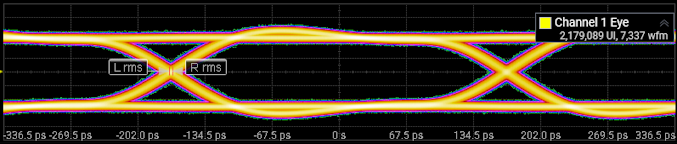
For example, a jitter (peak-to-peak) measurement is a measure of the time variances of the rising and falling edges of an NRZ eye diagram as these edges affect the crossing points of the eye. Infiniium generates a time histogram at the crossing point. It then positions the annotation labels at the full width of the histogram at the eye crossing.
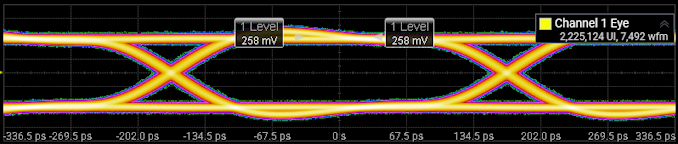
Some measurements show the measurement result directly. For example, a one level measurement is calculated using the mean value of the logic 1 level. Infiniium positions the annotation labels at the one level.
There are some instances when the instrument cannot detect the necessary parameters or source it needs to perform a specific measurement. When this situation occurs, a message appears under the Current column in place of the measurement result. This displayed message provides a brief statement of why the measurement was not completed.