DFE Pulse Response Tab
When Use Pulse Response or Use Pulse Response Optimization is selected in the Decision Feedback Equalizer Setup dialog box's Taps tab, use the Pulse Response tab to optimize the equalization that is applied to the pulse response. This tab lets you adjust the pulse delay (Dp) as well as the pulse length (Np) in UI.
The Automatic Taps setting has no effect on the display of or the settings shown in the Pulse Response tab.
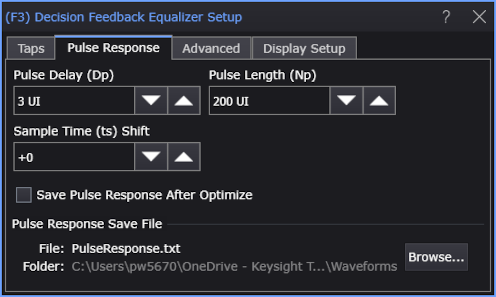
Select Save Pulse Response After Optimize to have the response automatically saved to an ASCII text file. The contents of the file is similar to the following listing:
File Format, WaveformYValues
Format Version, 1
Instrument, N1010A
SerialNumber,
SwVersion, P.06.60.308
Date, 06/21/2020 09:06:01
Source Name, Channel 5A
Channel Bandwidth, 15000000000
Channel Noise, 2E-06
Pulse Delay (Dp), 3
Pulse Length (Np), 200
Symbol Rate (Baud), 9953280000
Samples/UI, 30
Signal Amplitude, 0.000257699147049349
Main Cursor Index (ts), 111
Main Cursor Amplitude, 0.000250017282488446
Taps, 0.000188668491937765,9.66601087149695E-05,-7.71286501485765E-05,9.05218082888484E-05
Points, 6000
XOrg, 0
XInc, 3.34897976680384E-12
X Units, Second
Y Units, Watt
Data,
-6.59147544236711E-07
-2.60442158837837E-07
...