User-Defined Operators


User-defined operators are custom operators that modify an input waveform. You create these operators using Python, MATLAB, or Compiled MATLAB. Like Infiniium's standard operators, user operators perform math functions on input waveform(s) and display an output waveform.
User-defined operators are available in one-, two-, three-, and four-input versions.
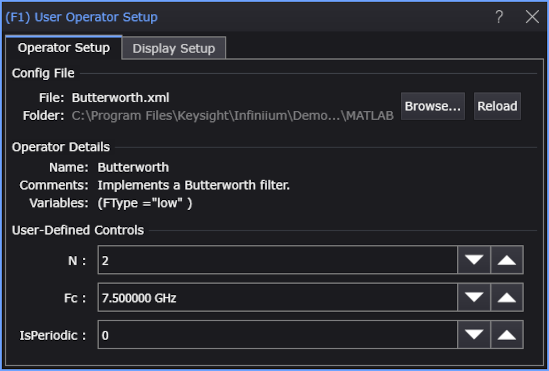
To configure your operator, you first create a script and then a simple XML configuration file that points to your script. The XML file also creates different input fields on the User Operator Setup dialog box.
To create a user-defined operator
- Write a MATLAB or Python script that creates your operator.
- Write an XML file that describes the operator and identifies the script.
- Import the XML file into the User Operator Setup dialog box.
- Use the Functions dialog box to select and assign waveform(s) to your operator.
User operators can do much more than simply run the your script. You can set up the operator to customize your script at run time. For example, you can initialize variables within your script and create up to four user-defined controls on the dialog box. Values that you enter or select in user-defined controls are passed to your script. The following types of user-defined controls can be created with the picture showing integer, double, string, and drop-down list controls.
Click the Display Setup tab to control the output waveform's display properties such as scaling, color, and custom waveform name.
|
|
When the number of points in input waveforms exceed the limit for MATLAB scripts and compiled MATLAB applications (64 M points for a one-input operator, 32 M points for a two-input operator, 22.369621 M points for a three-input operator, or 16 M points for a four-input operator), you must use file-based I/O in the user-defined operator. See File-Based I/O in MATLAB. You can also use File-Based I/O in Python.
It is possible to open the script file directly in the User Operator Setup dialog box without using an XML configuration file. However, without a configuration file you will not be able to specify variable values or setup user-defined controls.