Advanced Tab
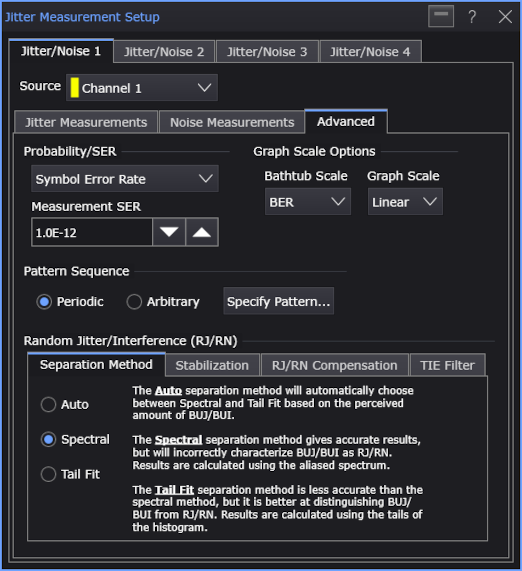
The Advanced tab in the Jitter Measurement Setup dialog box has these controls:
-
Probability/SER — Selects between using a probability or a symbol error rate (SER) in conjunction with the Jitter Bathtub curve when calculating the total jitter (TJ) and Eye Width.
When Probability is selected, use the Measurement Probability field to enter the value.
When Symbol Error Rate is selected, use the Measurement SER field to enter the value. J2, J4, J5, and J9 SER levels are:
- For J2, the total jitter is specified for a SER of 2.5e-3.
- For J4, the total jitter is specified for a SER of 2.5e-5.
- For J5, the total jitter is specified for a SER of 2.5e-6.
- For J9, the total jitter is specified for a SER of 2.5e-10.
-
Graph Scale Options — Let you specify scaling options for the jitter graphs:
- Bathtub Scale — Lets you display the Bathtub graphs using either the Q-scale or the BER scale. The Q-scale represents a Gaussian distribution as a straight line and makes it easier to see how Gaussian the distribution is.
- Graph Scale — Lets you choose a log or linear vertical scale.
-
Pattern Sequence — See Pattern Sequence.
-
Random Jitter/Interference (RJ/RN) — See Random Jitter/Interference (RJ/RN).