Noise Measurements Tab
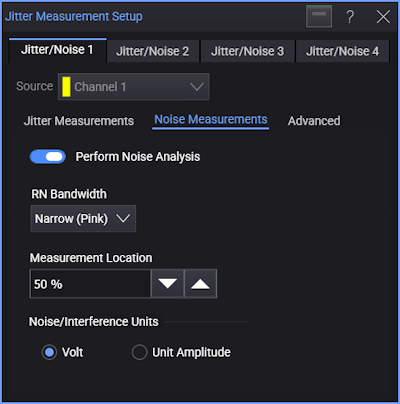
The Noise Measurements tab in the Jitter Measurement Setup dialog box has these controls:
-
Perform Noise Analysis — Enables or disables the Noise analysis.
-
RN Bandwidth — Like Jitter analysis, Noise analysis uses a spectral technique to separate RN (Random Noise) from PI (Periodic Interference).
Narrow bandwidth spikes that extend above the noise spectrum's baseline are considered to contain PI, while the remaining baseline is assumed to contain only RN. This technique works very well for wide-bandwidth (white) random jitter.
Wide bandwidth RN has a uniform power spectral density (PSD) across the entire jitter spectrum. Sometimes however, the RN being measured does not have a uniform PSD. Although this is not as common in practical communication system applications, it does occur frequently in noise sources generated using laboratory test equipment.
Conversely, the noise spectrum of some PI components appears much broader than the narrow spikes of a highly periodic noise component. These broad-bandwidth PI components are also uncommon, but they can be difficult to distinguish from RN by inspecting the noise spectrum alone.
For these reasons, you can specify whether you want to treat "broad lumps" in the noise spectrum as RN or PI.
-
Narrow (Pink) — Setting the RN Bandwidth mode to narrow (pink) acknowledges that the RN may or may not be flat, and that all broad lumps in the noise spectrum are considered to be RN.
-
Wide (White) — Setting the RN Bandwidth mode to wide (white) assumes that the RN is flat, and that all broad lumps in the noise spectrum are considered to be PI.
-
-
Measurement Location — Specifies the measurement location within the bit where 0% is the beginning of the bit, 50% is the middle of the bit, and 100% is the end of the bit.
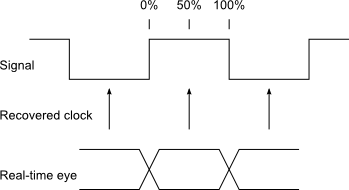
You can specify a location value from 5% to 95%.
-
Noise/Interference Units — Selects whether to express measurement values in Volts (V) or Unit Amplitude (UA).