Stabilization
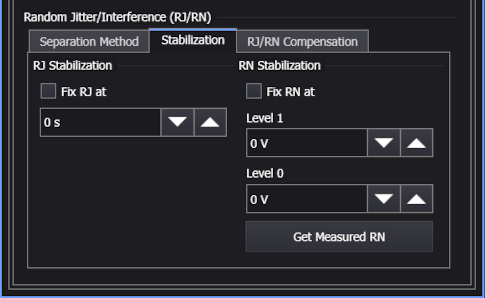
In the Advanced tab of the Jitter Measurement Setup dialog box, in the Random Jitter/Interference (RJ/RN) area, the Stabilization tab has these options:
-
RJ Stabilization — Select Fix RJ at to lock (stabilize) the value of the measured RJ that is used in jitter measurements. RJ stabilization prevents any uncorrelated non-Gaussian, non-periodic jitter from falsely contributing to any measured RJ value. One use of RJ stabilization is to prevent cross talk, from an adjacent channel, appearing as jitter. When stabilization is on, the measurement pane shows an asterisk is shown next to the RJ (rms) measurement results warning you that the measurement result has been modified. Above the table the annotation *RJ Fixed at: lists the entered value.
Click Get Measured RJ to automatically enter the current measured RJ value. This RJ value will be locked in subsequent jitter measurements.
To manually enter the RJ value, perform the following steps:
- Remove any sources of uncorrelated non-Gaussian, non-periodic jitter (for example, cross talk or non-periodic electromagnetic interference).
- Unselect Fix RJ at, measure the RJ, and enter the measured RJ into the Fix RJ at field.
- Select Fix RJ at to turn RJ stabilization on and reapply the sources of uncorrelated non-Gaussian, non-periodic jitter.
-
RN Stabilization — Select Fix RN at to lock (stabilize) the value of the measured RN that is used in amplitude measurements. Use RN stabilization to prevent any uncorrelated non-Gaussian, non-periodic amplitude noise from falsely contributing to any measured RN value. One use of RN stabilization is to prevent cross talk, from an adjacent channel, appearing as noise. When stabilization is on, the measurement pane shows an asterisk is shown next to the RN (rms) measurement results warning you that the measurement result has been modified. Above the table the annotation *RN Fixed (1/0): lists the entered values. Enter RN one/zero values in volts (electrical) or watts (optical), depending on the type of signal that you are measuring.
Click Get Measured RN to automatically enter the current measured RN value. This RN value will be locked in subsequent amplitude measurements.
To manually enter the RN value, perform the following steps:
- Remove any sources of uncorrelated non-Gaussian, non-periodic noise (for example, cross talk or non-periodic electromagnetic interference).
- Unselect Fix RN at, measure the RN, and enter the measured RN into the Fix RN at fields for each symbol level.
- Select Fix RN at to turn RN stabilization on and reapply the sources of uncorrelated non-Gaussian, non-periodic noise.