PAM Eye Widths

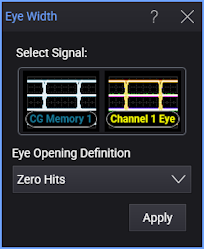 The PAM Eye Widths measurement measures the eye width (horizontal opening) for each eye of a PAM signal. On NRZ signals, the width of the single eye is measured. When the measurement is selected, the dialog box shown here is displayed. All the settings in this dialog box are linked to the settings in the PAM Eye Width dialog box, except for the Select Signal field.
By default, the Select Measurement Source/Settings dialog box has its Eye Opening Definition set to Zero Hits as shown in this picture. The eye opening is determined as the area in which there are no database hits.
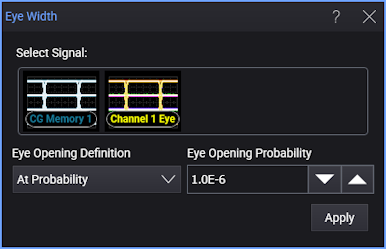
Eye Opening Definition Set to "At Probability"
When the Eye Opening Definition is set to At Probability, the Select Measurement Source/Settings dialog box appears as shown in this picture. The entered measurement-hit probability in the Eye Opening Probability field establishes the contour of an eye's opening.
PAM-N Analysis Setup Dialog Box Settings
To configure how the measurement is made, use the Measurement Configuration Tab of the PAM-N Analysis Setup dialog box which provides the settings listed in the following table.
| Setting | Description |
|---|---|
| Receiver Sample Timing | Configures the timing for sampling the signal data for all PAM measurements. |
| Eye Center Location | Selects the basis for determining the location of an eye's center on the waveform. This can be set at the maximum eye width or maximum eye height. |
| Eye Level Width | Defines the timespan (in percentage of symbol width) over which an eye's amplitude level is measured. |
| Time Units | Sets the time units for measurement: seconds or unit intervals. |
Measurement Algorithm
- An autoscale is performed to determine if the signal is formatted as PAM4 or NRZ.
- Determine the approximate signal-level amplitudes.
- Locate the crossing (transition) regions on both sides of the eyes.
- Determine the symbol period.
- Find the center of each eye. Note that the Receiver Sample Timing setting determines if only the middle eye (Eye 1/2) is located or if all three eyes are located (Eyes 0/1, 1/2, and 2/3).
- If the Eye Center Location setting is set to Maximum Eye Width, determine the horizontal line (center amplitude) across the eye at the maximum eye width and find the time at the line's midpoint (center time).
- If the Eye Center Location setting is set to Maximum Eye Height, determine the vertical line (center time) across the eye at the maximum eye height and find the amplitude at the line's midpoint (center amplitude).
- From the center of each eye, the eye boundaries are located based on zero data "hits" or at an eye opening probability. The probability defines the ratio of total hits in a waveform database column that can occur in the eye's opening. The probability can be set from 1 x 10⁻¹ to 1 x 10⁻⁹ using the Eye Opening Probability setting. The default probability is 1 x 10⁻². No extrapolation is used to determine Eye Widths at a specified probability.
- The Eye Width is reported.
To measure
- Click Auto Scale in the menu toolbar.
- Click the measurement toolbar's PAM tab.
- On the toolbar, locate and click the Eye Widths button.
SCPI Command
:MEASure:EYE:PAM:EWIDth