External Scaling
If there is external probing hardware (like an attenuator, transducer, or custom probe, for example) whose characteristics are not associated with a Keysight model number, you can use the External Scaling block to apply a custom attenuation and offset to the incoming signal so that the oscilloscope can properly compensate for them. You can apply external scaling regardless of whether a probe is attached.
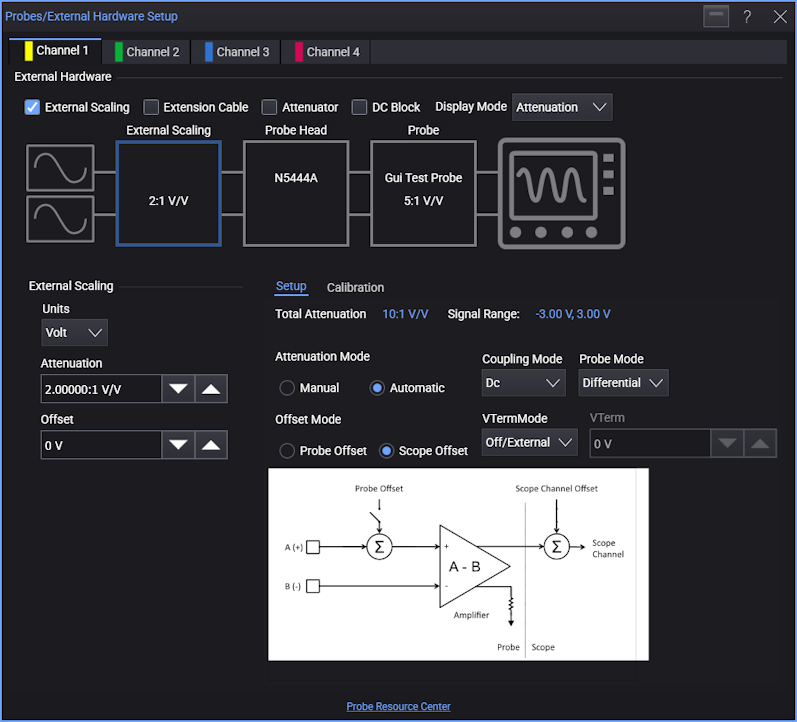
The Characteristics column for the External Scaling block gives you these controls:
-
Units — Specifies the units associated with the external probing hardware: Unknown, Volt, Ampere, or Watt.
-
Attenuation — Specifies the external hardware attenuation/gain/dB as an attenuation ratio (to 1).
-
Gain — Specifies the external hardware attenuation/gain/dB as a gain ratio (to 1).
-
dB — Specifies the external hardware attenuation/gain/dB as dB.
Positive dB values mean the gain ratio is greater than 1:1 and the attenuation ratio is less than 1:1. Negative dB values mean the gain ratio is less than 1:1 and the attenuation ratio is greater than 1:1.
-
Offset — Specifies the offset associated with external hardware.
External scaling is achieved as a simple linear transformation of the digital signal.
Y_n = (Y_n * externalAttenuation) + externalOffset
Because this transformation is performed in software after acquisition, it does not affect the hardware setup either in the oscilloscope or the probe. The effect of changing the external scaling is that you will see the channel waveform grid's numeric scale and measurement values change. The actual vertical range and signal are not be affected and remain visually the same.
Another feature of external scaling is that you can change the units of the signal. When changing the units, you will see the units for all vertical measurements and the channel waveform scale change. This is simply a display change and does not affect the actual signal or measurements.