Probe Calibration
In the Calibration tab on the lower right portion of the Probes/External Hardware Setup dialog box, you have these controls:
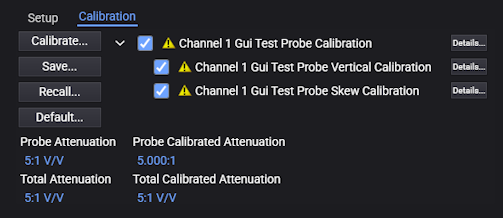
-
Calibrate... — Click to begin probe calibration. Follow the instructions presented in the graphical user interface to perform the probe calibration.
-
Use the check boxes to select some or all of the calibrations to run.
-
Details... — Click to view more information on the probe calibration results.
-
Save... — Click to save probe calibration results. These can recalled at a later time.
-
Recall... — Click to recall previously saved probe calibration results.
-
Default... — Click to return to the default probe calibration.