USB4 Gen 2-4 Protocol Decode Setup
When USB4 V2 Gen 2-4 is selected in the Protocol Decode dialog box, there are these controls for setting up the decode.
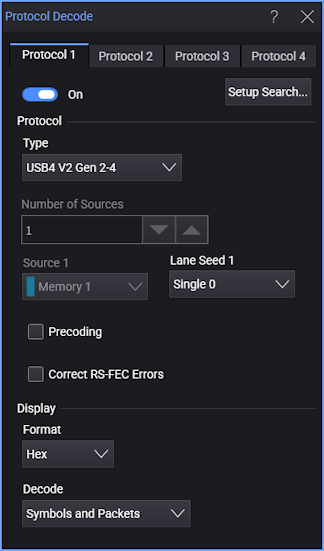
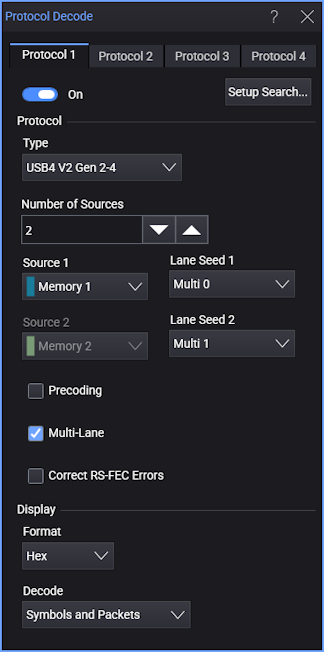
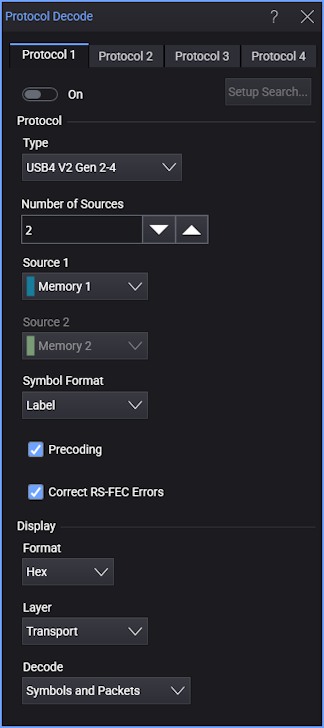
For the USB4 Gen 2-4 protocol decode, these options are available:
-
Number of Sources — There is a maximum number of three sources.
-
Source N — Specifies the input signal(s) to be decoded.
-
Lane Seed N — Determines the default descrambling seed to be used for this lane. For example, if Multi 0 is selected, the default descrambling seed is the one defined in the specification for Lane 0 in a multi-lane configuration.
-
Single 0 — This source is a single lane (not part of multiple lanes).
-
Multi 0 — This source is Lane 0 of a multi-lane decode.
-
Multi 1 — This source is Lane 1 of a multi-lane decode.
-
Multi 2 — This source is Lane 2 of a multi-lane decode. (Lane 2 can be present in USB4v2 Asymmetric mode.)
-
-
Multi-Lane — With multi-lane decode, each protocol decode can handle only one direction at a time. The data from all lanes specified are merged into the channel specified in Source 1. The lanes are merged only after finding the alignment characters on each lane.
If you want to decode another direction, you need to set up a different protocol decode for that direction (using Protocol 2, 3, or 4, for example).
When multi-lane decode is being performed, there is a single Packet Listing and Symbol Listing for the combined lanes. When multi-lane decode is off, there will be separate Packet Listing and Symbol Listing panes for each source.
-
Symbol Format — Specifies whether to display symbols using Labels or the 8- or 11-Bit representation.
-
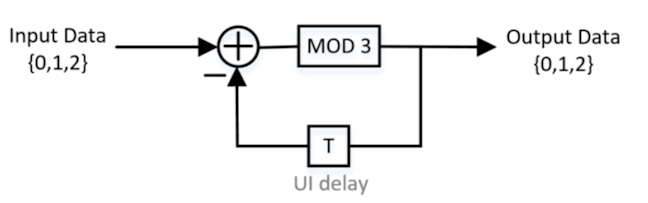
Precoding — When this option is selected, precoding is turned ON with the first bit that is RS FEC encoded. The pre-coder output is calculated by subtracting the previous output from the input as follows:
Out[n] = MOD(Inp[n] – Out[n-1], 3)
Output data = 0 is subtracted from the first trit (trinary symbol) of input data.
-
Correct RS-FEC Errors — The protocol decoder auto detects the existence of RS-FEC (Reed-Solomon Forward Error Correction) block data within the trace, and forward error checking is performed accordingly.
When the Correct RS-FEC Errors option is selected, forward error checking is performed, and a RS-FEC decoder corrects:
- For Gen 2/Gen 3: up to 2 Symbol Errors per received FEC block.
- For Gen 4: up to 12 Symbol Errors per received FEC block.
-
Display:
-
Format — Specifies the displayed format of the decoded values. You can select Hex, Decimal, or Binary.
-
Layer — For Gen 4, you can specify the layer you want to view:
-
Link — This link layer view displays intermediate decoding of 11-bit symbols with FEC correction applied. The link layer view shows raw 11-bit binary symbols and control symbol sequences. This is useful for lower-level diagnostics such as lane deskew analysis, clock state transitions, and training sequence inspection.
When Link is selected, the Symbol Format can be Label or 11-bit.
-
Transport — The transport layer view decodes full USB4 packets with all header fields, payload data, and CRC validation. This is the default view for Gen 2, Gen 3, and Gen 4.
When Transport is selected, the Symbol Format can be Label or 8-bit.
-
-
Decode — Specifies what to display in the Protocol content window: Symbols Only, Packets Only, or Symbols and Packets.
-