Eye Contour Group Setup
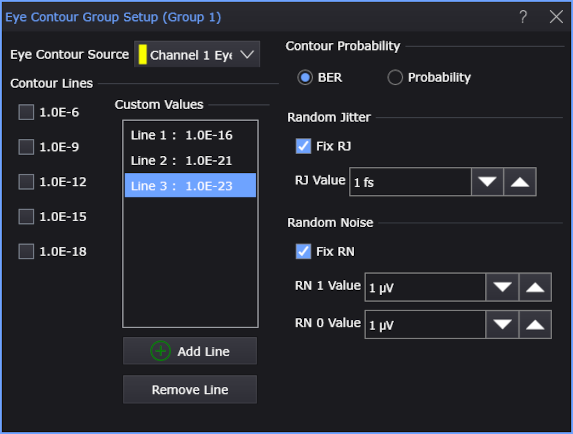
Use the Eye Contour Group Setup dialog box to place eye contour lines on NRZ or PAM eye diagrams. Eye contours provide additional insights into the quality of an eye diagram.
To open the Eye Contour Group Setup dialog box:
- From the main menu, choose Setup > Real Time Eye….
- In the Real-Time Eyes dialog box, select the tab of the real-time eye you want to set up, and click Add Eye Contour or Eye Contour Setup....
To create a group of eye contour lines
In the Eye Contour Group Setup dialog box:
-
In the Contour Lines list, select the lines that you want.
When applied to a PAM waveform, the group's lines are displayed within each of the three eye openings.
-
Use the Contour Probability field to select that line values be interpreted as:
- Probability, or
- BER (BER Error Rate) for NRZ signals or SER (Symbol Error Ratio) for PAM signals.
-
Click Add Line to add a value for a new line (see Add Eye Contour Line). Your group can have up to 8 contour lines. Values can range from 1.0E-1 to 1.0E-23.
-
When the group of eye-contour lines is created, close the Eye Contour Group Setup dialog box.
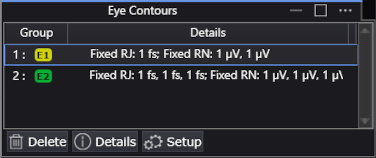
Up to 16 groups can be created with each group having a maximum of 8 contour lines. The Eye Contours panel that is shown in the following picture lists the eye contour groups with their source waveforms and any applied fixed RJ or RN.
To edit an existing eye contour group
- In the Eye Contours panel that is displayed below the waveforms, click in the list to select a group.
- Click the panel's Setup button.
Fixed RJ and RN
Use the Random Jitter and Random Noise fields to enter fixed values of RJ and RN. To measure the RJ or RN, perform the measurement while using a signal that has a short pattern. Or, perform the measurement using a separate instrument, such as a spectrum analyzer.
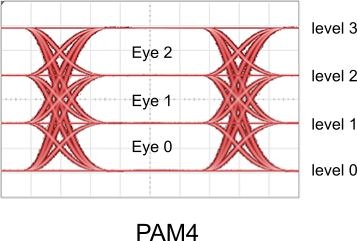
Values of RN can be entered for each eye level of an eye-contour group. PAM4 signals have four possible levels: 0, 1, 2, and 3. PAM3 signals have three possible levels: 0, 1, and 2. NRZ signals has two possible levels: 0 and 1.
| Field | Description | |
|---|---|---|
| RN 3 Value | Applies to level 3. |
|
| RN 2 Value | Applies to level 2. | |
| RN 1 Value | Applies to level 1. | |
| RN 0 Value | Applies to level 0. | |