Edge
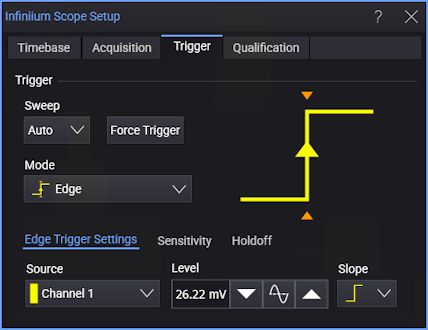
The Edge trigger mode identifies a trigger by looking for a specified slope and voltage level on a waveform. The Edge trigger mode is used for general-purpose waveform viewing such as troubleshooting.
-
Source — Select one of the analog input channels or the Aux Trig In input.
-
Level — Enter the trigger threshold level in the field or use the increase, 50%, or decrease buttons. Other ways to set the trigger level include dragging the "T" trigger level indicator on the left side of a waveform content window or turning the front panel Trigger Level knob .
-
Slope — Select:
- Rising Edge — Sets the slope of the trigger condition to a rising edge of the trigger source.
- Falling Edge — Sets the slope of the trigger condition to a falling edge of the trigger source.
- Either edge — The oscilloscope will trigger when either a rising or falling edge occurs on the specified channel, regardless of which edge caused the previous trigger event.
- Alternating edge — The oscilloscope will alternate between rising and falling edges on each trigger. This means the oscilloscope is set up for rising edge trigger, then immediately after a trigger occurs it is reconfigured for a falling edge trigger, and so on.