Edge Then Edge
The Edge Then Edge trigger mode triggers on an edge event after an arming event and a delay that can be:
- A specified time. This gives you a two-edge trigger where the arming and triggering edges are separated by time.
- A specified number of occurrences of a third edge event. This gives you a multiple edge trigger where between the arming edge and the triggering edge are a number of occurrences of a third edge.
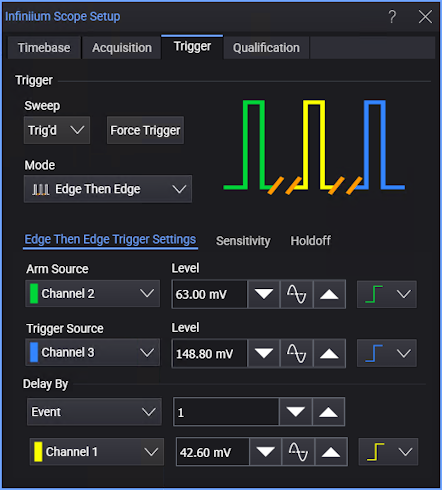
-
Arm Source — Select one of the analog input channels. The associated Level field (and increase, 50%, or decrease buttons) let you specify the threshold level for the arm source signal. The Slope control specifies whether the arming event occurs on a rising or falling edge.
Tip: When setting the arm level for your waveform, it is usually best to choose a voltage value that is equal to the voltage value at the midpoint of your waveform. For example, if you have a waveform whose minimum value is 0 (zero) volts and whose maximum value is 5 volts, then 2.5 volts is the best place to set your arm level. The reason is that there may be some ringing or noise at both the 0 and 5 volt levels that can cause false triggers.
-
Trigger Source — Select one of the analog input channels.
The associated Level field (and increase, 50%, or decrease buttons) let you specify the threshold level for the trigger source signal. The Slope control specifies whether the triggering event occurs on a rising or falling edge.
You can also set an edge count to trigger on the Nth edge.
-
Delay By — To specify the delay between the arming event and the trigger event, you can choose:
-
Time — The delay is an amount of time entered into the associated field.
-
Event — The delay is a number of occurrences of a specified third edge event.
The associated controls let you enter the number of occurrences, select the analog input channel, specify the edge threshold level, and specify the slope of the edge (rising or falling).
-