High Bandwidth Edge
The High Bandwidth Edge trigger mode provides rising and falling edge triggering all the way to the licensed acquisition bandwidth of the oscilloscope. Other trigger modes have less bandwidth.
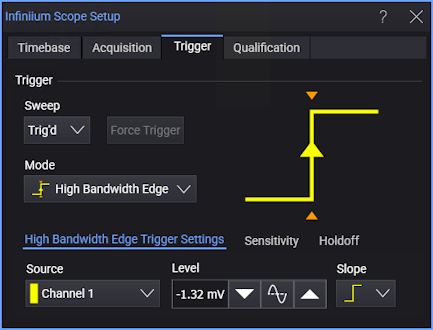
-
Source — Select one of the analog input channels.
-
Level — Enter the trigger threshold level in the field or use the increase, 50%, or decrease buttons. Other ways to set the trigger level include dragging the "T" trigger level indicator on the left side of a waveform content window or turning the front panel Trigger Level knob .
-
Slope — Select rising or falling edges.
The delay between a trigger occurring and a pulse being sent on the Trig Out connector of the oscilloscope is significantly longer in high-bandwidth mode than in other configurations. This mode also generally applies more hysteresis than with analog rising and falling edge triggering.