Window
The Window trigger mode lets you specify a voltage range and then trigger when the waveform either exits this range, enters this range, stays outside the range for too long or too short a time, or stays inside the range for too long or too short a time.
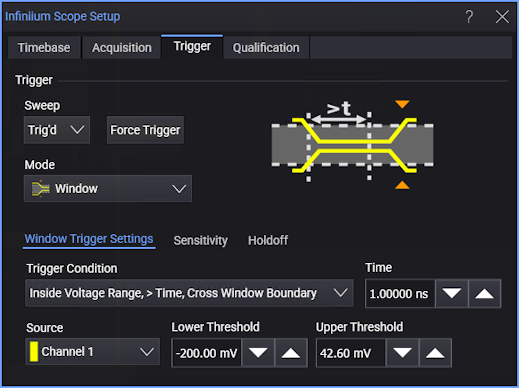
-
Trigger Condition — Selects the window condition to trigger on:
- Entering Voltage Range — Triggers when the signal enters the voltage range.
- Exiting Voltage Range — Triggers when the signal exits the voltage range.
- Inside Voltage Range, > Time, Cross Window Boundary — When the signal is inside the voltage range for greater than the specified Time, the trigger occurs when the signal crosses one of the voltage range boundaries.
- Inside Voltage Range, > Time, Timeout — When the signal is inside the voltage range for greater than the specified Time, the trigger occurs when the time is exceeded.
- Inside Voltage Range, < Time — Triggers when the signal is inside the voltage range for less than the specified Time.
- Outside Voltage Range, > Time, Cross Window Boundary — When the signal is outside the voltage range for greater than the specified Time, the trigger occurs when the signal crosses one of the voltage range boundaries.
- Outside Voltage Range, > Time, Timeout — When the signal is outside the voltage range for greater than the specified Time, the trigger occurs when the time is exceeded.
- Outside Voltage Range, < Time — Triggers when the signal is outside the voltage range for less than the specified Time.
-
Source — Select one of the analog input channels.
-
Lower Threshold — Sets the lower level of the voltage range.
-
Upper Threshold — Sets the upper level of the voltage range.