Python Measurement Scripts
To run a Python based user measurement, you must create a simple XML configuration file that identifies your measurement script. In addition to calling the script, the XML file populates the User Measurement Setup dialog box.
The version of Python supported for user operators is Python 3. You must modify the PC's PATH environment variable to include the path to the Python 3 executable.
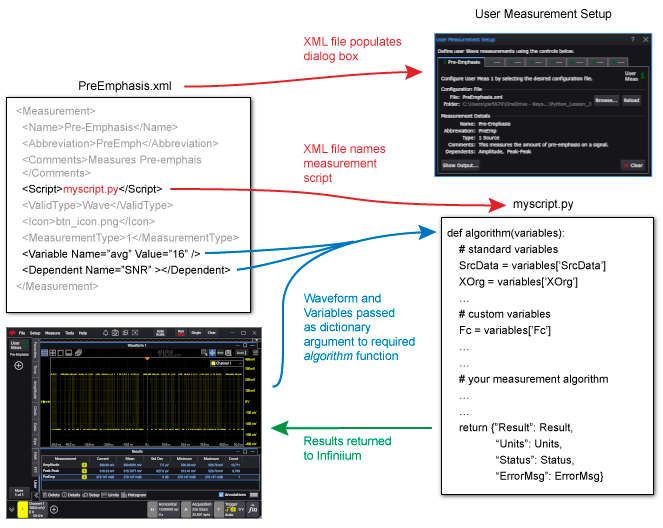
When a user measurement is run, Infiniium performs the following tasks for each data acquisition:
- Passes the source waveform, standard variables and any custom variables to the Python script. The source waveform is a one-dimensional NumPy array. With a real-time eye diagram, the source database is a two-dimensional NumPy array.
- Runs any selected "dependent" Infiniium measurements as specified in XML file.
- Executes the script.
- The script returns to Infiniium a dictionary of the measurement result and the result is displayed in the measurement results table. A number of standard output variables are also retrieved from the script.
NumPy is a library for creating multidimensional arrays For more information, go to https://numpy.org/. To import NumPy into your Python script enter the following line:
import numpy as np