The Agilent 8960 Wireless Communications Test Set and E5515C Fading
Solution provides a complete solution for performing faded signal tests
on mobile devices when coupled with the PXB. The PXB supports the following
8960/E5515C applications:
|
Model |
Description |
8960 Firmware Version |
PXB Firmware Version |
|
E1962B* |
cdma2000 Mobile Test App |
B.19.07 or later |
1.6.0 or later |
|
E1966A* |
1xEV-DO Terminal Test App |
A.13.10 or later |
1.6.0 or later |
|
E1987A* |
Fast Switch Test App Supports:
|
A.13.07 or later |
1.6.0 or later |
|
E6701G |
GSM/GPRS Lab App G |
G.01.12 or later |
1.6.0 or later |
|
E6702C |
cdma2000 Lab App C |
E.00.05 or later |
1.6.0 or later |
|
E6703C |
W-CDMA Lab App C |
C.01.17 or later |
1.5.3 or later |
|
E6706C |
1xEV-DO Lab App C |
E.00.05 or later |
1.6.0 or later |
|
E6785G |
Fast Switch Lab App G Supports:
|
G.00.15 or later |
1.6.0 or later |
|
E6785H |
Fast Switch Lab App H Supports:
|
H.00.06 or later |
1.6.0 or later |
|
E6703H |
DC-HSPA Support |
H.01.12 or later |
2.0.0 or later |
|
E6785H |
DC-HSPA Support |
H.01.13 or later |
2.0.0 or later |
* Requires the 8960 test application's corresponding Option 405 digital bus software license (E1962B-405, E1966A-405). The E1987A Fast Switch Test App requires the corresponding Option 405 license to use a desired format.
When a configuration that uses an 8960 is loaded or recalled, the PXB attempts to establish communication with the 8960 when the configuration is loaded. If communication is not established with the 8960 at that time, the PXB will attempt to establish communication:
If the Test Connection buttons is selected
When the Play button is selected (if the PXB is still not connected to the 8960 when the Play button is pressed, the PXB generates a warning message)
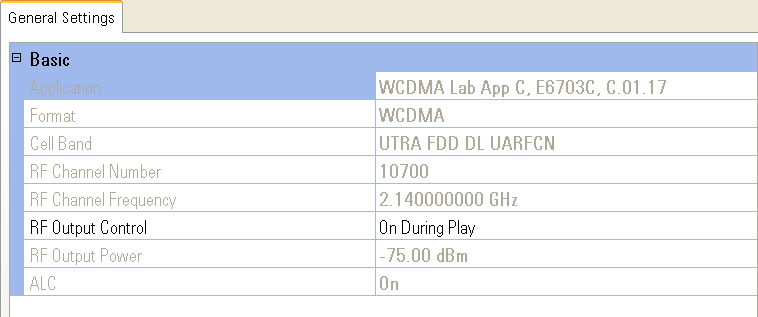
Shows current instrument format.
Shows current instrument cell band.
Shows current instrument cell band RF channel number.
Controls the state of the one box tester's RF output.
Always Off
This choice turns off the RF output.
Always On
This choice turns on the RF output.
On During Play
This choice turns on the RF output when the PXB is playing a signal and
turns the RF output off when the signal is no longer playing.
|
|
The 8960's Amplitude Offset feature can cause unexpected results in your measurement. Before you perform your measurement, please read the Keys to Success for information on managing amplitude offset and output power. |
