Open topic with navigation
Waveform Sequencing
Overview
How to Create / Edit a Waveform Sequence File
SCPI Commands for Waveform Sequencing
Examples of Waveform Sequence Files
Overview
The Waveform Sequencing feature allows you to createand edit waveform sequence (.seq) files. A waveform sequence can contain:
Each added waveform, sequence, or idle segment is referred to as a segment of the sequence. Any number of waveform files can be used to create a sequence (within capacity of the file system).
The maximum number of waveform files is 4 million for N5186A.
The maximum number of repetitions is 65535.
How to Create / Edit a Waveform Sequence File
To create/edit a waveform sequence file using the Sequence Editor in the GUI, perform the following steps.
|
GUI Location
|
Signals > Mode set to Waveform File > Waveform File tab > Waveform Utility > Create/Edit Sequence > Sequence Editor
|
-
In the Sequence Editor, click Select displayed with the Sequence File to select an existing sequence file for editing or to create a new one.
The default folder for storage of sequence files is:
Sequences
-
After selecting the sequence file, you can add segments to it by clicking the  button or delete an added segment from it by clicking the
  button. You can add a waveform file or another sequence file in this new segment or insert it as an idle segment.
-
If you want to add a waveform file or another sequence file in this new segment, perform the following steps.
-
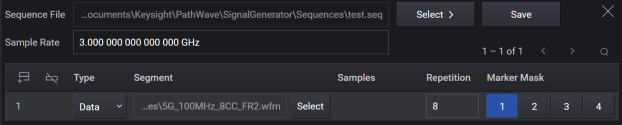
Ensure that Data is selected in the Type column.
-
Click Select in the row to select the waveform file / another sequence that you want to add for the new segment.
-
In the Repetition column of the row, specify the number of times the newly added waveform file/sequence plays (repeats) before the next segment plays.
-
If you want to insert this new segment as an idle segment, perform the following steps.
-
Select Idle in the Type column.
-
Specify the number of blank samples in the Samples column.
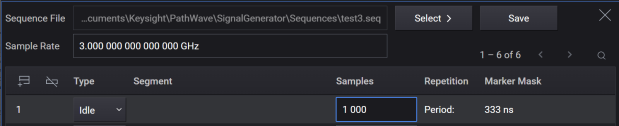
The period of the Idle segment is calculated from the Sample Rate and the specified number of Samples (Period = Samples / Sample Rate).
Sample Rate is a GUI only setting. To specify the Sample Rate via SCPI, use MEMory:WAVeform:HEADer:SAMPle:RATE "<file_name>",<sampleRate>|UNSPecified instead.
-
Repeat steps 2 to 4 to add more segments to the sequence file.
-
Click Save to save the segments details to the sequence file.
The waveform files, sequences, and/or idle segments play in the same order as placed into the waveform sequence using the Sequence Editor in the GUI or using the SCPI command. Once you create the sequence file, you can edit the segment settings or add more segments to this file.
When a sequence file is played and waveform segments in the sequence file are missing from the ARB memory, the instrument tries to upload them. If the sequence file is in the default folder for sequence files, the default folder for waveform files is checked. Otherwise, the folder where the sequence file is located is checked first, and then the default folder for waveform files is checked. The following files in the folder are checked for a segment <waveform>:
If <waveform> contains a file extension, <waveform>
Otherwise, the instrument tries to upload the following files in this order:
-
<waveform> as a secure waveform file
-
<waveform> as a non-secure waveform file
-
<waveform>.wfm
-
<waveform>.wiq
-
<waveform>.csv
SCPI Commands for Waveform Sequencing
|
SCPI Command
|
:MEMory:DATA:SEQuence <file name>,<waveform1>,<reps1>,NONE|M1|M2|M3|M4|M1M2|M1M3|M1M4|M2M3|M2M4|M3M4|M1M2M3|M1M2M4|M1M3M4|M2M3M4|M1M2M3M4|ALL,<waveform2>,<reps2>,NONE|M1|M2|M3|M4|M1M2|M1M3|M1M4|M2M3|M2M4|M3M4|M1M2M3|M1M2M4|M1M3M4|M2M3M4|M1M2M3M4|ALL
:MEMory:DATA:SEQuence? <file name>
|
|
SCPI Example
|
MEM:DATA:SEQ "SEQ:Test_Data","WFM1:ramp_test_wfm",25,M1M4,"WFM1:sine_test_wfm",100,ALL
MEM:DATA:SEQ? "SEQ:Test_Data"
|
| Notes |
-
To add an Idle segment, specify "IDLE,<sample>" in the <waveform> parameter, where <samples> is a number between 224 and 2,147,483,647 .
For example, the following command adds an Idle segment with 1000 samples as the first segment in the sequence file:
:MEM:DATA:SEQ "SEQ:MySequence","IDLE,1000",1,NONE,"MyWaveform",10,ALL
Although repetition and marker values are ignored for the Idle segment but these values must be provided in the command.
|
|
Backwards Compatibility SCPI
|
[:SOURce]:RADio:ARB:SEQuence[:MWAVeform]
|
Examples of Waveform Sequence Files
For the N5186A:
Assume that there are MyWaveform1.wfm (Keysight Signal Studio waveform), MyWaveform2.wiq (binary waveform) and MyWaveform3.csv (csv waveform) under:
Waveforms.
The following SCPI listings upload the waveform data from non-volatile memory to the arb memory and create waveform sequences.
From version A.03.00, :MMEMory:COPY can be omitted when the waveform is in the predefined folder because the file not found in the ARB memory is automatically uploaded from the non-volatile memory. Also, MSUS in the waveform parameters of :MEMory:DATA:SEQuence is not required. When used, it is ignored. For example:
:MEMory:DATA:SEQuence "SEQ:MySequence", "SWFM1:MyWaveform1", 10, ALL, "SWFM1:MyWaveform2", 100, ALL
is the same as
:MEMory:DATA:SEQuence "SEQ:MySequence", "MyWaveform1", 10, ALL, "MyWaveform2", 100, ALL
because SWFM1: is ignored.
Example 1: Simple Sequence
In this example, the first waveform is played 10 times and then the second waveform is played 100 times.
*RST
:MMEMory:DELete:WFM
:MMEMory:COPY "SNVWFM:MyWaveform1", "SWFM1:MyWaveform1"
:MMEMory:COPY "NVWFM:MyWaveform2", "SWFM1:MyWaveform2"
:MEMory:DATA:SEQuence "SEQ:MySequence", "MyWaveform1", 10, ALL, "MyWaveform2", 100, ALL
:SOURce:GROup:SIGNal:WAVeform:SELect "SEQ:MySequence"
Example 2: Nested Sequence
This is an example of a nested sequence. The first sequence will be named "BaseSequence" and consists of "MyWaveform1.wfm" repeated 10 times followed by "MyWaveform2.wiq" repeated 100 times. Then sequence named "MySequence" is created wherein "BaseSequence" will be repeated twice followed by "MyWaveform3" repeated 30 times. When "MySequence" is selected as waveform, segments played are as follows:
-
"MyWaveform1.wfm" 10 times
-
"MyWaveform2.wiq" 100 times
-
"MyWaveform1.wfm" 10 times
-
"MyWaveform2.wiq" 100 times
-
"MyWaveform3.csv" 30 times
*RST
:MMEMory:DELete:WFM1
:MMEMory:COPY "SNVWFM:MyWaveform1", "SWFM1:MyWavform1"
:MMEMory:COPY "NVWFM:MyWaveform2", "SWFM1:MyWaveform2"
:MMEMory:COPY "NVCSVWFM:MyWaveform3", "SWFM1:MyWaveform3"
:MEMory:DATA:SEQuence "SEQ:BaseSequence", "MyWaveform1", 10, ALL, "MyWaveform2", 100, ALL
:MEMory:DATA:SEQuence "SEQ:MySequence", "SEQ:BaseSequence", 2, ALL, "MyWaveform3", 30, ALL
:SOURce:GROup:SIGNal:WAVeform:SELect "SEQ:MySequence"
Please note that SEQ: cannot be omitted.
Example 3: Sequence on Ch2
This is an example of creating a simple sequence for playback on instruments with two channels, with Group 2 in Independent Configuration. The first waveform is played 10 times and then the second waveform is played 100 times.
*RST
:MMEMory:DELete:WFM2
:MMEMory:COPY "SNVWFM:MyWaveform1", "SWFM2:MyWaveform1"
:MMEMory:COPY "NVWFM:MyWaveform2", "SWFM2:MyWaveform2"
:MEMory:DATA:SEQuence "SEQ:MySequence", "MyWaveform1", 10, ALL, "MyWaveform2", 100, ALL
:SOURce:GROup2:SIGNal2:WAVeform:SELect "SEQ:MySequence"