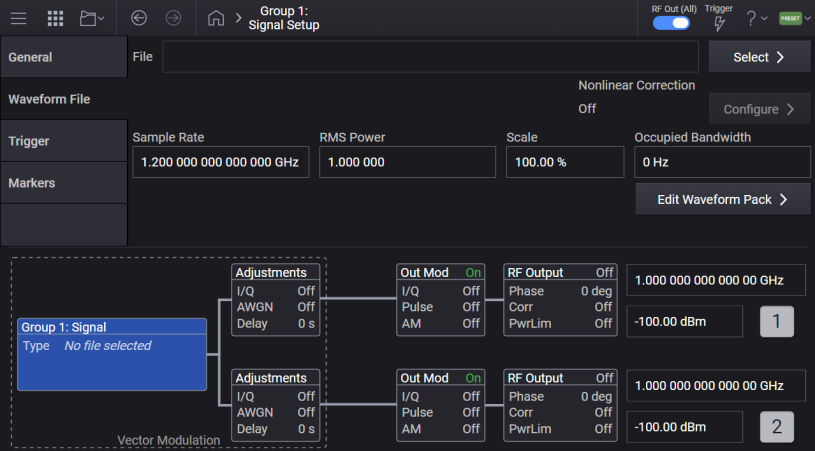
Signal block sets up the instrument’s vector modulation. This includes enabling vector modulation, selecting a waveform file for playback, or selecting optional signal modes, such as Multitone. See also, Vector Modulation Bandwidth Limitations.
The Signal block applies to N5186A only.
The Signal block sets up the instrument’s vector modulation. This includes enabling vector modulation, selecting a waveform file for playback, or selecting optional signal modes, such as Multitone. See also, Vector Modulation Bandwidth Limitations.
The vector modulation bandwidth is based on the instrument’s optional capabilities and operating settings. The bandwidth is as follows:
Table: N5186A MXG Vector Modulation BW
|
Operating Settings |
Bandwidth Options |
||||
|---|---|---|---|---|---|
| R10 |
B9X |
B5X |
B2X |
||
|
Max Sample Rate (MHz) |
1200 |
1200 |
600 |
300 |
|
|
Max Bandwidth (MHz) |
1000 |
1000 |
500 |
250 |
|
|
Modulation Bandwidth (MHz) |
9 kHz <= f <= 5.75 GHz |
1000 |
1000 |
500 |
250 |
|
5.75 GHz < f <= 31.25 GHz |
1000 |
1000 |
500 |
250 |
|
|
31.25 GHz < f <= 31.838 GHz |
1000 |
1000 |
500 |
250 |
|
| 31.838 GHz < f < 36.962 GHz | 1000 | 1000 | 500 | 250 | |
| 36.962 GHz <= f < 37.55 GHz | 1000 | 1000 | 500 | 250 | |
| 37.55 GHz <= f < 89.05 GHz | 1000 | 1000 | 500 | 250 | |
| 89.05 GHz <= f | 1000 | 1000 | 500 | 250 | |
If your configuration exceeds the available bandwidth, the following message appears in the Notifications Area:
Modulation BW is greater than instrument’s BW (<bandwidth>) at this frequency
In this scenario, you may operate the instrument with the resulting performance, or reduce the modulation setting to resume operation within the available bandwidth, as determined by the Mode in use.
Turns vector modulation signal on and off.
When I/Q Modulation Source is Internal, toggling this setting also toggles I/Q Modulation On to the same state.
|
GUI Location |
Signals > General tab > Enable |
|
SCPI Command |
[:SOURce]:GROup<group>:SIGNal<signal>[:STATe] ON|OFF|1|0 [:SOURce]:GROup<group>:SIGNal<signal>[:STATe]? |
|
SCPI Example |
GRO:SIGN ON GRO:SIGN? |
|
Notes |
If using floating licenses, be sure to query "SYST:ERR?" after attempting to set "SIGN ON"; if the license was not obtained from the server the error -310,"System error; feature not licensed" is returned. |
|
Preset |
OFF |
|
Coupling |
|
|
State Saved |
No
|
|
Backwards Compatibility SCPI |
The following commands are not recommended. They are for the convenience of users with existing remote programs developed for earlier versions of the signal generator or ported from a similar product. [:SOURce]:RADio[1]:ARB[:STATe] Alias [:SOURce]:SIGNal[1][:STATe] to :SOURce:GROup1:SIGNal1[:STATe] Alias [:SOURce]:SIGNal2[:STATe] to :SOURce:GROup2:SIGNal1[:STATe] N51xxB: [:SOURce]:RADio[1]:ALL:OFF :RADio:MTONe:ARB[:STATe] |
| Backwards Compatibility Notes |
For N51xxB:
Alias :RADio:MTONe:ARB[:STATe] ON to :SOURce:GROup1:SIGNal1:MODE MTON; :SOURce:GROup1:SIGNal1[:STATe] ON Alias :RADio:MTONe:ARB[:STATe] OFF to :SOURce:GROup1:SIGNal1[:STATe] OFF |
Selects the vector modulation signal mode. Some signal modes are optional capabilities and require a license to enable.
If AWGN is On in the Adjustments block, when you set Mode to AWGN, AWGN in the Adjustments block is disabled.
When using floating licenses with automatic check out, all available signal modes are displayed in the GUI. The license is checked out from the server when the signal mode is selected. The license is checked in (returned to the server) when preset is performed.
|
Capability |
SCPI Syntax |
License |
|---|---|---|
|
AMOD |
E7642APPC |
|
|
MTON |
E7621APPC |
|
|
SSB |
E7621APPC |
|
|
WAV |
NA |
|
|
AWGN |
Option 403 |
|
GUI Location |
Signals > General tab > Mode |
|
SCPI Command |
[:SOURce]:GROup<group>:SIGNal<signal>:MODE AMODulation|MTONe|SSB|WAVeform|AWGN [:SOURce]:GROup<group>:SIGNal<signal>:MODE? |
|
SCPI Example |
GRO:SIGN:MODE AMOD GRO:SIGN:MODE? |
|
Dependencies |
AWGN:
|
|
Preset |
WAVeform |
|
Notes |
For N5186A, the following licenses are required. MTONe and SSB: E7621APPC AMOD: E7642APPC When floating licenses are used, licenses are returned to the server when a preset is performed. |
|
State Saved |
Yes |
|
Choices |
Analog Modulation | Multitone | Single Tone | Waveform File | AWGN |
|
Backwards Compatibility SCPI |
The following commands are not recommended. They are for the convenience of users with existing remote programs developed for earlier versions of the signal generator or ported from a similar product. Alias [:SOURce]:SIGNal[1]:MODE to :SOURce:GROup1:SIGNal1:MODE Alias [:SOURce]:SIGNal2:MODE to :SOURce:GROup2:SIGNal1:MODE |
Requires Option PCH
Provided to allow programmatic compatibility with other Keysight Technologies signal generators.
Sync Off – The channels are not synchronized. Each signal plays based on its trigger settings.
|
GUI Location |
Signals > Synchronization Role |
|
SCPI Command |
[:SOURce]:GROup<group>:SIGNal<signal>:SROLe OFF [:SOURce]:GROup<group>:SIGNal<signal>:SROLe? |
|
SCPI Example |
GRO:SIGN:SROL SEC GRO:SIGN:SROL? |
|
Notes |
Without Option PCH: Attempting to set SROLe raises error -221, Settings Conflict; Option PCH is required. With Option PCH: Synchronization Role is Off and not changeable. Sending the SCPI command raises error 703, Feature not supported; on {Model#}, see Global Trigger. |
|
Choices |
Sync Off |
|
Preset |
Sync Off |
|
Dependencies |
Available only with Option PCH and Configuration is set to Independent. |
|
State Saved |
Yes |
|
Backwards Compatibility SCPI |
The following commands are not recommended. They are for the convenience of users with existing remote programs developed for earlier versions of the signal generator or ported from a similar product. Alias [:SOURce]:SIGNal[1]:SROLe to :SOURce:GROup1:SIGNal1:SROLe Alias [:SOURce]:SIGNal2:SROLe to :SOURce:GROup2:SIGNal1:SROLe |
Allows scaling the signal down without disrupting the output. The dynamic range is not adjusted (optimized) when this value is adjusted. This signal’s power relationship with other signals, including noise, is not adjusted when this value is changed. When the signal’s power is adjusted using other features, then this value is reset to 0 dB.
|
GUI Location |
Signals > General tab > Signal Attenuation |
|
SCPI Command |
[:SOURce]:GROup<group>:SIGNal<signal>:POWer:SATTenuation <rel_ampl> [:SOURce]:GROup<group>:SIGNal<signal>:POWer:SATTenuation? |
|
SCPI Example |
GRO:SIGN:POW:SATT -3 GRO:SIGN:POW:SATT? |
|
Dependencies |
When Mode is AWGN, this setting is disabled. |
|
Preset |
0 dB |
|
State Saved |
Yes |
|
Min |
-100 dB |
|
Max |
0 dB |
|
Resolution |
0.01dB |
|
Backwards Compatibility SCPI |
The following commands are not recommended. They are for the convenience of users with existing remote programs developed for earlier versions of the signal generator or ported from a similar product. Alias [:SOURce]:SIGNal[1]:POWer:SATTenuation to :SOURce:GROup1:SIGNal1:POWer:SATTenuation Alias [:SOURce]:SIGNal2:POWer:SATTenuation to :SOURce:GROup2:SIGNal1:POWer:SATTenuation |
Remote command only.
The sample rate used by the signal is available via a SCPI query. This value is available regardless of the signal’s enabled or disabled state.
|
SCPI Command |
[:SOURce]:GROup<group>:SIGNal<signal>:SCLock:RATE? |
|
SCPI Example |
GRO:SIGN:SCL:RATE? |
|
State Saved |
No |
|
Min |
0 Hz |
| Max |
Sample Rate. For Sample Rate, see Vector Modulation Bandwidth Limitations table. |
| Backwards Compatibility SCPI |
N51xxB: [:SOURce]:RADio[1]:MTONe:ARB:SCLock:RATE? |
| Backwards Compatibility Notes |
For N51xxB: Alias [:SOURce]:RADio[1]:MTONe:ARB:SCLock:RATE? to [:SOURce]:GROup1:SIGNal1:SCLock:RATE? |
Click this button to access the Analysis screen which provides the complementary cumulative distribution function (CCDF) measurement for a given signal or file.
The CCDF measurement is a statistical power measurement that indicates the probability of a signal power reaching or exceeding a given power value. CCDF represents the complement of the cumulative distribution function (CDF) that is, CCDF = 1 – CDF.
|
GUI Location |
Signals > General tab > Analysis |
Each measurement can be defined as follows:
CDF = Probability(x < K)
CCDF = Probability(x ≥ K)
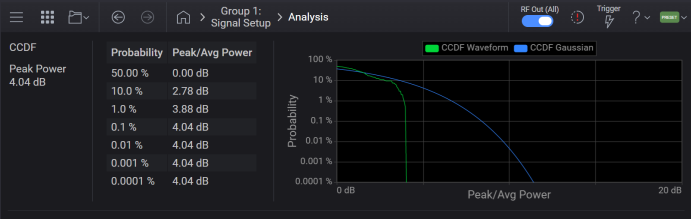
The Signal Generator application visualizes the CCDF curve with probability (%) on the y-axis and power (dB) on the x-axis. Power on the x-axis is relative to the average signal power, so 0 dB is the average power of the signal. As an example, a value of 2 dB and 12% on the curve indicates that there is a 12% probability that the signal power will reach 2 dB or more above the average power.
Behind the CCDF curve, another line is drawn to represent the Gaussian noise CCDF reference.
|
SCPI Command |
[:SOURce]:GROup<group>:SIGNal<signal>:CCDF:DATA? |
|
SCPI Example |
:GRO:SIGN:CCDF:DATA? |
| Preset | 0,0,0,0,0,0,0,0 |
| State Saved | No |
| Dependencies |
This CCDF calculation has the following requirements:
|
| Notes |
Runs the CCDF calculation then retrieves a list of floating point measurement results. Returns 8 scalar results:
|
|
SCPI Command |
:CALCulate:CCDF:DATA? <waveform file> |
|
SCPI Example |
:CALC:CCDF:DATA? "mywaveform.wfm" |
| Preset | 0,0,0,0,0,0,0,0 |
| State Saved | No |
| Dependencies | See the Dependencies for Calculate CCDF for Signal. |
| Notes | See the Notes for Calculate CCDF for Signal. |
Clears the phase accumulation resulting from a non-zero frequency offset.
When using frequency offset, dynamic range is managed by the instrument to reduce DAC overrange. Phase Accumulator Reset restores the dynamic range when the frequency offset is set to zero.
When the baseband Frequency Offset is non-zero, the hardware rotator accumulates phase shift of the baseband signal. This residual phase remains even after the offset value is returned to zero. While there is a non-zero residual phase present in the signal, the instrument will automatically prevent DAC overrange errors from occurring by scaling the signal down by 1/square root of 2.
|
GUI Location |
Signals > General tab > Reset Phase Accumulator |
|
SCPI Command |
[:SOURce]:GROup<group>:SIGNal<signal>:FREQuency:OFFSet:PHASe:RESet |
|
SCPI Example |
GRO:SIGN:FREQ:OFFS:PHAS:RES |
|
Notes |
This command clears the phase accumulation and thus zeros the phase shift. |
|
Backwards Compatibility SCPI |
The following commands are not recommended. They are for the convenience of users with existing remote programs developed for earlier versions of the signal generator or ported from a similar product. [:SOURce]:RADio[1]:ARB:BASeband:FREQuency:OFFSet:PHASe:RESet Alias [:SOURce]:SIGNal[1]:FREQuency:OFFSet:PHASe:RESet to :SOURce:GROup1:SIGNal1:FREQuency:OFFSet:PHASe:RESet Alias [:SOURce]:SIGNal2:FREQuency:OFFSet:PHASe:RESet to :SOURce:GROup2:SIGNal1:FREQuency:OFFSet:PHASe:RESet N51xxB:
|
| Backwards Compatibility Notes |
For N51xxB:
|
Sets the frequency offset for the vector modulation on the indicated Signal. The offset is the distance from the channel’s RF center frequency to the center of the modulation bandwidth. If you set frequency offset to a non-zero value, and then return the offset to zero hertz, it is recommended you perform Reset Phase Accumulator.
|
GUI Location |
Signals > General tab > Frequency Offset |
|
SCPI Command |
[:SOURce]:GROup<group>:SIGNal<signal>:FREQuency:OFFSet <frequency> [:SOURce]:GROup<group>:SIGNal<signal>:FREQuency:OFFSet? |
|
SCPI Example |
GRO:SIGN:FREQ:OFFS 25 MHz GRO:SIGN:FREQ:OFFS? |
|
Preset |
0 |
|
Couplings |
For N5186A only: If CW Interferer is ON and the Frequency Offset is set to a non-zero value, CW Interferer is set to OFF and a Settings Conflict error message is generated. |
|
Notes |
Attempting to set Frequency Offset to non-zero Hz while CW interferer is ON raises the error -221, "Settings conflict; Baseband Frequency Offset cannot be used when CW Interferer is ON." |
| Min |
- (BW/2) For BW, see Vector Modulation Bandwidth Limitations table. |
| Max |
BW/2 For BW, see Vector Modulation Bandwidth Limitations table. |
|
Resolution |
0.00001 Hz |
|
Backwards Compatibility SCPI |
The following commands are not recommended. They are for the convenience of users with existing remote programs developed for earlier versions of the signal generator or ported from a similar product.
N51xxB:
|
| Backwards Compatibility Notes |
For N51xxB:
|
|
State Saved |
Yes |
Sets the trigger mode (or type), determining how the waveform plays when triggered. These mode selections are described in the table below.
Triggers control the playback by telling the signal generator when to play the modulating signal (waveform). Depending on the trigger settings, the waveform playback can occur once or continuously.
A trigger signal comprises both positive and negative signal transitions (states), which are also called high and low periods. You can configure the signal generator to trigger on either state of the trigger signal. It is common to have multiple trigger signals, also referred to as trigger occurrences or events, occur when the signal generator requires only a single trigger. In this situation, the signal generator’s action is based on the setting within the trigger mode.
When you select a trigger mode, you may lose the signal (carrier plus modulation) from the RF output until you trigger the waveform. This is because the signal generator sets the I and Q signals to zero volts prior to the first trigger event, which suppresses the carrier. After the first trigger event, the waveform’s final I and Q levels determine whether you will see the carrier signal or not (zero = no carrier, other values = carrier visible). At the end of most files, the final I and Q points are set to a value other than zero.
Continuous: The framed data sequence repeats continuously until you turn the signal off or select a different waveform, or trigger mode. The sequence restarts every time the previous playback is completed.
Single: The framed data sequence plays once for every trigger received.
Segment Advance: For N5186A. The trigger controls the segment advance within a waveform sequence. To use this choice, a waveform sequence must be the active waveform.
|
GUI Location |
Signals >Trigger tab> Trigger Mode |
|
SCPI Command |
[:SOURce]:GROup<group>:SIGNal<signal>:TRIGger:TYPE CONTinuous|SINGle|SADVance [:SOURce]:GROup<group>:SIGNal<signal>:TRIGger:TYPE? |
|
SCPI Example |
GRO:SIGN:TRIG:TYPE SING GRO:SIGN:TRIG:TYPE? |
|
Choices |
Continuous | Single |
|
Notes |
For N5186A, attempting to set SADVance raises the error 703,"Feature not supported; SADVance not supported on {model}". |
|
Preset |
CONT |
|
State Saved |
Yes |
|
Backwards Compatibility SCPI |
The following commands are not recommended. They are for the convenience of users with existing remote programs developed for earlier versions of the signal generator or ported from a similar product. [:SOURce]:RADio[1]:ARB:TRIGger:TYPE Alias [:SOURce]:SIGNal[1]:CMODulation:TRIGger:TYPE to :SOURce:GROup1:SIGNal1:TRIGger:TYPE Alias [:SOURce]:SIGNal2:CMODulation:TRIGger:TYPE to :SOURce:GROup2:SIGNal1:TRIGger:TYPE Alias [:SOURce]:SIGNal[1]:MTONe:TRIGger:TYPE to :SOURce:GROup1:SIGNal1:TRIGger:TYPE Alias [:SOURce]:SIGNal2:MTONe:TRIGger:TYPE to :SOURce:GROup2:SIGNal1:TRIGger:TYPE Alias [:SOURce]:SIGNal[1]:WAVeform:TRIGger:TYPE to :SOURce:GROup1:SIGNal1:TRIGger:TYPE Alias [:SOURce]:SIGNal2:WAVeform:TRIGger:TYPE to :SOURce:GROup2:SIGNal1:TRIGger:TYPE N51xxB:
|
| Backwards Compatibility Notes |
For N51xxB:
|
Selects the waveform’s response to a trigger signal while using the continuous trigger mode.
Free Run: The waveform is immediately triggered and played when Enable Vector Modulation Signal is turned on and a valid waveform file is selected. The waveform repeats until you turn off Enable Vector Modulation Signal, select another trigger, or choose another waveform file. Triggers received while the waveform is playing are ignored.
Trigger & Run: The waveform waits for a trigger before it starts playing. When the waveform receives the trigger, it plays continuously until you turn off Enable Vector Modulation Signal, select another trigger, or choose another waveform file. Subsequent triggers are ignored.
Reset & Run: The waveform waits for a trigger before it starts playing. When the waveform receives the trigger, it plays continuously. Subsequent triggers reset the waveform to the beginning. For a waveform sequence, it means the beginning of the first segment in the sequence.
|
GUI Location |
Signals > Trigger tab > Trigger Mode > Continuous |
|
SCPI Command |
[:SOURce]:GROup<group>:SIGNal<signal>:TRIGger:TYPE:CONTinuous[:TYPE] FREE|TRIGger|RESet [:SOURce]:GROup<group>:SIGNal<signal>:TRIGger:TYPE:CONTinuous[:TYPE]? |
|
SCPI Example |
GRO:SIGN:TRIG:TYPE:CONT TRIG GRO:SIGN:TRIG:TYPE:CONT? |
|
Preset |
FREE |
|
Couplings |
When Trigger Source is changed to IMMediate, Continuous Mode changes to Free Run. |
|
State Saved |
Yes |
|
Choices |
Free Run | Trigger & Run | Reset & Run |
|
Backwards Compatibility SCPI |
The following commands are not recommended. They are for the convenience of users with existing remote programs developed for earlier versions of the signal generator or ported from a similar product.
N51xxB:
|
| Backwards Compatibility Notes |
For N51xxB:
|
Enables or disables the retriggering mode that controls how the retriggering function performs while a waveform is playing.
OFF (0)/No Retrigger: If a trigger is received early, while a waveform is playing, it will be ignored.
IMMediate/Restart on Trigger: If a trigger occurs while a waveform is playing, the ARB will reset and replay the waveform from the start, but there will be a gap in the playback while this is occurring. It will reset itself for every trigger it receives.
ON (1)/Buffered Trigger (N5186A only): If an early trigger occurs while a waveform is playing, the waveform will be retriggered at the end of the current waveform sequence and play once more. The RF will not be aligned with this early trigger. If the trigger occurs during the Trigger Delay period it will be ignored. When the Trigger Source is Global Trigger, and Global Trigger Source is Immediate, Buffered Trigger is not available.
|
GUI Location |
Signals > Trigger tab > Trigger Mode > Single |
|
SCPI Command |
[:SOURce]:GROup<group>:SIGNal<signal>:TRIGger:TYPE:SINGle:RETRigger ON|OFF|1|0|IMMediate [:SOURce]:GROup<group>:SIGNal<signal>:TRIGger:TYPE:SINGle:RETRigger? |
|
SCPI Example |
GRO:SIGN:TRIG:TYPE:SING:RETR 0 GRO:SIGN:TRIG:TYPE:SING:RETR? |
|
Dependencies |
Available only when Trigger Mode is Single |
|
Couplings |
When Trigger Source is changed to IMMediate, Single Mode changes to OFF When Trigger Source is Global Trigger, and Global Trigger Source is IMMediate, Single Mode becomes OFF and is not changeable. |
|
Preset |
ON When SCPI Backward Compatibility Mode is N51xxB:
|
|
State Saved |
Yes |
|
Choices |
Buffered Trigger | No Retrigger | Restart on Trigger |
|
Backwards Compatibility SCPI |
The following commands are not recommended. They are for the convenience of users with existing remote programs developed for earlier versions of the signal generator or ported from a similar product.
N51xxB:
|
| Backwards Compatibility Notes |
For N51xxB:
|
Sets the trigger source.
| Trigger Source | Description | Availability |
| BUS |
The trigger is initiated programmatically. When to use *TRG:
To initiate a trigger programmatically for an individual group (channel) and an individual signal, use: [:SOURce]:GROup<group>:SIGNal<signal>:TRIGger:IMMediate |
N5186A |
| KEY |
The trigger is initiated manually. To initiate the trigger, use the There is one trigger button for the instrument. Therefore, if you have multiple groups (channels), all groups and signals are triggered together when you use the Trigger button. |
N5186A |
| EXTernal |
Enables the triggering of the waveform playing by an externally applied signal at the following connectors:
|
N5186A |
| IMMediate | Enables immediate triggering of the waveform playing. |
N5186A |
| Global Trigger (GTRig) | The trigger source must be used when synchronized playback is needed across channels in instruments with multiple channels. There is one global trigger for the instrument; all signals and groups (channels) utilizing Global Trigger will be affected by changes to the Global Trigger settings. |
N5186A |
On N51xxB, the Trigger Source command (:RAD:ARB:TRIG) doesn’t have the IMMediate selection. Due to this difference, SCPIs related to Trigger don’t behave in exactly the same way as N51xxB. The following table shows returned values of Trigger Source and Continuous Mode in N51xxB and this instrument when the SCPI commands are sent in the following order. The user from N51xxB should understand the behavior difference.
|
# |
SCPI Command |
Setting Values |
|||
|---|---|---|---|---|---|
|
Trigger Source |
Continuous Mode |
||||
|
N5182B |
N5186A |
N5182B |
N5186A |
||
|
1 |
*RST |
EXTernal |
IMMediate |
FREE |
FREE |
|
2 |
:RADio:ARB:TRIGger EXTernal |
EXTernal |
EXTernal |
RESet |
RESet |
|
3 |
:RADio:ARB:TRIGger:TYPE:CONTinuous:TYPE FREE |
EXTernal |
IMMediate |
FREE |
FREE |
|
4 |
:RADio:ARB:TRIGger BUS |
BUS |
BUS |
FREE |
TRIGger |
|
5 |
:RADio:ARB:TRIGger:TYPE:CONTinuous:TYPE FREE |
BUS |
IMMediate |
FREE |
FREE |
|
GUI Location |
Signals > Trigger tab > Trigger Source |
|
SCPI Command |
[:SOURce]:GROup<group>:SIGNal<signal>:TRIGger[:SOURce] KEY|BUS|EXTernal|IMMediate|GTRigger [:SOURce]:GROup<group>:SIGNal<signal>:TRIGger[:SOURce]? |
|
SCPI Example |
GRO:SIGN:TRIG KEY GRO:SIGN:TRIG? |
|
Couplings |
When Trigger Mode is Continuous:
When Trigger Mode is Single:
|
|
Preset |
IMMediate When SCPI Backward Compatibility Mode is N51xxB:
|
|
Choices |
Immediate | Key | Bus | External | Global Trigger |
|
State Saved |
Yes |
|
Backwards Compatibility SCPI |
E82x7D, E8663D, and N51xxB:
[:SOURce]:RADio:ARB:TRIGger[:SOURce] Alias [:SOURce]:SIGNal[1]:CMODulation:TRIGger[:SOURce] to :SOURce:GROup1:SIGNal1:TRIGger[:SOURce] Alias [:SOURce]:SIGNal2:CMODulation:TRIGger[:SOURce] to :SOURce:GROup2:SIGNal1:TRIGger[:SOURce] Alias [:SOURce]:SIGNal[1]:MTONe:TRIGger[:SOURce] to :SOURce:GROup1:SIGNal1:TRIGger[:SOURce] Alias [:SOURce]:SIGNal2:MTONe:TRIGger[:SOURce] to :SOURce:GROup2:SIGNal1:TRIGger[:SOURce] Alias [:SOURce]:SIGNal[1]:NR5G:TRIGger[:SOURce] to :SOURce:GROup1:SIGNal1:TRIGger[:SOURce] Alias [:SOURce]:SIGNal2:NR5G:TRIGger[:SOURce] to :SOURce:GROup2:SIGNal1:TRIGger[:SOURce] Alias [:SOURce]:SIGNal[1]:WAVeform:TRIGger[:SOURce] to :SOURce:GROup1:SIGNal1:TRIGger[:SOURce] Alias [:SOURce]:SIGNal2:WAVeform:TRIGger[:SOURce] to :SOURce:GROup2:SIGNal1:TRIGger[:SOURce]
N51xxB:
|
| Backwards Compatibility Notes |
For N51xxB: Alias [:SOURce]:RADio[1]:TDME:ARB:TRIGger[:SOURce] to :SOURce:GROup1:SIGNal1:TRIGger[:SOURce] Alias [:SOURce]:RADio[1]:DMODulation:ARB:TRIGger[:SOURce] to [:SOURce]:GROup1:SIGNal1:TRIGger[:SOURce] Alias [:SOURce]:IQ:OUTPut[1]:TRIGger:SOURce to [:SOURce]:GROup1:SIGNal1:TRIGger[:SOURce] |
Signal Trigger Delay applies to the N5186A only. It delays the vector modulation (I/Q) of a signal with respect to trigger events, excluding the Immediate trigger source.
|
GUI Location |
Signals > Trigger tab >Trigger Delay |
|
SCPI Command |
[:SOURce]:GROup<group>:SIGNal<signal>:TRIGger:DELay <time> [:SOURce]:GROup<group>:SIGNal<signal>:TRIGger:DELay? |
|
SCPI Example |
GRO:SIGN:TRIG:DEL 500 ms GRO:SIGN:TRIG:DEL? |
| Notes | For N5186A: Trigger delay is not applied when Trigger Source is Immediate. |
|
Preset |
0 s When SCPI Backward Compatibility Mode is N51xxB:
|
|
State Saved |
Yes |
|
Min |
0 s |
|
Max |
41 s |
|
Resolution |
N5186A 833.333… ps |
| Backwards Compatibility SCPI |
N51xxB:
|
| Backwards Compatibility Notes |
For N51xxB:
|
Applies to N5186A only.
Enables or disables the operating state of the external trigger delay function.
|
GUI Location |
Signals > Trigger tab > Trigger Delay > On |
|
SCPI Command |
[:SOURce]:GROup<group>:SIGNal<signal>:TRIGger:DELay:STATe ON|OFF|1|0 [:SOURce]:GROup<group>:SIGNal<signal>:TRIGger:DELay:STATe? |
|
SCPI Example |
GRO:SIGN:TRIG:DEL:STAT ON GRO:SIGN:TRIG:DEL:STAT? |
|
Preset |
ON When SCPI Backward Compatibility Mode is N51xxB:
|
|
Range |
OFF|ON |
|
State Saved |
Yes |
| Backwards Compatibility SCPI |
For N51xxB:
|
| Backwards Compatibility Notes |
For N51xxB:
|
External Trigger Source applies to the N5186A only. Selects the external trigger source connector. To configure available trigger connectors, see the Connectors topic.
|
GUI Location |
Signals > Trigger > Trigger Source > External |
|
SCPI Command |
[:SOURce]:GROup<group>:SIGNal<signal>:TRIGger:EXTernal[:SOURce] <integer> [:SOURce]:GROup<group>:SIGNal<signal>:TRIGger:EXTernal[:SOURce]? |
|
SCPI Example |
GRO:SIGN:TRIG:EXT:SOUR 1 GRO:SIGN:TRIG:EXT:SOUR? |
|
Dependencies |
For N5186A, the values are based on the channel as follows:
Attempting to set a selection unavailable for a Group's configuration will generate an Illegal Parameter error. |
|
Couplings |
If the specified connector was being used (not None) as an output, then the Trigger Output Routing of that connector is set to None and a Settings Conflict error message is generated. |
|
Preset |
1 |
|
Range |
For N5185A and N5186A 1|2|3|4|5|6 |
|
State Saved |
Yes |
| Backwards Compatibility Notes |
For N51xxB:
|
Remote command only
Selects the internal PTrigger line used as the external trigger source.
EPT1: Selects the internal PTrigger line 1.
EPT2: Selects the internal PTrigger line 2.
|
SCPI Command |
[:SOURce]:RADio[1]:ARB:TRIGger[:SOURce]:EXTernal[:SOURce] EPT1|EPT2 [:SOURce]:RADio[1]:ARB:TRIGger[:SOURce]:EXTernal[:SOURce]? |
|
SCPI Example |
:RAD:ARB:TRIG:EXT EPT1 :RAD:ARB:TRIG:EXT? |
|
Couplings |
|
|
Preset |
EPT1 |
|
Range |
External Pattern Trigger 1|External Pattern Trigger 2 |
|
State Saved |
Yes |
| Backwards Compatibility SCPI |
N51xxB: [:SOURce]:RADio[1]:ARB:TRIGger[:SOURce]:EXTernal[:SOURce] |
| Backwards Compatibility Notes |
For N51xxB:
|
Remote command only
Sets the slope used by the external trigger commands listed under EPT Source.
POSitive: Triggers on a rising edge.
NEGative: Triggers on a falling edge.
|
SCPI Command |
[:SOURce]:RADio[1]:ARB:TRIGger[:SOURce]:EXTernal:SLOPe POSitive|NEGative [:SOURce]:RADio[1]:ARB:TRIGger[:SOURce]:EXTernal:SLOPe? |
|
SCPI Example |
RAD:ARB:TRIG:EXT:SLOP NEG RAD:ARB:TRIG:EXT:SLOP? |
|
Couplings |
|
|
Preset |
POSitive |
|
Range |
Negative|Positive |
|
State Saved |
Yes |
|
Backwards Compatibility SCPI |
N51xxB: [:SOURce]:RADio[1]:ARB:TRIGger[:SOURce]:EXTernal:SLOPe |
| Backwards Compatibility Notes |
For N51xxB:
|
Remote command only.
This SCPI command is provided for compatibility with other Keysight signal generators. The command is accepted without producing an error, and the value is retained, however it performs no action in the signal generator.
|
SCPI Command |
[:SOURce]:GROup<group>:SIGNal<signal>:TRIGger[:SOURce]:EXTernal:HOLDoff <time> [:SOURce]:GROup<group>:SIGNal<signal>:TRIGger[:SOURce]:EXTernal:HOLDoff? |
|
SCPI Example |
GRO:SIGN:TRIG:EXT:HOLD 500ms GRO:SIGN:TRIG:EXT:HOLD? |
|
Preset |
1 ms |
|
State Saved |
Yes |
|
Min |
4 ns |
|
Max |
10 s |
|
Resolution |
1 ns |
|
Backwards Compatibility SCPI |
The following commands are not recommended. They are for the convenience of users with existing remote programs developed for earlier versions of the signal generator or ported from a similar product. Alias [:SOURce]:SIGNal[1]:CMODulation:TRIGger[:SOURce]:EXTernal:HOLDoff to :SOURce:GROup1:SIGNal1:TRIGger[:SOURce]:EXTernal:HOLDoff Alias [:SOURce]:SIGNal2:CMODulation:TRIGger[:SOURce]:EXTernal:HOLDoff to :SOURce:GROup2:SIGNal1:TRIGger[:SOURce]:EXTernal:HOLDoff Alias [:SOURce]:SIGNal[1]:MTONe:TRIGger[:SOURce]:EXTernal:HOLDoff to :SOURce:GROup1:SIGNal1:TRIGger[:SOURce]:EXTernal:HOLDoff Alias [:SOURce]:SIGNal2:MTONe:TRIGger[:SOURce]:EXTernal:HOLDoff to :SOURce:GROup2:SIGNal1:TRIGger[:SOURce]:EXTernal:HOLDoff Alias [:SOURce]:SIGNal[1]:WAVeform:TRIGger[:SOURce]:EXTernal:HOLDoff to :SOURce:GROup1:SIGNal1:TRIGger[:SOURce]:EXTernal:HOLDoff Alias [:SOURce]:SIGNal2:WAVeform:TRIGger[:SOURce]:EXTernal:HOLDoff to :SOURce:GROup2:SIGNal1:TRIGger[:SOURce]:EXTernal:HOLDoff |
Remote command only.
Triggers the signal when Trigger Source is set to BUS.
This command generates errors with the following cases:
:SOURce:SIGNal2:WAVeform:TRIGger:IMMediate is used in 2 Tx Coherent Configuration
When Trigger Source is not BUS
A different Signal Mode is selected
|
SCPI Command |
[:SOURce]:GROup<group>:SIGNal<signal>:TRIGger:IMMediate |
|
SCPI Example |
GRO:SIGN:TRIG:IMM |
|
Backwards Compatibility SCPI |
The following commands are not recommended. They are for the convenience of users with existing remote programs developed for earlier versions of the signal generator or ported from a similar product. Alias [:SOURce]:SIGNal[1]:CMODulation:TRIGger:IMMediate to :SOURce:GROup1:SIGNal1:TRIGger:IMMediate Alias [:SOURce]:SIGNal2:CMODulation:TRIGger:IMMediate to :SOURce:GROup2:SIGNal1:TRIGger:IMMediate Alias [:SOURce]:SIGNal[1]:MTONe:TRIGger:IMMediate to :SOURce:GROup1:SIGNal1:TRIGger:IMMediate Alias [:SOURce]:SIGNal2:MTONe:TRIGger:IMMediate to :SOURce:GROup2:SIGNal1:TRIGger:IMMediate Alias [:SOURce]:SIGNal[1]:WAVeform:TRIGger:IMMediate to :SOURce:GROup1:SIGNal1:TRIGger:IMMediate Alias [:SOURce]:SIGNal2:WAVeform:TRIGger:IMMediate to :SOURce:GROup2:SIGNal1:TRIGger:IMMediate |
When using trigger Continuous Mode of Reset & Run, or Single Mode of Restart on Trigger, if an External Trigger signal is received during the waveform playback, the playback continues during the trigger delay. Set Trigger Delay Blanking On to suppress playback during the delay period.
For the N5186A, the external trigger delay blanking is on and not changeable.
|
GUI Location |
Signals > Trigger tab > Trigger Delay Blanking |
|
SCPI Command |
[:SOURce]:GROup<group>:SIGNal<signal>:TRIGger[:SOURce]:EXTernal:DELay:RBLanking[:STATe] ON|OFF|1|0 [:SOURce]:GROup<group>:SIGNal<signal>:TRIGger[:SOURce]:EXTernal:DELay:RBLanking[:STATe]? |
|
SCPI Example |
GRO:SIGN:TRIG:EXT:DEL:RBL ON |
|
Notes |
Trigger Delay Blanking is ON and not changeable. Attempting to change using SCPI command raises the error -224,"Illegal parameter value". |
|
Preset |
ON |
|
State Saved |
Yes |
|
Choices |
OFF | ON |
|
Backwards Compatibility SCPI |
The following commands are not recommended. They are for the convenience of users with existing remote programs developed for earlier versions of the signal generator or ported from a similar product. Alias [:SOURce]:SIGNal[1]:CMODulation:TRIGger[:SOURce]:EXTernal:DELay:RBLanking[:STATe] to :SOURce:GROup1:SIGNal1:TRIGger[:SOURce]:EXTernal:DELay:RBLanking[:STATe] Alias [:SOURce]:SIGNal2:CMODulation:TRIGger[:SOURce]:EXTernal:DELay:RBLanking[:STATe] to :SOURce:GROup2:SIGNal1:TRIGger[:SOURce]:EXTernal:DELay:RBLanking[:STATe] Alias [:SOURce]:SIGNal[1]:MTONe:TRIGger[:SOURce]:EXTernal:DELay:RBLanking[:STATe] to :SOURce:GROup1:SIGNal1:TRIGger[:SOURce]:EXTernal:DELay:RBLanking[:STATe] Alias [:SOURce]:SIGNal2:MTONe:TRIGger[:SOURce]:EXTernal:DELay:RBLanking[:STATe] to :SOURce:GROup2:SIGNal1:TRIGger[:SOURce]:EXTernal:DELay:RBLanking[:STATe] Alias [:SOURce]:SIGNal[1]:WAVeform:TRIGger[:SOURce]:EXTernal:DELay:RBLanking[:STATe] to :SOURce:GROup1:SIGNal1:TRIGger[:SOURce]:EXTernal:DELay:RBLanking[:STATe] Alias [:SOURce]:SIGNal2:WAVeform:TRIGger[:SOURce]:EXTernal:DELay:RBLanking[:STATe] to :SOURce:GROup2:SIGNal1:TRIGger[:SOURce]:EXTernal:DELay:RBLanking[:STATe] |
In cases where playback synchronization with another instrument or device under test is desired, enable external-trigger Playback Synchronization to ensure that the output signal is synchronous to the trigger event. Waveform samples will be skipped until internal processing is complete and playback commences.
|
GUI Location |
Signal > Trigger tab> Trigger Source set to External > Enable Playback Synchronization |
|
SCPI Command |
[:SOURce]:GROup<group>:SIGNal<signal>:TRIGger[:SOURce]:EXTernal:SYNChronize:OUTPut ON|OFF|1|0 [:SOURce]:GROup<group>:SIGNal<signal>:TRIGger[:SOURce]:EXTernal:SYNChronize:OUTPut? |
|
SCPI Example |
GRO:SIGNal:TRIG:EXT:SYNC:OUTP ON GRO:SIGNal:TRIG:EXT:SYNC:OUTP? |
|
Couplings |
Only applied when Trigger Source is set to External, or Global Trigger Source is set to External, Trigger Mode is set to Continuous, and Continuous Mode is set to Trigger & Run. |
|
Preset |
OFF |
|
State Saved |
Yes |
|
Choices |
OFF | ON |
|
Notes |
|
|
Backwards Compatibility SCPI |
The following commands are not recommended. They are for the convenience of users with existing remote programs developed for earlier versions of the signal generator or ported from a similar product. Alias [:SOURce]:SIGNal[1]:CMODulation:TRIGger[:SOURce]:EXTernal:SYNChronize:OUTPut to :SOURce:GROup1:SIGNal1:TRIGger[:SOURce]:EXTernal:SYNChronize:OUTPut Alias [:SOURce]:SIGNal2:CMODulation:TRIGger[:SOURce]:EXTernal:SYNChronize:OUTPut to :SOURce:GROup2:SIGNal1:TRIGger[:SOURce]:EXTernal:SYNChronize:OUTPut Alias [:SOURce]:SIGNal[1]:MTONe:TRIGger[:SOURce]:EXTernal:SYNChronize:OUTPut to :SOURce:GROup1:SIGNal1:TRIGger[:SOURce]:EXTernal:SYNChronize:OUTPut Alias [:SOURce]:SIGNal2:MTONe:TRIGger[:SOURce]:EXTernal:SYNChronize:OUTPut to :SOURce:GROup2:SIGNal1:TRIGger[:SOURce]:EXTernal:SYNChronize:OUTPut Alias [:SOURce]:SIGNal[1]:WAVeform:TRIGger[:SOURce]:EXTernal:SYNChronize:OUTPut to :SOURce:GROup1:SIGNal1:TRIGger[:SOURce]:EXTernal:SYNChronize:OUTPut Alias [:SOURce]:SIGNal2:WAVeform:TRIGger[:SOURce]:EXTernal:SYNChronize:OUTPut to :SOURce:GROup2:SIGNal1:TRIGger[:SOURce]:EXTernal:SYNChronize:OUTPut |
See also, How Playback Synchronization Works.
In this mode, the signal generator modulates the RF carrier with three types of analog modulation: amplitude, frequency and phase.
Sets the analog modulation type to Amplitude, Frequency, or Phase modulation.
|
GUI Location |
Signals > General tab > Mode set to Analog Modulation > Analog Analog Modulation tab > AM, FM, or PM |
|
SCPI Command |
[:SOURce]:GROup<group>:SIGNal<signal>:AMODulation:TYPE AM|FM|PM [:SOURce]:GROup<group>:SIGNal<signal>:AMODulation:TYPE? |
|
SCPI Example |
GRO:SIGN:AMOD:TYPE AM GRO:SIGN:AMOD:TYPE? |
|
Preset |
AM |
|
Choices |
AM | FM | PM |
|
State Saved |
Yes |
|
Backwards Compatibility SCPI |
The following commands are not recommended. They are for the convenience of users with existing remote programs developed for earlier versions of the signal generator or ported from a similar product. Alias [:SOURce]:SIGNal[1]:AMODulation:TYPE to :SOURce:GROup1:SIGNal1:AMODulation:TYPE Alias [:SOURce]:SIGNal2:AMODulation:TYPE to :SOURce:GROup2:SIGNal1:AMODulation:TYPE |
Sets the AM waveform type.
|
GUI Location |
Signals > Mode set to Analog Modulation > Analog Modulation tab > Modulation Type set to AM > Waveform |
|
SCPI Command |
[:SOURce]:GROup<group>:SIGNal<signal>:AM:SHAPe SINE|DUAL|TRIangle|RUP|RDOWn|SQUare [:SOURce]:GROup<group>:SIGNal<signal>:AM:SHAPe? |
|
SCPI Example |
GRO:SIGN:AM:SHAP TRI GRO:SIGN:AM:SHAP? |
|
Preset |
SINE |
|
State Saved |
Yes |
|
Choices |
Sine | Dual-sine | Triangle | Ramp Up | Ramp Down | Square |
|
Backwards Compatibility SCPI |
The following commands are not recommended. They are for the convenience of users with existing remote programs developed for earlier versions of the signal generator or ported from a similar product. Alias [:SOURce]:SIGNal[1]:AM:SHAPe to :SOURce:GROup1:SIGNal1:AM:SHAPe Alias [:SOURce]:SIGNal2:AM:SHAPe to :SOURce:GROup2:SIGNal1:AM:SHAPe |
Sets the rate of modulation for the AM mode.
|
GUI Location |
Signals > Mode set to Analog Modulation > Analog Modulation tab > Modulation Type set to AM > Rate |
|
SCPI Command |
[:SOURce]:GROup<group>:SIGNal<signal>:AM:FREQuency <freq> [:SOURce]:GROup<group>:SIGNal<signal>:AM:FREQuency? |
|
SCPI Example |
GRO:SIGN:AM:FREQ 10.5 kHz GRO:SIGN:AM:FREQ? |
|
Preset |
10 kHz |
|
State Saved |
Yes |
|
Min |
1 Hz |
|
Max |
Sine: Bandwidth/2 Others: Bandwidth/16 For bandwidth, see Vector Modulation Bandwidth Limitations. |
|
Backwards Compatibility SCPI |
The following commands are not recommended. They are for the convenience of users with existing remote programs developed for earlier versions of the signal generator or ported from a similar product. Alias [:SOURce]:SIGNal[1]:AM:FREQuency to :SOURce:GROup1:SIGNal1:AM:FREQuency Alias [:SOURce]:SIGNal2:AM:FREQuency to :SOURce:GROup2:SIGNal1:AM:FREQuency |
Sets rate (frequency) for the second sine of Dual-Sine.
|
GUI Location |
Signals > Mode set to Analog Modulation > Analog Modulation tab > Modulation Type set to AM > Waveform set to Dual-Sine > Rate 2 |
|
SCPI Command |
[:SOURce]:GROup<group>:SIGNal<signal>:AM:DSINe:FREQuency <freq> [:SOURce]:GROup<group>:SIGNal<signal>:AM:DSINe:FREQuency? |
|
SCPI Example |
GRO:SIGN:AM:DSIN:FREQ 10.5 kHz GRO:SIGN:AM:DSIN:FREQ? |
|
Preset |
10 kHz |
|
State Saved |
Yes |
|
Min |
1 Hz |
|
Max |
Bandwidth/16 For bandwidth, see Vector Modulation Bandwidth Limitations. |
|
Backwards Compatibility SCPI |
The following commands are not recommended. They are for the convenience of users with existing remote programs developed for earlier versions of the signal generator or ported from a similar product. Alias [:SOURce]:SIGNal[1]:AM:DSINe:FREQuency to :SOURce:GROup1:SIGNal1:AM:DSINe:FREQuency Alias [:SOURce]:SIGNal2:AM:DSINe:FREQuency to :SOURce:GROup2:SIGNal1:AM:DSINe:FREQuency |
Sets the modulation depth for the AM mode in percent.
|
GUI Location |
Signals > Mode set to Analog Modulation > Analog Modulation tab > Modulation Type set to AM > Depth |
|
SCPI Command |
[:SOURce]:GROup<group>:SIGNal<signal>:AM[:DEPTh] <real> [:SOURce]:GROup<group>:SIGNal<signal>:AM[:DEPTh]? |
|
SCPI Example |
GRO:SIGN:AM 30 GRO:SIGN:AM? |
|
Preset |
50 |
|
State Saved |
Yes |
|
Min |
0 |
|
Max |
100 |
|
Backwards Compatibility SCPI |
The following commands are not recommended. They are for the convenience of users with existing remote programs developed for earlier versions of the signal generator or ported from a similar product. Alias [:SOURce]:SIGNal[1]:AM[:DEPTh] to :SOURce:GROup1:SIGNal1:AM[:DEPTh] Alias [:SOURce]:SIGNal2:AM[:DEPTh] to :SOURce:GROup2:SIGNal1:AM[:DEPTh] |
Sets relative amplitude for the second sine of a Dual-Sine waveform.
|
GUI Location |
Signals > Mode set to Analog Modulation > Analog Modulation tab >Modulation Type > AM > Waveform set to Dual-Sine > Amplitude 2 |
|
SCPI Command |
[:SOURce]:GROup<group>:SIGNal<signal>:AM:DSINe:AMPLitude:PERCent <real> [:SOURce]:GROup<group>:SIGNal<signal>:AM:DSINe:AMPLitude:PERCent? |
|
SCPI Example |
GRO:SIGN:AM:DSIN:AMPL:PERC 5 GRO:SIGN:AM:DSIN:AMPL:PERC? |
|
Preset |
50 |
|
State Saved |
Yes |
|
Min |
0 |
|
Max |
100 |
|
Backwards Compatibility SCPI |
The following commands are not recommended. They are for the convenience of users with existing remote programs developed for earlier versions of the signal generator or ported from a similar product. Alias [:SOURce]:SIGNal[1]:AM:DSINe:AMPLitude:PERCent to :SOURce:GROup1:SIGNal1:AM:DSINe:AMPLitude:PERCent Alias [:SOURce]:SIGNal2:AM:DSINe:AMPLitude:PERCent to :SOURce:GROup2:SIGNal1:AM:DSINe:AMPLitude:PERCent |
Sets the RMS power of AM signal.
When AM signal is generated (or recalculated), this value is set based on the generated signal.
|
GUI Location |
Signals > Mode set to Analog Modulation > Analog Modulation tab >Modulation Type set to AM > RMS Power |
|
SCPI Command |
[:SOURce]:GROup<group>:SIGNal<signal>:AM:RMS <real> [:SOURce]:GROup<group>:SIGNal<signal>:AM:RMS? |
|
SCPI Example |
GRO:SIGN:AM:RMS 1 GRO:SIGN:AM:RMS? |
|
Preset |
1 |
|
State Saved |
Yes |
|
Min |
0.1 |
|
Max |
1.414213562 |
|
Resolution |
0.000000001 |
Sets the scale factor of AM signal.
When AM signal is generated (or recalculated), this value is set based on the generated signal.
|
GUI Location |
Signals > Mode set to Analog Modulation > Analog Modulation tab >Modulation Type set to AM > Scale |
|
SCPI Command |
[:SOURce]:GROup<group>:SIGNal<signal>:AM:SCALe <real> [:SOURce]:GROup<group>:SIGNal<signal>:AM:SCALe? |
|
SCPI Example |
GRO:SIGN:AM:SCAL 100 GRO:SIGN:AM:SCAL? |
|
Preset |
70 |
|
State Saved |
Yes |
|
Min |
1 |
|
Max |
100 |
|
Resolution |
0.01 |
Sets the occupied bandwidth of AM signal.
When AM signal is generated (or recalculated), this value is set to the same value as Sample Rate.
|
GUI Location |
Signals > Mode set to Analog Modulation > Analog Modulation tab >Modulation Type set to AM > Occupied Bandwidth |
|
SCPI Command |
[:SOURce]:GROup<group>:SIGNal<signal>:AM:OBWidth <freq> [:SOURce]:GROup<group>:SIGNal<signal>:AM:OBWidth? |
|
SCPI Example |
GRO:SIGN:AM:OBW 140 kHz GRO:SIGN:AM:OBW? |
|
Preset |
0 |
|
State Saved |
Yes |
|
Min |
0 Hz |
|
Max |
BW For BW, see Vector Modulation Bandwidth Limitations table. |
|
Resolution |
1 Hz |
Sets the FM waveform type.
|
GUI Location |
Signals > Mode set to Analog Modulation > Analog Modulation tab > Modulation Type FM > Waveform |
|
SCPI Command |
[:SOURce]:GROup<group>:SIGNal<signal>:FM:SHAPe SINE|DUAL|TRIangle|RUP|RDOWn|SQUare [:SOURce]:GROup<group>:SIGNal<signal>:FM:SHAPe? |
|
SCPI Example |
GRO:SIGN:FM:SHAP TRI GRO:SIGN:FM:SHAP? |
|
Preset |
SINE |
|
State Saved |
Yes |
|
Choices |
Sine | Dual-sine | Triangle | Ramp Up | Ramp Down | Square |
|
Backwards Compatibility SCPI |
The following commands are not recommended. They are for the convenience of users with existing remote programs developed for earlier versions of the signal generator or ported from a similar product. Alias [:SOURce]:SIGNal[1]:FM:SHAPe to :SOURce:GROup1:SIGNal1:FM:SHAPe Alias [:SOURce]:SIGNal2:FM:SHAPe to :SOURce:GROup2:SIGNal1:FM:SHAPe |
Sets the rate of modulation for the FM mode.
|
GUI Location |
Signals > Mode set to Analog Modulation > Analog Modulation tab > Modulation Type set to FM > Rate |
|
SCPI Command |
[:SOURce]:GROup<group>:SIGNal<signal>:FM:FREQuency <freq> [:SOURce]:GROup<group>:SIGNal<signal>:FM:FREQuency? |
|
SCPI Example |
GRO:SIGN:FM:FREQ 10.5 kHz GRO:SIGN:FM:FREQ? |
|
Preset |
10 kHz |
|
State Saved |
Yes |
|
Min |
1 Hz |
|
Max |
Sine: Bandwidth/4 Others: Bandwidth/16 For bandwidth, see Vector Modulation Bandwidth Limitations. |
|
Backwards Compatibility SCPI |
The following commands are not recommended. They are for the convenience of users with existing remote programs developed for earlier versions of the signal generator or ported from a similar product. Alias [:SOURce]:SIGNal[1]:FM:FREQuency to :SOURce:GROup1:SIGNal1:FM:FREQuency Alias [:SOURce]:SIGNal2:FM:FREQuency to :SOURce:GROup2:SIGNal1:FM:FREQuency |
Sets the FM Rate for a the second sine of a Dual-Sine waveform.
|
GUI Location |
Signals > Mode set to Analog Modulation > Analog Modulation tab >Modulation Type set to FM > Waveform set to Dual-Sine > Rate 2 |
|
SCPI Command |
[:SOURce]:GROup<group>:SIGNal<signal>:FM:DSINe:FREQuency <freq> [:SOURce]:GROup<group>:SIGNal<signal>:FM:DSINe:FREQuency? |
|
SCPI Example |
GRO:SIGN:FM:DSIN:FREQ 10.5 kHz GRO:SIGN:FM:DSIN:FREQ? |
|
Preset |
10 kHz |
|
State Saved |
Yes |
|
Min |
1 Hz |
|
Max |
Bandwidth/16 For bandwidth, see Vector Modulation Bandwidth Limitations. |
|
Backwards Compatibility SCPI |
The following commands are not recommended. They are for the convenience of users with existing remote programs developed for earlier versions of the signal generator or ported from a similar product. Alias [:SOURce]:SIGNal[1]:FM:DSINe:FREQuency to :SOURce:GROup1:SIGNal1:FM:DSINe:FREQuency Alias [:SOURce]:SIGNal2:FM:DSINe:FREQuency to :SOURce:GROup2:SIGNal1:FM:DSINe:FREQuency |
Sets the frequency modulation deviation.
|
GUI Location |
Signals > Mode set to Analog Modulation > Analog Modulation tab >Modulation Type set to FM > Deviation |
|
SCPI Command |
[:SOURce]:GROup<group>:SIGNal<signal>:FM[:DEViation] <freq> [:SOURce]:GROup<group>:SIGNal<signal>:FM[:DEViation]? |
|
SCPI Example |
GRO:SIGN:FM 20 GRO:SIGN:FM? |
|
Preset |
0.5 Hz |
|
State Saved |
Yes |
|
Min |
0 Hz |
|
Max |
50 MHz |
|
Backwards Compatibility SCPI |
The following commands are not recommended. They are for the convenience of users with existing remote programs developed for earlier versions of the signal generator or ported from a similar product. Alias [:SOURce]:SIGNal[1]:FM[:DEViation] to :SOURce:GROup1:SIGNal1:FM[:DEViation] Alias [:SOURce]:SIGNal2:FM[:DEViation] to :SOURce:GROup2:SIGNal1:FM[:DEViation] |
Sets relative amplitude for the second sine of a Dual-Sine waveform.
|
GUI Location |
Signals > Mode set to Analog Modulation > Analog Modulation tab > Modulation Type set to FM > Waveform set to Dual-Sine > Amplitude 2 |
|
SCPI Command |
[:SOURce]:GROup<group>:SIGNal<signal>:FM:DSINe:AMPLitude:PERCent <real> [:SOURce]:GROup<group>:SIGNal<signal>:FM:DSINe:AMPLitude:PERCent? |
|
SCPI Example |
GRO:SIGN:FM:DSIN:AMPL:PERC 5 GRO:SIGN:FM:DSIN:AMPL:PERC? |
|
Preset |
50 |
|
State Saved |
Yes |
|
Min |
0 |
|
Max |
100 |
|
Backwards Compatibility SCPI |
The following commands are not recommended. They are for the convenience of users with existing remote programs developed for earlier versions of the signal generator or ported from a similar product. Alias [:SOURce]:SIGNal[1]:FM:DSINe:AMPLitude:PERCent to :SOURce:GROup1:SIGNal1:FM:DSINe:AMPLitude:PERCent Alias [:SOURce]:SIGNal2:FM:DSINe:AMPLitude:PERCent to :SOURce:GROup2:SIGNal1:FM:DSINe:AMPLitude:PERCent |
Sets the RMS of FM signal.
When FM signal is generated (or recalculated), this value is set based on the generated signal.
|
GUI Location |
Signals > Mode set to Analog Modulation > Analog Modulation tab > Modulation Type set to FM > RMS Power |
|
SCPI Command |
[:SOURce]:GROup<group>:SIGNal<signal>:FM:RMS <real> [:SOURce]:GROup<group>:SIGNal<signal>:FM:RMS? |
|
SCPI Example |
GRO:SIGN:FM:RMS 1 GRO:SIGN:FM:RMS? |
|
Preset |
1 |
|
State Saved |
Yes |
|
Min |
0.1 |
|
Max |
1.414213562 |
|
Resolution |
0.000000001 |
Sets the scale factor of FM signal.
When FM signal is generated (or recalculated), this value is set based on the generated signal.
|
GUI Location |
Signals > Mode set to Analog Modulation > Analog Modulation tab > Modulation Type set to FM > Scale |
|
SCPI Command |
[:SOURce]:GROup<group>:SIGNal<signal>:FM:SCALe <real> [:SOURce]:GROup<group>:SIGNal<signal>:FM:SCALe? |
|
SCPI Example |
GRO:SIGN:FM:SCAL 100 GRO:SIGN:FM:SCAL? |
|
Preset |
70 |
|
State Saved |
Yes |
|
Min |
1 |
|
Max |
100 |
|
Resolution |
0.01 |
Sets the occupied bandwidth of FM signal.
When FM signal is generated (or recalculated), this value is set to the same value as Sample Rate.
|
GUI Location |
Signals > Mode set to Analog Modulation > Analog Modulation tab > Modulation Type set to FM > Occupied Bandwidth |
|
SCPI Command |
[:SOURce]:GROup<group>:SIGNal<signal>:FM:OBWidth <freq> [:SOURce]:GROup<group>:SIGNal<signal>:FM:OBWidth? |
|
SCPI Example |
GRO:SIGN:FM:OBW 140 kHz GRO:SIGN:FM:OBW? |
|
Preset |
0 |
|
State Saved |
Yes |
|
Min |
0 Hz |
|
Max |
BW For BW, see Vector Modulation Bandwidth Limitations table. |
|
Resolution |
1 Hz |
Sets the PM waveform type.
|
GUI Location |
Signals > Mode set to Analog Modulation > Analog Modulation tab > Modulation Type > PM > Waveform |
|
SCPI Command |
[:SOURce]:GROup<group>:SIGNal<signal>:PM:SHAPe SINE|DUAL|TRIangle|RUP|RDOWn|SQUare [:SOURce]:GROup<group>:SIGNal<signal>:PM:SHAPe? |
|
SCPI Example |
GRO:SIGN:PM:SHAP TRI GRO:SIGN:PM:SHAP? |
|
Preset |
SINE |
|
State Saved |
Yes |
|
Choices |
Sine | Dual-sine | Triangle | Ramp Up | Ramp Down | Square |
|
Backwards Compatibility SCPI |
The following commands are not recommended. They are for the convenience of users with existing remote programs developed for earlier versions of the signal generator or ported from a similar product. Alias [:SOURce]:SIGNal[1]:PM:SHAPe to :SOURce:GROup1:SIGNal1:PM:SHAPe Alias [:SOURce]:SIGNal2:PM:SHAPe to :SOURce:GROup2:SIGNal1:PM:SHAPe |
Sets the rate of modulation for the PM mode.
|
GUI Location |
Signals > Mode set to Analog Modulation > Analog Modulation tab > Modulation Type set to PM > Rate |
|
SCPI Command |
[:SOURce]:GROup<group>:SIGNal<signal>:PM:FREQuency <freq> [:SOURce]:GROup<group>:SIGNal<signal>:PM:FREQuency? |
|
SCPI Example |
GRO:SIGN:PM:FREQ 10.5 kHz GRO:SIGN:PM:FREQ? |
|
Preset |
10 kHz |
|
State Saved |
Yes |
|
Min |
1 Hz |
|
Max |
Sine: Bandwidth/4 Others: Bandwidth/16 For bandwidth, see Vector Modulation Bandwidth Limitations. |
|
Backwards Compatibility SCPI |
The following commands are not recommended. They are for the convenience of users with existing remote programs developed for earlier versions of the signal generator or ported from a similar product. Alias [:SOURce]:SIGNal[1]:PM:FREQuency to :SOURce:GROup1:SIGNal1:PM:FREQuency Alias [:SOURce]:SIGNal2:PM:FREQuency to :SOURce:GROup2:SIGNal1:PM:FREQuency |
Sets the PM Rate for a the second sine of a Dual-Sine waveform.
|
GUI Location |
Signals > Mode set to Analog Modulation > Analog Modulation tab > Modulation Type set to PM > Waveform set to Dual-Sine > Rate 2 |
|
SCPI Command |
[:SOURce]:GROup<group>:SIGNal<signal>:PM:DSINe:FREQuency <freq> [:SOURce]:GROup<group>:SIGNal<signal>:PM:DSINe:FREQuency? |
|
SCPI Example |
GRO:SIGN:PM:DSIN:FREQ 10.5 kHz GRO:SIGN:PM:DSIN:FREQ? |
|
Preset |
10 kHz |
|
State Saved |
Yes |
|
Min |
1 Hz |
|
Max |
Bandwidth/16 For bandwidth, see Vector Modulation Bandwidth Limitations. |
|
Backwards Compatibility SCPI |
The following commands are not recommended. They are for the convenience of users with existing remote programs developed for earlier versions of the signal generator or ported from a similar product. Alias [:SOURce]:SIGNal[1]:PM:DSINe:FREQuency to :SOURce:GROup1:SIGNal1:PM:DSINe:FREQuency Alias [:SOURce]:SIGNal2:PM:DSINe:FREQuency to :SOURce:GROup2:SIGNal1:PM:DSINe:FREQuency |
Sets the phase modulation deviation in radian.
|
GUI Location |
Signals > Mode set to Analog Modulation > Analog Modulation tab > Modulation Type set to PM > Deviation |
|
SCPI Command |
[:SOURce]:GROup<group>:SIGNal<signal>:PM[:DEViation] <real> [:SOURce]:GROup<group>:SIGNal<signal>:PM[:DEViation]? |
|
SCPI Example |
GRO:SIGN:PM 7 GRO:SIGN:PM? |
|
Preset |
0.5 |
|
State Saved |
Yes |
|
Min |
0 |
|
Max |
10 |
|
Backwards Compatibility SCPI |
The following commands are not recommended. They are for the convenience of users with existing remote programs developed for earlier versions of the signal generator or ported from a similar product. Alias [:SOURce]:SIGNal[1]:PM[:DEViation] to :SOURce:GROup1:SIGNal1:PM[:DEViation] Alias [:SOURce]:SIGNal2:PM[:DEViation] to :SOURce:GROup2:SIGNal1:PM[:DEViation] |
Sets relative amplitude for the second sine of a Dual-Sine waveform.
|
GUI Location |
Signals > Mode set to Analog Modulation > Analog Modulation tab > Modulation Type set to PM > Waveform set to Dual-Sine > Amplitude 2 |
|
SCPI Command |
[:SOURce]:GROup<group>:SIGNal<signal>:PM:DSINe:AMPLitude:PERCent <real> [:SOURce]:GROup<group>:SIGNal<signal>:PM:DSINe:AMPLitude:PERCent? |
|
SCPI Example |
GRO:SIGN:PM:DSIN:AMPL:PERC 5 GRO:SIGN:PM:DSIN:AMPL:PERC? |
|
Preset |
50 |
|
State Saved |
Yes |
|
Min |
0 |
|
Max |
100 |
|
Backwards Compatibility SCPI |
The following commands are not recommended. They are for the convenience of users with existing remote programs developed for earlier versions of the signal generator or ported from a similar product. Alias [:SOURce]:SIGNal[1]:PM:DSINe:AMPLitude:PERCent to :SOURce:GROup1:SIGNal1:PM:DSINe:AMPLitude:PERCent Alias [:SOURce]:SIGNal2:PM:DSINe:AMPLitude:PERCent to :SOURce:GROup2:SIGNal1:PM:DSINe:AMPLitude:PERCent |
Sets the RMS of PM signal.
When PM signal is generated (or recalculated), this value is set based on the generated signal.
|
GUI Location |
Signals > Mode set to Analog Modulation > Analog Modulation tab > Modulation Type set to PM > RMS Power |
|
SCPI Command |
[:SOURce]:GROup<group>:SIGNal<signal>:PM:RMS <real> [:SOURce]:GROup<group>:SIGNal<signal>:PM:RMS? |
|
SCPI Example |
GRO:SIGN:PM:RMS 1 GRO:SIGN:PM:RMS? |
|
Preset |
1 |
|
State Saved |
Yes |
|
Min |
0.1 |
|
Max |
1.414213562 |
|
Resolution |
0.000000001 |
Sets the scale factor of PM signal.
When PM signal is generated (or recalculated), this value is set based on the generated signal.
|
GUI Location |
Signals > Mode set to Analog Modulation > Analog Modulation tab > Modulation Type set to PM > Scale |
|
SCPI Command |
[:SOURce]:GROup<group>:SIGNal<signal>:PM:SCALe <real> [:SOURce]:GROup<group>:SIGNal<signal>:PM:SCALe? |
|
SCPI Example |
GRO:SIGN:PM:SCAL 100 GRO:SIGN:PM:SCAL? |
|
Preset |
70 |
|
State Saved |
Yes |
|
Min |
1 |
|
Max |
100 |
|
Resolution |
0.01 |
Sets the occupied bandwidth of PM signal.
When PM signal is generated (or recalculated), this value is set to the same value as Sample Rate.
|
GUI Location |
Signals > Mode set to Analog Modulation > Analog Modulation tab > Modulation Type set to PM > Occupied Bandwidth |
|
SCPI Command |
[:SOURce]:GROup<group>:SIGNal<signal>:PM:OBWidth <freq> [:SOURce]:GROup<group>:SIGNal<signal>:PM:OBWidth? |
|
SCPI Example |
GRO:SIGN:PM:OBW 140 kHz GRO:SIGN:PM:OBW? |
|
Preset |
0 |
|
State Saved |
Yes |
|
Min |
0 Hz |
|
Max |
BW For BW, see Vector Modulation Bandwidth Limitations table. |
|
Resolution |
1 Hz |
This capability requires license model E7621APPC.
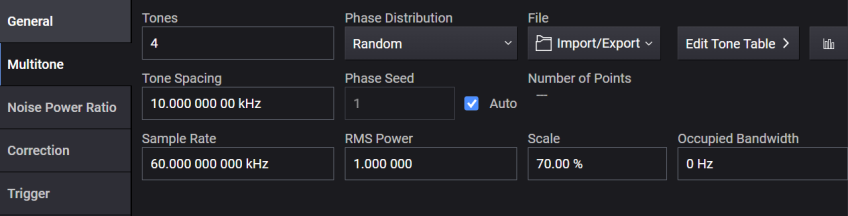
The number of samples of a Multitone signal is determined by Tones and Tone Spacing when the required BW is much smaller than the maximum sample rate. However, when the required BW becomes larger and the max Sample Rate needs to be used, the number of samples of Multitone signal is determined mainly by the greatest common divisor (GCD) of the max Sample Rate and Tone Spacing.
For example, assuming the max Sample Rate is 2.56 GHz, if Tones and Tone Spacing are set to 201 and 12,111,111 Hz respectively, the GCD is 1 Hz, which requires the signal to be 1 sec long in time. Therefore 2.56 G samples are required, which is far larger points than the size of internal buffer array (
If the tone spacing is changed to 12,111,000 Hz, the GCD becomes 1 kHz and the signal length will reduce to 0.001 sec. It is 2.56 M samples and small enough to fit in the buffer.
Remote command only.
This is an action command that imports the tone table data from the multitone file. The multitone file is a text file that consists of four columns separated by spaces, tabs, or commas. The four columns are status, frequency (Hz), relative amplitude (dB) and phase (degree). Only UTF-8 encoding with and without BOM is supported.
The query returns the name of either the most recently used file in this command or the most recently exported tone table file.
The following is the example of the multitone file in which five tones are defined with 1.0 MHz spacing. The relative amplitude of tones are all zero.
1 -2000000 0 40.11
1 -1000000 0 167.88
1 0 0 277.88
1 1000000 0 236.63
1 2000000 0 155.84
The multitone file needs to satisfy the following conditions, otherwise it is rejected with an error message.
The tone frequencies in the file need to be equally spaced. The tone frequencies are rounded to the resolution of Tone Spacing before the check.
The bandwidth of tones, the maximum - the minimum tone frequencies, is less than or equal to the vector modulation bandwidth that varies based on the channel frequency. See Vector Modulation Bandwidth Limitations.
The number of Tones and Tone Spacing need to be within their specified ranges.
The center of tones is at frequency zero.
The tone frequencies are in the ascending order.
The values are separate with a single space. Consecutive multiple spaces are not allowed.
The RMS of generated waveform is not too small. For example, when many tones have the same phase, an error message appears.
The MTONE MSUS can be used to specify the multitone file. See File Location and Default Folders for more details about MTONE MSUS. With MTONE, you can send or select a multitone file as shown below.
:MMEMory:DATA "MTONE:myTones", ...
:SIGNal:MTONe:ARB:SETup "MTONE:myTones"
|
SCPI Command |
[:SOURce]:GROup<group>:SIGNal<signal>:MTONe:ARB:SETup "<file_name>" [:SOURce]:GROup<group>:SIGNal<signal>:MTONe:ARB:SETup? |
|
SCPI Example |
GRO:SIGN:MTON:ARB:SET "MTONE:myTones" |
|
State Saved |
No |
|
Backwards Compatibility SCPI |
The following commands are not recommended. They are for the convenience of users with existing remote programs developed for earlier versions of the signal generator or ported from a similar product. Alias [:SOURce]:SIGNal[1]:MTONe:ARB:SETup to :SOURce:GROup1:SIGNal1:MTONe:ARB:SETup Alias [:SOURce]:SIGNal2:MTONe:ARB:SETup to :SOURce:GROup2:SIGNal1:MTONe:ARB:SETup Alias [:SOURce]:RADio:MTONe:ARB:SETup to :SOURce:GROup1:SIGNal1:MTONe:ARB:SETup Alias [:SOURce]:RADio:MTONe:ARB:SETup? to :SOURce:GROup1:SIGNal1:MTONe:ARB:SETup? N51xxB:
|
| Backwards Compatibility Notes |
For N51xxB: Alias [:SOURce]:RADio[1]:MTONe:ARB:SETup to [:SOURce]:GROup1:SIGNal1:MTONe:ARB:SETup |
Remote command only.
Query only. Returns values of all tones included in the internal tone table.
|
SCPI Command |
[:SOURce]:GROup<group>:SIGNal<signal>:MTONe:ARB:SETup:TABLe? |
|
SCPI Example |
GRO:SIGN:MTON:ARB:SET:TABL? |
| Notes | Query returns values in the order of state, frequency (Hz), relative amplitude (dB), and phase (degree) for each tone in the table. For example, if the tone table includes 10 tones, then 10 x 4 = 40 values are returned. |
|
State Saved |
No |
|
Backwards Compatibility SCPI |
The following commands are not recommended. They are for the convenience of users with existing remote programs developed for earlier versions of the signal generator or ported from a similar product. Alias [:SOURce]:SIGNal[1]:MTONe:ARB:SETup:TABLe? to :SOURce:GROup1:SIGNal1:MTONe:ARB:SETup:TABLe? Alias [:SOURce]:SIGNal2:MTONe:ARB:SETup:TABLe? to :SOURce:GROup2:SIGNal1:MTONe:ARB:SETup:TABLe? |
Remote command only.
This command is provided for compatibility with earlier versions of instrument software, creating and configuring an internal tone table for signal 1 of group 1.
|
SCPI Command |
[:SOURce]:RADio[1]:MTONe:ARB:SETup:TABLe <freq_spacing>, <num_tones>,<phase1>,<state1>,<phase2>,<state2>,... [:SOURce]:RADio[1]:MTONe:ARB:SETup:TABLe? |
|
SCPI Example |
RAD:MTON:ARB:SET:TABL 10000,4, 0,1,0,1,0,1,0,1 RAD:MTON:ARB:SET:TABL? |
| Notes |
Command parameters:
Query returns values in the order of frequency (Hz), relative amplitude (dB), phase (degree), and state for each tone in the table. For example, if the tone table includes 10 tones, 10 x 4 = 40 values are returned. |
|
State Saved |
No |
Sets the number of tones. Setting this value regenerates tones with 0 dB amplitude and randomly calculated phases.
Values set with Setup are discarded.
|
GUI Location |
Signals > Mode set to Multitone > Multitone tab >Tones |
|
SCPI Command |
[:SOURce]:GROup<group>:SIGNal<signal>:MTONe:ARB:NTONes <integer> [:SOURce]:GROup<group>:SIGNal<signal>:MTONe:ARB:NTONes? |
|
SCPI Example |
GRO:SIGN:MTON:ARB:NTON 2 GRO:SIGN:MTON:ARB:NTON? |
|
Preset |
4 When SCPI Backward Compatibility Mode is N51xxB:
|
|
State Saved |
Yes |
|
Min |
2 |
|
Max |
For N5186A:
1000
200,001
1,000,001 |
|
Resolution |
1 |
|
Backwards Compatibility SCPI |
The following commands are not recommended. They are for the convenience of users with existing remote programs developed for earlier versions of the signal generator or ported from a similar product.
N51xxB: [:SOURce]:RADio[1]:MTONe:ARB:SETup:TABLe:NTONes |
| Backwards Compatibility Notes |
For N51xxB:
|
Sets the frequency spacing between the tones. Setting this value regenerates tones with 0 dB amplitude and randomly calculated phases.
Values set with Setup are discarded.
|
GUI Location |
Signals > Mode set to Multitone > Multitone tab > Tone Spacing |
|
SCPI Command |
[:SOURce]:GROup<group>:SIGNal<signal>:MTONe:ARB:FSPacing <integer> [:SOURce]:GROup<group>:SIGNal<signal>:MTONe:ARB:FSPacing? |
|
SCPI Example |
GRO:SIGN:MTON:ARB:FSP 128 GRO:SIGN:MTON:ARB:FSP? |
|
Preset |
10 kHz |
|
State Saved |
Yes |
|
Min |
100 Hz |
|
Max |
Floor((Bandwidth in Vector Modulation Bandwidth Limitations)/((Number of Tones) - 1)/100) * 100 |
|
Resolution |
0.00001 Hz |
|
Backwards Compatibility SCPI |
[:SOURce]:SIGNal<signal>:MTONe:ARB:FSPacing <freq> [:SOURce]:SIGNal<signal>:MTONe:ARB:FSPacing? |
|
Backwards Compatibility SCPI |
The following commands are not recommended. They are for the convenience of users with existing remote programs developed for earlier versions of the signal generator or ported from a similar product.
N51xxB: [:SOURce]:RADio[1]:MTONe:ARB:SETup:TABLe:FSPacing [:SOURce]:RADio[1]:TTONe:ARB:FSPacing |
| Backwards Compatibility Notes |
For N51xxB:
|
Exports a multitone file. The values are equivalent to the results of the TABLe query command. The format of this file is the same as the Setup command.
There is no query form for this command.
|
GUI Location |
Signals > Mode set to Multitone > Multitone tab > Export Tone Table |
|
SCPI Command |
[:SOURce]:GROup<group>:SIGNal<signal>:MTONe:ARB:SETup:TABLe:EXPort <file_name> |
|
SCPI Example |
:GRO:SIGN:MTON:ARB:SET:TABL:EXP "a.txt" |
| Backwards Compatibility SCPI | [:SOURce]:RADio:MTONe:ARB:SETup:STORe
N51xxB: [:SOURce]:RADio[1]:MTONe:ARB:SETup:STORe |
| Backwards Compatibility Notes |
Alias [:SOURce]:RADio:MTONe:ARB:SETup:STORe to [:SOURce]:GROup1:SIGNal1:MTONe:ARB:SETup:TABLe:EXPort. For N51xxB: Alias [:SOURce]:RADio[1]:MTONe:ARB:SETup:STORe to [:SOURce]:GROup1:SIGNal1:MTONe:ARB:SETup:TABLe:EXPort |
Exports a multitone file including results of NPR. When NPR is off, the values are not valid. The values are equivalent to the results of the TABLe query command. The format of this file is the same as the Setup command.
|
GUI Location |
Signals > Mode set to Multitone > Multitone tab > Export Tone Table w/ NPR |
|
SCPI Command |
[:SOURce]:GROup<group>:SIGNal<signal>:MTONe:ARB:NPR:SETup:TABLe:EXPort <file_name> |
|
SCPI Example |
:GRO:SIGN:MTON:ARB:NPR:SET:TABL:EXP "a.txt" |
Exports a multitone file including results of Calibration. The values are equivalent to the results of the TABLe query command. The format of this file is the same as the Setup command.
|
GUI Location |
Signals > Mode set to Multitone > Multitone tab > Export Tone Table w/ Correction |
|
SCPI Command |
[:SOURce]:GROup<group>:SIGNal<signal>:MTONe:ARB:CORRection:SETup:TABLe:EXPort <file_name> |
|
SCPI Example |
:GRO:SIGN:MTON:ARB:CORR:SET:TABL:EXP "a.txt" |
Query only
Returns the number of sample points. The value becomes valid after generation.
|
SCPI Command |
[:SOURce]:GROup<group>:SIGNal<signal>:MTONe:ARB:SAMPles:COUNt? |
|
SCPI Example |
:GRO:SIGN:MTON:ARB:SAMP:COUN? |
|
Preset |
0 |
Sets the phase distribution. After setting this value, phases of the tones are regenerated. After importing Tone Table, this value is set to User Defined. When this value is User Defined and phases of the tones are regenerated by changing another value, this value is set to Random.
|
GUI Location |
Signals > Mode set to Multitone > Multitone tab > Phase Distribution |
|
SCPI Command |
[:SOURce]:GROup<group>:SIGNal<signal>:MTONe:ARB:PHASe:DISTribution RANDom|CONStant|PARabolic|USER [:SOURce]:GROup<group>:SIGNal<signal>:MTONe:ARB:PHASe:DISTribution? |
|
SCPI Example |
:GRO:SIGN:MTON:ARB:PHAS:DIST PAR :GRO:SIGN:MTON:ARB:PHAS:DIST? |
|
Couplings |
Cannot be select User Defined from GUI and SCPI After importing tone table, the value is set to User Defined. In the case of User Defined, when the phase list is regenerated, this value is set to Random. |
|
Preset |
RANDom When SCPI Backward Compatibility Mode is N51xxB:
|
|
Range |
Random | Constant | Parabolic | User Defined |
|
State Saved |
Yes |
| Backwards Compatibility SCPI |
N51xxB: [:SOURce]:RADio[1]:MTONe:ARB:SETup:TABLe:PHASe:INITialize |
| Backwards Compatibility Notes |
For N51xxB: Alias [:SOURce]:RADio[1]:MTONe:ARB:SETup:TABLe:PHASe:INITialize FIXed to :SOURce:GROup1:SIGNal1:MTONe:ARB:PHASe:DISTribution CONStant; Alias [:SOURce]:RADio[1]:MTONe:ARB:SETup:TABLe:PHASe:INITialize RANDom to :SOURce:GROup1:SIGNal1:MTONe:ARB:PHASe:DISTribution RANDom Alias [:SOURce]:RADio[1]:MTONe:ARB:SETup:TABLe:PHASe:INITialize PARabolic to :SOURce:GROup1:SIGNal1:MTONe:ARB:PHASe:DISTribution PARabolic The query returns the last value set via this command, or FIXed if no value has been explicitly set. Changing Multitone Phase Distribution does not update the query result. |
Sets the phase seed setting. After setting this value, phases of the tones are regenerated.
|
GUI Location |
Signals > Mode set to Multitone > Multitone tab > Phase Seed |
|
SCPI Command |
[:SOURce]:GROup<group>:SIGNal<signal>:MTONe:ARB:PHASe:RANDom:SEED <integer> [:SOURce]:GROup<group>:SIGNal<signal>:MTONe:ARB:PHASe:RANDom:SEED? |
|
SCPI Example |
:GRO:SIGN:MTON:ARB:PHAS:SEED 1 :GRO:SIGN:MTON:ARB:PHAS:SEED? |
|
Preset |
1 |
|
Min |
0 |
|
Max |
2147483647 |
|
State Saved |
Yes |
Turns the phase seed auto off or on. When the phase seed is changed, this value is turned off. After setting this value, phases of the tones are regenerated.
When On, the phase list is generated in the same way as A.12 or before.
|
GUI Location |
Signals > Mode set to Multitone > Multitone tab > Phase Seed Auto |
|
SCPI Command |
[:SOURce]:GROup<group>:SIGNal<signal>:MTONe:ARB:PHASe:RANDom:SEED:AUTO ON|OFF|1|0 [:SOURce]:GROup<group>:SIGNal<signal>:MTONe:ARB:PHASe:RANDom:SEED:AUTO? |
|
SCPI Example |
:GRO:SIGN:MTON:ARB:PHAS:RAND:SEED:AUTO 1 :GRO:SIGN:MTON:ARB:PHAS:RAND:SEED:AUTO? |
|
Couplings |
When the Phase Seed is changed, the value is set to false. |
|
Preset |
1 When SCPI Backward Compatibility Mode is N51xxB:
|
|
State Saved |
Yes |
| Backwards Compatibility SCPI |
N51xxB: [:SOURce]:RADio[1]:MTONe:ARB:SETup:TABLe:PHASe:INITialize:SEED |
| Backwards Compatibility Notes |
For N51xxB: Alias [:SOURce]:RADio[1]:MTONe:ARB:SETup:TABLe:PHASe:INITialize:SEED FIXed to :SOURce:GROup1:SIGNal1:MTONe:ARB:PHASe:RANDom:SEED:AUTO OFF Alias [:SOURce]:RADio[1]:MTONe:ARB:SETup:TABLe:PHASe:INITialize:SEED RANDom to :SOURce:GROup1:SIGNal1:MTONe:ARB:PHASe:RANDom:SEED:AUTO ON The query returns FIXed when Multitone Phase Seed Auto is OFF and RANDom when Multitone Phase Seed Auto is ON. |
Sets the sample rate of multitone, accepts frequency units (e.g., 100 MHz).
|
GUI Location |
Signals > Mode set to Multitone > Multitone tab > Sample Rate |
|
SCPI Command |
[:SOURce]:GROup<group>:SIGNal<signal>:MTONe:ARB:SCLock:RATE <freq> [:SOURce]:GROup<group>:SIGNal<signal>:MTONe:ARB:SCLock:RATE? |
|
SCPI Example |
GRO:SIGN:MTON:ARB:SCL:RATE 100 MHz GRO:SIGN:MTON:ARB:SCL:RATE? |
|
Couplings |
|
|
Preset |
Sample Rate For SR, see Vector Modulation Bandwidth Limitations |
|
State Saved |
Yes |
| Min |
1.0 Hz |
| Max |
Sample Rate For SR, see Vector Modulation Bandwidth Limitations |
| Resolution | 0.000001 Hz |
| Backwards Compatibility SCPI |
N51xxB:
|
| Backwards Compatibility Notes |
For N51xxB: Alias [:SOURce]:RADio[1]:MONTe:ARB:SCLock:RATE to :SOURce:GROup1:SIGNal1:MTONe:ARB:SCLock:RATE Alias [:SOURce]:RADio[1]:TTONe:ARB:SCLock:RATE to :SOURce:GROup1:SIGNal1:MTONe:ARB:SCLock:RATE |
Sets the RMS of Multitone signal.
When Multitone signal is generated (or recalculated), this value is set based on the generated signal.
|
GUI Location |
Signals > Mode set to Multitone > Multitone tab > RMS Power |
|
SCPI Command |
[:SOURce]:GROup<group>:SIGNal<signal>:MTONe:RMS <real> [:SOURce]:GROup<group>:SIGNal<signal>:MTONe:RMS? |
|
SCPI Example |
GRO:SIGN:MTON:RMS 1 GRO:SIGN:MTON:RMS? |
|
Preset |
1 |
|
State Saved |
Yes |
|
Min |
0.1 |
|
Max |
1.414213562 |
|
Resolution |
0.000000001 |
Sets the scale factor of Multitone signal.
When Multitone signal is generated (or recalculated), this value is set based on the generated signal.
|
GUI Location |
Signals > Mode set to Multitone > Multitone tab > Scale |
|
SCPI Command |
[:SOURce]:GROup<group>:SIGNal<signal>:MTONe:SCALe <real> [:SOURce]:GROup<group>:SIGNal<signal>:MTONe:SCALe? |
|
SCPI Example |
GRO:SIGN:MTON:SCAL 100 GRO:SIGN:MTON:SCAL? |
|
Preset |
70 |
|
State Saved |
Yes |
|
Min |
1 |
|
Max |
100 |
|
Resolution |
0.01 |
Sets the occupied bandwidth of Multitone signal.
When Multitone signal is generated (or recalculated), this value is set to the same value as (Tones - 1) x Tone Spacing.
|
GUI Location |
Signals > Mode set to Multitone > Multitone tab > Occupied Bandwidth |
|
SCPI Command |
[:SOURce]:GROup<group>:SIGNal<signal>:MTONe:OBWidth <freq> [:SOURce]:GROup<group>:SIGNal<signal>:MTONe:OBWidth? |
|
SCPI Example |
GRO:SIGN:MTON:OBW 140 kHz GRO:SIGN:MTON:OBW? |
|
Preset |
0 |
|
State Saved |
Yes |
|
Min |
0 Hz |
|
Max |
BW For BW, see Vector Modulation Bandwidth Limitations table. |
|
Resolution |
1 Hz |
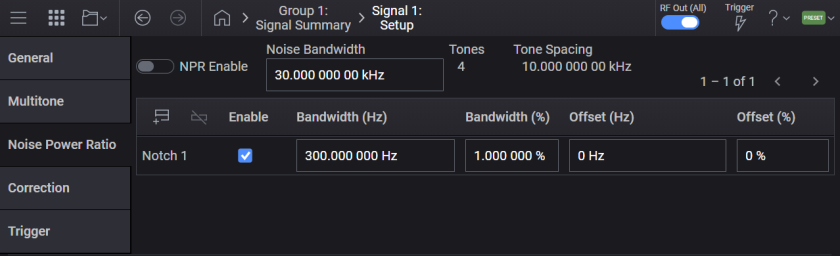
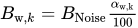
Noise Power Ratio (NPR) settings can be used to create notches (= to turn off the states of tones). When we have  tones with tone spacing
  , Noise Bandwidth can be calculated with
  . At the
  -th notch, the relationship between Relative Width (%)
  and Absolute Width (Hz)
  is defined as
  and the relationship between Relative Center (%)
  and Absolute Center (Hz)
  is also defined as
 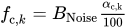 . At the
  -th tone, when
  is satisfied, the state of the tone is turned off.
The region includes the border line (see the 1st notch). Also, the border is not required to set the same frequency of the tone (see the 2nd notch).
Multiple notches can be overlapped (see the 3rd and the 4th notches).
Notch can be defined for out of the noise BW (see the 5th notch).
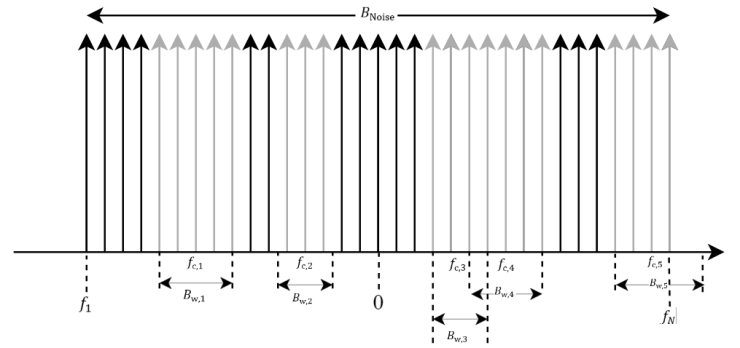
Turns NPR on or off. When on, notch parameters are applied to the waveform.
|
GUI Location |
Signals > Mode set to Multitone > Noise Power Ratio tab > NPR Enable |
|
SCPI Command |
[:SOURce]:GROup<group>:SIGNal<signal>:MTONe:ARB:NPR[:STATe] ON|OFF|1|0 [:SOURce]:GROup<group>:SIGNal<signal>:MTONe:ARB:NPR[:STATe]? |
|
SCPI Example |
:GRO:SIGN:MTON:ARB:NPR 1 :GRO:SIGN:MTON:ARB:NPR? |
|
Preset |
OFF |
|
State Saved |
Yes |
Sets the noise bandwidth.
|
GUI Location |
Signals > Mode set to Multitone > Noise Power Ratio tab > Noise Bandwidth |
|
SCPI Command |
[:SOURce]:GROup<group>:SIGNal<signal>:MTONe:ARB:NPR:NBWidth <freq> [:SOURce]:GROup<group>:SIGNal<signal>:MTONe:ARB:NPR:NBWidth? |
|
SCPI Example |
:GRO:SIGN:MTON:ARB:NPR:NBW 60kHz :GRO:SIGN:MTON:ARB:NPR:NBW? |
|
Preset |
30 kHz |
|
Min |
(min(Tones) - 1) * Tone Spacing = Tone Spacing |
|
Max |
(max(Tones) - 1) * Tone Spacing = 200000 * Tone Spacing |
|
Resolution |
0.00001 Hz |
|
Couplings |
(Tones - 1) * Tone Spacing |
|
State Saved |
Yes |
Returns Tones calculated from Noise Bandwidth. When NPR Enable is On, the value is synchronized with Tones in Multitone.
|
GUI Location |
Signals > Mode set to Multitone > Noise Power Ratio tab > Tones |
|
SCPI Command |
[:SOURce]:GROup<group>:SIGNal<signal>:MTONe:ARB:NPR:NTONes? |
|
SCPI Example |
:GRO:SIGN:MTON:ARB:NPR:NTON? |
|
Couplings |
Noise Bandwidth / Tone Spacing + 1 |
Adds a notch.
|
GUI Location |
Signals > Mode set to Multitone > Noise Power Ratio tab > Add icon |
|
SCPI Command |
[:SOURce]:GROup<group>:SIGNal<signal>:MTONe:ARB:NPR:NOTCh:ADD |
|
SCPI Example |
:GRO:SIGN:MTON:ARB:NPR:NOTC:ADD |
Deletes a notch.
|
GUI Location |
Signals > Mode set to Multitone > Noise Power Ratio tab > Delete icon |
|
SCPI Command |
[:SOURce]:GROup<group>:SIGNal<signal>:MTONe:ARB:NPR:NOTCh:DELete <number> |
|
SCPI Example |
:GRO:SIGN:MTON:ARB:NPR:NOTC:DEL 1 |
Returns the number of notches. The maximum number of notches is 20.
|
GUI Location |
Signals > Mode set to Multitone > Noise Power Ratio tab > Count |
|
SCPI Command |
[:SOURce]:GROup<group>:SIGNal<signal>:MTONe:ARB:NPR:NOTCh:COUNt? |
|
SCPI Example |
:GRO:SIGN:MTON:ARB:NPR:NOTC:COUN? |
Enables or disables the notch.
|
GUI Location |
Signals > Mode set to Multitone > Noise Power Ratio tab > Enable |
|
SCPI Command |
[:SOURce]:GROup<group>:SIGNal<signal>:MTONe:ARB:NPR:NOTCh<notch>[:STATe] [:SOURce]:GROup<group>:SIGNal<signal>:MTONe:ARB:NPR:NOTCh<notch>[:STATe]? |
|
SCPI Example |
:GRO:SIGN:MTON:ARB:NPR:NOTC ON :GRO:SIGN:MTON:ARB:NPR:NOTC? |
|
Preset |
ON |
|
State Saved |
Yes |
Sets the notch bandwidth.
|
GUI Location |
Signals > Mode set to Multitone > Noise Power Ratio tab > Bandwidth (Hz) |
|
SCPI Command |
[:SOURce]:GROup<group>:SIGNal<signal>:MTONe:ARB:NPR:NOTCh<notch>:BANDwidth <freq> [:SOURce]:GROup<group>:SIGNal<signal>:MTONe:ARB:NPR:NOTCh<notch>:BANDwidth? |
|
SCPI Example |
:GRO:SIGN:MTON:ARB:NPR:NOTC:BAND 10 MHz :GRO:SIGN:MTON:ARB:NPR:NOTC:BAND? |
|
Preset |
300 Hz |
|
Min |
0 |
|
Max |
Noise Bandwidth * max(Relative Width) / 100 = 0.4 * Noise Bandwidth |
|
State Saved |
Yes |
Sets the notch bandwidth percent.
|
GUI Location |
Signals > Mode set to Multitone > Noise Power Ratio tab > Bandwidth (%) |
|
SCPI Command |
[:SOURce]:GROup<group>:SIGNal<signal>:MTONe:ARB:NPR:NOTCh<notch>:BANDwidth:PERCent <real> [:SOURce]:GROup<group>:SIGNal<signal>:MTONe:ARB:NPR:NOTCh<notch>:BANDwidth:PERCent? |
|
SCPI Example |
:GRO:SIGN:MTON:ARB:NPR:NOTC:BAND:PERC 10 :GRO:SIGN:MTON:ARB:NPR:NOTC:BAND:PERC? |
|
Preset |
1 |
|
Min |
0 |
|
Max |
40 |
|
State Saved |
Yes |
Sets the notch offset.
|
GUI Location |
Signals > Mode set to Multitone > Noise Power Ratio tab > Offset (Hz) |
|
SCPI Command |
[:SOURce]:GROup<group>:SIGNal<signal>:MTONe:ARB:NPR:NOTCh<notch>[:FREQuency]:OFFSet <freq> [:SOURce]:GROup<group>:SIGNal<signal>:MTONe:ARB:NPR:NOTCh<notch>[:FREQuency]:OFFSet? |
|
SCPI Example |
:GRO:SIGN:MTON:ARB:NPR:NOTC:FREQ:OFFS 1 MHz :GRO:SIGN:MTON:ARB:NPR:NOTC:FREQ:OFFS? |
|
Preset |
0 |
|
Min |
0 |
|
Max |
Noise Bandwidth * max(Relative Center) / 100 = 0.5 * Noise Bandwidth |
|
State Saved |
Yes |
Sets the notch offset percent.
|
GUI Location |
Signals > Mode set to Multitone > Noise Power Ratio tab > Offset (%) |
|
SCPI Command |
[:SOURce]:GROup<group>:SIGNal<signal>:MTONe:ARB:NPR:NOTCh<notch>[:FREQuency]:OFFSet:PERCent <real> [:SOURce]:GROup<group>:SIGNal<signal>:MTONe:ARB:NPR:NOTCh<notch>[:FREQuency]:OFFSet:PERCent? |
|
SCPI Example |
:GRO:SIGN:MTON:ARB:NPR:NOTC:FREQ:OFFS:PERC 10 :GRO:SIGN:MTON:ARB:NPR:NOTC:FREQ:OFFS:PERC? |
|
Preset |
0 |
|
Min |
-50 |
|
Max |
50 |
|
State Saved |
Yes |
Remote command only.
Query only. Returns values of all tones included in the internal tone table. Notch calculation according to Noise Power Ratio (NPR) settings is applied to this table. When NPR Enable is ON, a waveform is generated from the table.
|
SCPI Command |
[:SOURce]:GROup<group>:SIGNal<signal>:MTONe:ARB:NPR:SETup:TABLe? |
|
SCPI Example |
:GRO:SIGN:MTON:ARB:NPR:SET:TABL? |
| Notes | Query returns values in the order of state, frequency (Hz), power (dB), and phase (degree) for each tone in the table. For example, if the tone table includes 10 tones, 10 x 4 = 40 values are returned. |
|
State Saved |
No |
N7621 Signal Studio for Multitone Distortion has a settings file (.mtd file). Import elements; Tone Count, Tone Spacing, Noise Offset, Phase Distribution, Phase Seed, Notch Center, Notch Width, Number of Iterations, and Desired Suppression under the NPR element. The value of Noise Offset is imported to the frequency offset and deducted from the RF Frequency. The negative value of Desired Suppression is imported to the tolerance.
|
SCPI Command |
[:SOURce]:GROup<group>:SIGNal<signal>:MTONe:ARB:NPR:MTD:FILE:IMPort "<file_name>" |
|
SCPI Example |
:GRO:SIGN:MTON:ARB:NPR:MTD:FILE:IMPort "a.mtd" |
Multitone Correction eliminates inter-modulation distortion (IMD) on notches.
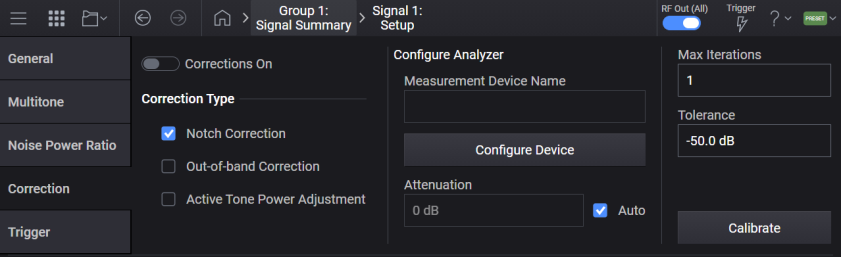
Turns the correction on or off. The setting cannot be turned on before calibration. N7621APPC with subscription date December 1, 2023 is required to turn it on.
|
GUI Location |
Signals > Mode set to Multitone > Calibration > Corrections On |
|
SCPI Command |
[:SOURce]:GROup<group>:SIGNal<signal>:MTONe:ARB:CORRection[:STATe] ON|OFF|1|0 [:SOURce]:GROup<group>:SIGNal<signal>:MTONe:ARB:CORRection[:STATe]? |
|
SCPI Example |
:GRO:SIGN:MTON:ARB:CORR 1 :GRO:SIGN:MTON:ARB:CORR? |
|
Preset |
OFF |
|
State Saved |
Yes |
Turns the notch correction off or on. When on, tones whose states are off in the tone table are corrected to reduce IMD.
|
GUI Location |
Signals > Mode set to Multitone > Calibration > Notch Correction |
|
SCPI Command |
[:SOURce]:GROup<group>:SIGNal<signal>:MTONe:ARB:CORRection:NOTCh[:STATe] ON|OFF|1|0 [:SOURce]:GROup<group>:SIGNal<signal>:MTONe:ARB:CORRection:NOTCh[:STATe]? |
|
SCPI Example |
:GRO:SIGN:MTON:ARB:CORR:NOTC 1 :GRO:SIGN:MTON:ARB:CORR:NOTC? |
|
Preset |
ON |
|
State Saved |
Yes |
|
Initial S/W Revision |
A.14.00 |
Turns the out-of-band correction off or on. When on, tones in the adjacent channels of the tone table are corrected to reduce IMD. This correction employs approximately three times of Noise Bandwidth.
|
GUI Location |
Signals > Mode set to Multitone > Calibration > Out-of-band Correction |
|
SCPI Command |
[:SOURce]:GROup<group>:SIGNal<signal>:MTONe:ARB:CORRection:OOBand[:STATe] ON|OFF|1|0 [:SOURce]:GROup<group>:SIGNal<signal>:MTONe:ARB: CORRection:OOBand[:STATe]? |
|
SCPI Example |
:GRO:SIGN:MTON:ARB:CORR:OOB 1 :GRO:SIGN:MTON:ARB:CORR:OOB? |
|
Preset |
OFF |
|
State Saved |
Yes |
Turns the active tone power adjustment off or on. When on, tones whose states are on in the multitone table are corrected to adjust the relative amplitude defined in the multitone table.
|
GUI Location |
Signals > Mode set to Multitone > Calibration > Active Tone Power Adjustment |
|
SCPI Command |
[:SOURce]:GROup<group>:SIGNal<signal>:MTONe:ARB:CORRection:ATPower[:STATe] ON|OFF|1|0 [:SOURce]:GROup<group>:SIGNal<signal>:MTONe:ARB: CORRection:ATPower[:STATe]? |
|
SCPI Example |
:GRO:SIGN:MTON:ARB:CORR:ATP 1 :GRO:SIGN:MTON:ARB:CORR:ATP? |
|
Preset |
OFF |
|
State Saved |
Yes |
|
Initial S/W Revision |
A.14.00 |
Sets the device.
|
GUI Location |
Signals > Mode set to Multitone > Calibration > Measurement Device Name |
|
SCPI Command |
:SYSTem:COMMunicate:MTONe:ARB:CORRection:DEVice <"device name"> :SYSTem:COMMunicate:MTONe:ARB:CORRection:DEVice? |
|
SCPI Example |
:SYST:COMM:MTON:ARB:CORR:DEV "InstSA" :SYST:COMM:MTON:ARB:CORR:DEV? |
| Preset | This is unaffected by a Preset but is set to an empty string on a "Restore System Settings to Default Values." |
|
State Saved |
Persistent, survives preset and power cycle but not saved in the instrument state. |
|
Initial S/W Revision |
A.14.00 |
Sets the attenuation. When the Attenuation Auto is on, the value is set to the receiver attenuation.
|
GUI Location |
Signals > Mode set to Multitone > Calibration > Attenuation |
|
SCPI Command |
[:SOURce]:GROup{1:16}:SIGNal{1:8}:MTONe:ARB:CORRection:RECeiver:ATTenuation <rel_ampl> [:SOURce]:GROup{1:16}:SIGNal{1:8}:MTONe:ARB:CORRection:RECeiver:ATTenuation? |
|
SCPI Example |
:GRO:SIGN:MTON:ARB:NPR:CORR:REC:ATT 20 dB :GRO:SIGN:MTON:ARB:NPR:CORR:REC:ATT? |
|
Preset |
0 |
|
State Saved |
Yes |
|
Initial S/W Revision |
A.14.00 |
Turns the receiver attenuation auto off or on. When on, the receiver attenuation is automatically adjusted. Otherwise, the value of the Attenuation is used for the receiver attenuation. When the attenuation is changed, this value is turned off.
|
GUI Location |
Signals > Mode set to Multitone > Calibration > Attenuation Auto |
|
SCPI Command |
[:SOURce]:GROup<group>:SIGNal<signal>:MTONe:ARB:CORRection:RECeiver:ATTenuation:AUTO ON|OFF|1|0 [:SOURce]:GROup<group>:SIGNal<signal>:MTONe:ARB:CORRection:RECeiver:ATTenuation:AUTO? |
|
SCPI Example |
:GRO:SIGN:MTON:ARB:CORR:REC:ATT 1 :GRO:SIGN:MTON:ARB:CORR:REC:ATT? |
|
Preset |
ON |
|
State Saved |
Yes |
|
Initial S/W Revision |
A.14.00 |
Sets the iterations. Calibration is repeated until the iterations until the notch depth after calibration is larger than the tolerance. The calibration time is increased in proportion to 2^(n+1) at the n-th iteration.
|
GUI Location |
Signals > Mode set to Multitone > Calibration > Max Iterations |
|
SCPI Command |
[:SOURce]:GROup<group>:SIGNal<signal>:MTONe:ARB:CORRection:ITERations <integer> [:SOURce]:GROup<group>:SIGNal<signal>:MTONe:ARB:SETup:CORRection:ITERations? |
|
SCPI Example |
:GRO:SIGN:MTON:ARB:CORR:ITER 5 :GRO:SIGN:MTON:ARB:CORR:ITER? |
|
Preset |
1 |
|
Min |
1 |
|
Max |
10 |
|
State Saved |
Yes |
|
Initial S/W Revision |
A.14.00 |
Sets the tolerance. Calibration is repeated until the iterations when the notch depth after calibration is larger than the tolerance.
|
GUI Location |
Signals > Mode set to Multitone > Calibration > Tolerance |
|
SCPI Command |
[:SOURce]:GROup<group>:SIGNal<signal>:MTONe:ARB:CORRection:TOLerance <rel_ampl> [:SOURce]:GROup<group>:SIGNal<signal>:MTONe:ARB:CORRection:TOLerance? |
|
SCPI Example |
:GRO:SIGN:MTON:ARB:CORR:TOL -60 dB :GRO:SIGN:MTON:ARB:CORR:TOL? |
|
Preset |
-50 dB |
|
Min |
-100 |
|
Max |
-40 |
|
Resolution |
0.1 dB |
|
State Saved |
Yes |
|
Initial S/W Revision |
A.14.00 |
Calibrates a multitone waveform. When the multitone waveform is successfully calibrated, Enable is automatically turned on.
|
GUI Location |
Signals > Mode set to Multitone > Calibration > Calibrate |
|
SCPI Command |
[:SOURce]:GROup<group>:SIGNal<signal>:MTONe:ARB:CORRection:CALbrate |
|
SCPI Example |
:GRO:SIGN:MTON:ARB:CORR:CAL |
|
Initial S/W Revision |
A.14.00 |
Aborts the multitone calibration.
|
GUI Location |
Signals > Mode set to Multitone > Calibration > Calibrate > Abort |
|
SCPI Command |
[:SOURce]:GROup<group>:SIGNal<signal>:MTONe:ARB:CORRection:CALibrate:ABORt |
|
SCPI Example |
:GRO:SIGN:MTON:ARB:CORR:CAL:ABOR |
|
Initial S/W Revision |
A.14.00 |
Remote command only.
Query only. Returns values of all tones included in the internal tone table. Calibration results are applied to this table. When Correction is on, a waveform is generated from the table.
|
SCPI Command |
[:SOURce]:GROup<group>:SIGNal<signal>:MTONe:ARB:CORRection:SETup:TABLe? |
|
SCPI Example |
:GRO:SIGN:MTON:ARB:CORR:SET:TABL? |
| Notes | Query returns values in the order of state, frequency (Hz), power (dB), and phase (degree) for each tone in the table. For example, if the tone table includes 10 tones, then 10 x 4 = 40 values are returned. |
|
State Saved |
No |
|
Initial S/W Revision |
A.14.00 |
Remote command only.
Modifies the indicated tone (row) of the multitone waveform. The details of the parameters are as follows:
<row_number>: The row number of the table output by the TABLe command. If <row_number> exceeds the size of table, an error -222 message "Data out of range; Selected row does not exist." is raised.
<power>: The power level of the tone defined in the row number, in decibels (dB). Power levels for all tones share the total power of the channel with the specified ratios. For each tone, the minimum is -200 dB and the maximum is 30 dB.
<phase>: The phase, in degrees, of the tone relative to the carrier.
<state>: The state of the tone in this row can be enabled (1) or disabled (0).
|
SCPI Command |
[:SOURce]:GROup<group>:SIGNal<signal>:MTONe:ARB:SETup:TABLe:ROW <row_number>,<power>,<phase>,<state> [:SOURce]:GROup<group>:SIGNal<signal>:MTONe:ARB:SETup:TABLe:ROW? <row_number> |
|
SCPI Example |
:GRO:SIGN:MTON:ARB:SET:TABL:ROW 1,0.0,0.0,1 :GRO:SIGN:MTON:ARB:SET:TABL:ROW? 5 |
| Notes | Query returns values in the order of state, frequency (Hz), relative amplitude (dB), and phase (degree) for the specified row in the tone table. For example, if the tone table includes 10 tones, then 10 x 4 = 40 values are returned. |
| Backwards Compatibility SCPI |
N51xxB: [:SOURce]:RADio[1]:MTONe:ARB:SETup:TABLe:ROW |
| Backwards Compatibility Notes |
For N51xxB:
|
Remote command only.
Sets the multitone alignment.
| SCPI Command |
[:SOURce]:RADio[1]:MTONe:ARB:ALIGnment LEFT|CENTer|RIGHt [:SOURce]:RADio[1]:MTONe:ARB:ALIGnment? |
| SCPI Example |
RAD:MTON:ARB:ALIG RIGH RAD:MTON:ARB:ALIG? |
| Dependencies | Available only on Group 1 Signal 1. |
| Preset | CENTer |
| Range | Left|Center|Right |
| State Saved | Yes |
| Backwards Compatibility SCPI |
N51xxB: [:SOURce]:RADio[1]:MTONe:ARB:ALIGnment [:SOURce]:RADio[1]:TTONe:ARB:ALIGnment |
| Backwards Compatibility Notes |
For N51xxB: Alias [:SOURce]:RADio[1]:TTONe:ARB:ALIGnment to [:SOURce]:RADio[1]:MTONe:ARB:ALIGnment |
Remote command only.
Applies the current multitone settings. When the two-tone apply is performed, the following settings are applied on Group 1 Signal 1:
| SCPI Command |
[:SOURce]:RADio[1]:TTONe:ARB:APPLy |
| SCPI Example |
RAD:TTON:ARB:APPL |
| State Saved | No |
| Backwards Compatibility SCPI |
N51xxB: [:SOURce]:RADio[1]:TTONe:ARB:APPLy |
| Backwards Compatibility Notes |
For N51xxB: Apply [:SOURce]:RADio[1]:TTONe:ARB:APPLy to [:SOURce]:GROup1:SIGNal1:MTONe settings. |
Remote command only.
Clears header information to the default value of the current tone settings.
| SCPI Command |
[:SOURce]:RADio[1]:MTONe:ARB:HEADer:CLEar |
| SCPI Example |
RAD:MTON:ARB:HEAD:CLE |
| Dependencies | This command is available when Multitone is enabled. |
| State Saved | No |
| Backwards Compatibility SCPI |
N51xxB: [:SOURce]:RADio[1]:MTONe:ARB:HEADer:CLEar [:SOURce]:RADio[1]:TTONe:ARB:HEADer:CLEar |
| Backwards Compatibility Notes |
For N51xxB:
|
Remote command only.
Sets the multitone state.
| SCPI Command |
[:SOURce]:RADio[1]:MTONe:ARB[:STATe] ON|OFF|1|0 [:SOURce]:RADio[1]:MTONe:ARB[:STATe]? |
| SCPI Example |
RAD:MTON:ARB 1 RAD:MTON:ARB? |
| Couplings | When Multitone State is ON, the following settings of Group 1 Signal 1 are applied:
|
| Preset | OFF |
| State Saved | Yes |
| Backwards Compatibility SCPI |
N51xxB: [:SOURce]:RADio[1]:MTONe:ARB[:STATe] |
| Backwards Compatibility Notes |
For N51xxB: Apply [:SOURce]:RADio[1]:MTONe:ARB[:STATe] to [:SOURce]:GROup1:SIGNal1:MODE and [:SOURce]:GROup1:SIGNal1[:STATe]. |
Remote command only.
Sets the two-tone state.
| SCPI Command |
[:SOURce]:RADio[1]:TTONe:ARB[:STATe] ON|OFF|1|0 [:SOURce]:RADio[1]:TTONe:ARB[:STATe]? |
| SCPI Example |
RAD:TTON:ARB 1 RAD:TTON:ARB? |
| Couplings | When Two-tone State is ON, the following settings of Group 1 Signal 1 are applied:
|
| Preset | OFF |
| State Saved | Yes |
| Backwards Compatibility SCPI |
N51xxB: [:SOURce]:RADio[1]:TTONe:ARB[:STATe] |
| Backwards Compatibility Notes |
For N51xxB: Couple [:SOURce]:RADio[1]:TTONe:ARB[:STATe] to [:SOURce]:GROup1:SIGNal1:MTONe:ARB:NTONe, [:SOURce]:GROup1:SIGNal1:MODE and [:SOURce]:GROup1:SIGNal1[:STATe]. |
Remote command only.
Provided to allow programmatic compatibility with other Keysight Technologies signal generators. Command is accepted but does nothing.
| SCPI Command |
[:SOURce]:RADio[1]:MTONe:ARB:MDEStination:AAMPlitude NONE|M1|M2|M3|M4 [:SOURce]:RADio[1]:MTONe:ARB:MDEStination:AAMPlitude? |
| SCPI Example |
:RAD:MTON:ARB:MDES:AAMP M1 :RAD:MTON:ARB:MDES:AAMP? |
| Notes |
The setting remains NONE and is not changeable. Attempting to change raises error +703,"Feature not supported;feature is not available." The query reports the same error and returns NONE. |
| Preset | NONE |
| Range | None|Marker1|Marker2|Marker3|Marker4 |
| State Saved | No |
| Backwards Compatibility SCPI |
N51xxB: [:SOURce]:RADio[1]:MTONe:ARB:MDEStination:AAMPlitude [:SOURce]:RADio[1]:TTONe:ARB:MDEStination:AAMPlitude |
| Backwards Compatibility Notes |
For N51xxB: Alias [:SOURce]:RADio[1]:TTONe:ARB:MDEStination:AAMPlitude to [:SOURce]:RADio[1]:MTONe:ARB:MDEStination:AAMPlitude |
Remote command only.
Provided to allow programmatic compatibility with other Keysight Technologies signal generators. Command is accepted but does nothing.
| SCPI Command |
[:SOURce]:RADio[1]:MTONe:ARB:MDEStination:ALCHold NONE|M1|M2|M3|M4 [:SOURce]:RADio[1]:MTONe:ARB:MDEStination:ALCHold? |
| SCPI Example |
:RAD:MTON:ARB:MDES:ALCH M2 :RAD:MTON:ARB:MDES:ALCH? |
| Notes |
|
| Preset | NONE |
| Range | None|Marker1|Marker2|Marker3|Marker4 |
| State Saved | No |
| Backwards Compatibility SCPI |
N51xxB: [:SOURce]:RADio[1]:MTONe:ARB:MDEStination:ALCHold [:SOURce]:RADio[1]:TTONe:ARB:MDEStination:ALCHold |
| Backwards Compatibility Notes |
For N51xxB: Alias [:SOURce]:RADio[1]:TTONe:ARB:MDEStination:ALCHold to [:SOURce]:RADio[1]:MTONe:ARB:MDEStination:ALCHold |
Remote command only.
Provided to allow programmatic compatibility with other Keysight Technologies signal generators. Command is accepted but does nothing.
| SCPI Command |
[:SOURce]:RADio[1]:MTONe:ARB:MDEStination:PULSe NONE|M1|M2|M3|M4 [:SOURce]:RADio[1]:MTONe:ARB:MDEStination:PULSe? |
| SCPI Example |
:RAD:MTON:ARB:MDES:PULS M3 :RAD:MTON:ARB:MDES:PULS? |
| Notes |
|
| Preset | NONE |
| Range | None|Marker1|Marker2|Marker3|Marker4 |
| State Saved | No |
| Backwards Compatibility SCPI |
N51xxB: [:SOURce]:RADio[1]:MTONe:ARB:MDEStination:PULSe [:SOURce]:RADio[1]:TTONe:ARB:MDEStination:PULSe |
| Backwards Compatibility Notes |
For N51xxB: Alias [:SOURce]:RADio[1]:TTONe:ARB:MDEStination:PULSe to [:SOURce]:RADio[1]:MTONe:ARB:MDEStination:PULSe |
Single Tone generates a single CW tone at a specified offset to the channel’s RF Frequency. This capability requires license model E7621APPC.
Sets the frequency of a single CW tone with respect to the channel’s RF Frequency.
|
GUI Location |
Signals > Mode set to Single Tone > Single Tone tab > Frequency Offset |
|
SCPI Command |
[:SOURce]:GROup<group>:SIGNal<signal>:SSB:FREQuency <freq> [:SOURce]:GROup<group>:SIGNal<signal>:SSB:FREQuency? |
|
SCPI Example |
GRO:SIGN:SSB:FREQ 10.5 kHz GRO:SIGN:SSB:FREQ? |
|
Preset |
10 kHz |
|
State Saved |
Yes |
|
Min |
-(Bandwidth/2) For bandwidth, see Vector Modulation Bandwidth Limitations. |
|
Max |
Bandwidth/2 For bandwidth, see Vector Modulation Bandwidth Limitations. |
|
Backwards Compatibility SCPI |
The following commands are not recommended. They are for the convenience of users with existing remote programs developed for earlier versions of the signal generator or ported from a similar product. Alias [:SOURce]:SIGNal[1]:SSB:FREQuency to :SOURce:GROup1:SIGNal1:SSB:FREQuency Alias [:SOURce]:SIGNal2:SSB:FREQuency to :SOURce:GROup2:SIGNal1:SSB:FREQuency |
Sets the RMS of Single Tone signal.
When a single tone signal is generated (or recalculated), this value is set based on the generated signal.
|
GUI Location |
Signals > Mode set to Single Tone > Single Tone tab > RMS Power |
|
SCPI Command |
[:SOURce]:GROup<group>:SIGNal<signal>:SSB:RMS <real> [:SOURce]:GROup<group>:SIGNal<signal>:SSB:RMS? |
|
SCPI Example |
GRO:SIGN:SSB:RMS 1 GRO:SIGN:SSB:RMS? |
|
Preset |
1 |
|
State Saved |
Yes |
|
Min |
0.1 |
|
Max |
1.414213562 |
|
Resolution |
0.000000001 |
Sets the scale factor of Single Tone signal.
When a single tone signal is generated (or recalculated), this value is set based on the generated signal.
|
GUI Location |
Signals > Mode set to Single Tone > Single Tone tab > Scale |
|
SCPI Command |
[:SOURce]:GROup<group>:SIGNal<signal>:SSB:SCALe <real> [:SOURce]:GROup<group>:SIGNal<signal>:SSB:SCALe? |
|
SCPI Example |
GRO:SIGN:SSB:SCAL 100 GRO:SIGN:SSB:SCAL? |
|
Preset |
70 |
|
State Saved |
Yes |
|
Min |
1 |
|
Max |
100 |
|
Resolution |
0.01 |
Sets the occupied bandwidth of Single Tone signal.
When a single tone signal is generated (or recalculated), this value is set to the same value as 2 x Single Tone Frequency (abs value).
|
GUI Location |
Signals > Mode set to Single Tone > Single Tone tab > Occupied Bandwidth |
|
SCPI Command |
[:SOURce]:GROup<group>:SIGNal<signal>:SSB:OBWidth <freq> [:SOURce]:GROup<group>:SIGNal<signal>:SSB:OBWidth? |
|
SCPI Example |
GRO:SIGN:SSB:OBW 140 kHz GRO:SIGN:SSB:OBW? |
|
Preset |
0 |
|
State Saved |
Yes |
|
Min |
0 Hz |
|
Max |
BW For BW, see Vector Modulation Bandwidth Limitations table. |
|
Resolution |
1 Hz |
Allows you to select waveform data to play. Both waveform data in ARB memory and non-volatile memory can be selected.
If you have Option 8SG, waveform files assigned to the same signal group must have unique file names. The ARB waveform memory references the file name alone and does not distinguish between different directories. For more information, refer to ARB Waveform Memory.
When waveform data in non-volatile memory is selected, it first uploads the data to the Arb memory and the uploaded data is played. The data in non-volatile memory can be specified either with a path to the file or MSUS for non-volatile waveform data. i.e. "SNVWFM" and "NVWFM."
Waveform on the Arb memory can be selected either with "SWFMn" or "WFMn." See also ARB Waveform Memory.
Even when the file with the same name on the non-volatile memory is selected, the waveform is uploaded to the arb memory.
When a filename that does not exist is given to this command, the value is not updated and -257, "File name error" is issued. Setting an empty string, e.g. GRO:SIGN:WAV "", ends up with the same result. The value isn’t changed, and the error is issued.
File names and file paths must comprise ASCII characters only. Otherwise, a "File name not found" error occurs. In addition, a file name cannot contain a comma or a semicolon.
|
GUI Location |
Signals > Mode set to Waveform File > Waveform File tab > File |
|
SCPI Command |
[:SOURce]:GROup<group>:SIGNal<signal>:WAVeform[:SELect] <string> [:SOURce]:GROup<group>:SIGNal<signal>:WAVeform[:SELect]? |
|
SCPI Example |
GRO:SIGN:WAV "wav1.wfm" GRO:SIGN:WAV? |
|
Preset |
"" |
|
State Saved |
Yes |
|
Backwards Compatibility SCPI |
The following commands are not recommended. They are for the convenience of users with existing remote programs developed for earlier versions of the signal generator or ported from a similar product.
N51xxB: [:SOURce]:RADio[1]:ARB:WAVeform:NHEaders |
| Backwards Compatibility Notes |
For N51xxB:
|
If you use an embedded application (e.g. 5G NR, Custom Modulation) to configure and generate a waveform, clicking Generate automatically saves the waveform configuration as a metadata file along with the generated waveform file. Then whenever the waveform is selected from the Signal Setup screen, the Edit in App button appears next to the File field, providing easy access to the appropriate application with the configuration used to generate this waveform.
|
Format |
File Extension |
Description |
|---|---|---|
|
Signal Studio |
*.wfm |
Waveforms exported from Keysight Signal Studio applications. |
|
Keysight 16-bit binary |
*.wiq *.bin *.WAVEFORM |
Contains interleaved I/Q samples (I0, Q0, I1, Q1, …). Values must be stored in 16-bit signed integers. The Default Binary File Format can be set to either Big Endian or Little Endian. See Keysight 16-Bit Binary in the Creating and Downloading Waveforms tutorial. |
|
ASCII |
*.csv *.txt |
Two floating-point numbers (one for I and the other for Q) delimited by a comma, a tab or a whitespace, should appear in each line. Each line can have more than two values, but only the first two values are read as IQ point data. For example, the csv file may have values for I, Q, Marker1, Marker2, Marker3, and Marker4 in one line. In this case, only the first two values in the line are imported as an IQ point. The rest of the values are discarded. Only UTF-8 encoding with and without BOM is supported. If the max abs value of I or Q is less than or equal to 1.0, no scaling is applied to the IQ data. If it is more than 1.0, the IQ data is normalized with the max abs value of I or Q. |
|
Sequence |
*.seq |
Created by Keysight signal generators. |
|
MATLAB |
*.mat |
The MAT file format (version 4, 6, 7, and 7.3) and the HDF5 format are supported. See MATLAB in the Creating and Downloading Waveforms tutorial. |
The waveform header contains waveform properties such as the sample rate and the RMS value.
A secure waveform file (*.wfm) and a sequence file (*.seq) each contain a header. Other files don’t contain a header but an external header file is supported. An external header file must have the same name as the waveform file with an extension of .whd or .HEADER. It must be placed in the same folder as the associated waveform file.
When a waveform file is selected, the following settings are updated:
Sample Rate if specified in the header.
Scale if specified in the header.
RMS
If a value is specified in the header, it is updated to that value. Otherwise,
If a secure waveform file is selected, it is set to 1.0.
If a sequence file is selected and all the waveforms referenced in the header have been uploaded, it is calculated from the RMS value and the length of the waveforms.
If a non-secure waveform file is selected, it’s calculated from the waveform.
Occupied Bandwidth
If a value is specified in the header, it is updated to that value.
If a value is not specified but the Sample Rate is specified in the header, it is updated to that Sample Rate.
Manually updating the Waveform File Occupied Bandwidth GUI value does not adjust the occupied bandwidth of the waveform. Rather, it sets the frequency span over which the RF flatness correction and dynamic range optimizations occur. See Optimize Dynamic Range with OBW for more information.
ALC Hold Marker Routing if specified in the header.
RF Blanking Marker Routing if specified in the header.
This command takes the current settings for the selected waveform file and saves them to the header file for the waveform. A waveform file must be selected for this command to function. The settings saved in the header are:
Occupied Bandwidth
RMS Power
Sample Rate
Scale
|
SCPI Command |
[:SOURce]:GROup<group>:SIGNal<signal>:WAVeform:HEADer:SAVE |
|
SCPI Example |
:GRO:SIGN:WAV:HEAD:SAVE |
|
Notes |
Attempting to send this command when the selected waveform is a .wfm file, raises the error +629,"File format invalid; <file_name> has an extension that does not support saving waveform headers." The file formats that support Header Save are:
|
|
Backwards Compatible SCPI |
N51xxB:
|
| Backwards Compatible Notes |
For N51xxB:
|
The following table shows MSUS examples.
|
SCPI command example |
File |
|---|---|
|
GRO:SIGN:WAV "SNVWFM:abc" |
Waveforms\abc.wfm |
|
GRO:SIGN:WAV "NVWFM:abc" |
Waveforms\abc.wiq |
|
GRO:SIGN:WAV "SWFM1:abc" |
Waveform "abc" in Ch1 ARB memory |
|
GRO:SIGN:WAV "WFM1:abc" |
Waveform "abc" in Ch1 ARB memory |
|
GRO:SIGN:WAV "SWFM2:abc" |
Waveform "abc" in Ch2 ARB memory |
Please note that there is no MSUS for .bin extension. To select a .bin file, relative or absolute path can be used as shown below.
GRO:SIGN:WAV "abc.bin"
Auto folder selection works for this setting in the same way as memory commands, defined in the ARB Waveform Memory topic. See also File Location and Default Folders in that same topic for details.
With Auto Folder Selection, the folder of waveform file on non-volatile memory is automatically selected by the extension of file name when relative file path is given as command parameter. For example, when
GRO:SIGN:WAV "abc.wfm"
is sent, the software looks in the following folder as a location of waveform file:
Waveforms\
If the extension is not supported by Auto Folder Selection, the file path is the top level of the file system.
The following table shows some of waveform file path examples and which folders are selected.
|
SCPI command example |
Folder |
|---|---|
|
GRO:SIGN:WAV "abc.wfm" |
Waveforms\ |
|
GRO:SIGN:WAV "myDir\abc.wfm" |
Waveforms\myDir |
|
GRO:SIGN:WAV "C:\wfm\abc.wfm" |
Not applicable, an error will be generated |
|
GRO:SIGN:WAV "abc.wiq" |
Waveforms\ |
|
GRO:SIGN:WAV "abc.bin" |
Top level of file system |
|
GRO:SIGN:WAV "abc.csv" |
Top level of file system |
|
GRO:SIGN:WAV "Waveforms\abc.bin" |
Waveforms\ |
If an inappropriate file extension is used, a non-intuitive folder is selected. The following table shows such examples.
|
SCPI command example |
Folder |
|---|---|
|
GRO:SIGN:WAV "abc.sgen" |
States\ |
|
GRO:SIGN:WAV "..\abc.sgen" |
Top level of file system |
An .sgen file is usually a state file, in which instrument settings are saved, however, it is possible to create a signal file with .sgen and then select it as a waveform file. For example, you can send your waveform file with
:MMEM:DATA "abc.sgen", …
and select it with
:GRO:SIGN:WAV "abc.sgen"
This works perfectly, however, the file is saved in the "States" folder under the default folder because Auto Folder Detection designates the "States" folder as the location for .sgen files.
If the number of samples in the specified waveform file is smaller than the Segment Length Minimum or is not a multiple of the Waveform Quantum, the MXG can automatically extend it by either repeating the waveform or appending zeros at the end. The extension method can be configured by the Waveform Extension Method. A message is shown if extension occurs.
Allows you to configure and set the nonlinear correction for the signal. By default, it is set to Off.
When you select a waveform file, the Configure button is enabled that allows you to configure the nonlinear correction.

The instrument provides the following type of nonlinear correction using the Digital Predistortion (DPD) technique.
| Correction Type | Description | Availability |
| DUT Nonlinear Correction |
Used by X-Apps Power Amplifier Test. X-Apps extract correction coefficients, which are applied before waveform upload. For details, refer to DUT Nonlinear Correction. |
Keysight N9055EM0E Power Amplifier Test X-Apps |
When Nonlinear Correction is enabled, an icon appears in the Signal Block, as shown below.
D indicates DUT nonlinear correction.
Sets the sample rate of the modulating waveform, accepts frequency units (e.g., 100 MHz).
|
GUI Location |
Signals > Mode set to Waveform File >Mode set to Waveform File > Waveform File tab > Sample Rate |
|
SCPI Command |
[:SOURce]:GROup<group>:SIGNal<signal>:WAVeform:SCLock:RATE <freq> [:SOURce]:GROup<group>:SIGNal<signal>:WAVeform:SCLock:RATE? |
|
SCPI Example |
GRO:SIGN:WAV:SCL:RATE 100 MHz GRO:SIGN:WAV:SCL:RATE? |
| Preset |
For Sample Rate, see Vector Modulation Bandwidth Limitations table. When SCPI Backward Compatibility Mode is N51xxB:
|
|
State Saved |
Yes |
|
Min |
N5186A: 1.0 Hz |
| Max |
For Sample Rate, see Vector Modulation Bandwidth Limitations table. |
|
Resolution |
0.000001 Hz |
|
Backwards Compatibility SCPI |
The following commands are not recommended. They are for the convenience of users with existing remote programs developed for earlier versions of the signal generator or ported from a similar product. Alias [:SOURce]:SIGNal[1]:WAVeform:SCLock:RATE to :SOURce:GROup1:SIGNal1:WAVeform:SCLock:RATE Alias [:SOURce]:SIGNal2:WAVeform:SCLock:RATE to :SOURce:GROup2:SIGNal1:WAVeform:SCLock:RATE |
Sets the RMS on the modulating waveform.
GUI Location | Signals > Mode set to Waveform File > Waveform File tab > RMS Power |
SCPI Command | [:SOURce]:GROup<group>:SIGNal<signal>:WAVeform:RMS <real> [:SOURce]:GROup<group>:SIGNal<signal>:WAVeform:RMS? |
SCPI Example | GRO:SIGN:WAV:RMS 1 GRO:SIGN:WAV:RMS? |
Preset | 1 |
State Saved | Yes |
Min | 0.1 |
Max | 1.414213562 |
Resolution | 0.000000001 |
Backwards Compatibility SCPI | The following commands are not recommended. They are for the convenience of users with existing remote programs developed for earlier versions of the signal generator or ported from a similar product. Alias [:SOURce]:SIGNal[1]:WAVeform:RMS to :SOURce:GROup1:SIGNal1:WAVeform:RMS Alias [:SOURce]:SIGNal2:WAVeform:RMS to :SOURce:GROup2:SIGNal1:WAVeform:RMS |
GUI option only.
This button calculates the RMS Power from the selected waveform header file and displays this value in the RMS Power field.
GUI Location | Signals > Mode set to Waveform File > Waveform File tab > Calculate |
Click the  button displayed with the RMS Power field to access the Calculate button.
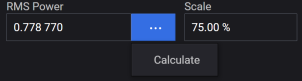
Sets the scale factor of the modulating waveform in percent.
GUI Location | Signals > Mode set to Waveform File > Waveform File tab > Scale |
SCPI Command | [:SOURce]:GROup<group>:SIGNal<signal>:WAVeform:SCALe <real> [:SOURce]:GROup<group>:SIGNal<signal>:WAVeform:SCALe? |
SCPI Example | GRO:SIGN:WAV:SCAL 85 GRO:SIGN:WAV:SCAL? |
Preset | 70 |
State Saved | Yes |
Min | 1 |
Max | 100 |
Resolution | 0.01 |
Backwards Compatibility SCPI | The following commands are not recommended. They are for the convenience of users with existing remote programs developed for earlier versions of the signal generator or ported from a similar product. Alias [:SOURce]:SIGNal[1]:WAVeform:SCALe to :SOURce:GROup1:SIGNal1:WAVeform:SCALe Alias [:SOURce]:SIGNal2:WAVeform:SCALe to :SOURce:GROup2:SIGNal1:WAVeform:SCALe N51xxB: [:SOURce]:RADio[1]:ARB:RSCaling |
| Backwards Compatibility Notes | For N51xxB: Alias [:SOURce]:RADio[1]:ARB:RSCaling to [:SOURce]:GROup1:SIGNal1:WAVeform:SCALe |
Set the occupied bandwidth of vector modulated signal.
Occupied bandwidth is the bandwidth containing 99 percent of the total integrated power of the transmitted spectrum, centered on the assigned channel frequency.
In Waveform File mode, a GUI-entered value does not control the width of the occupied bandwidth. Rather, it sets the frequency span over which the RF flatness correction and dynamic range optimizations occur. See Optimize Dynamic Range with OBW for more information.
GUI Location | Signals > Mode set to Waveform File > Waveform File tab > Occupied Bandwidth |
SCPI Command | [:SOURce]:GROup<group>:SIGNal<signal>:WAVeform:OBWidth <freq> [:SOURce]:GROup<group>:SIGNal<signal>:WAVeform:OBWidth? |
SCPI Example | GRO:SIGN:WAV:OBW 140 kHz GRO:SIGN:WAV:OBW? |
Preset | 0 |
State Saved | Yes |
Min | 0 Hz |
| Max | For Bandwidth, see Vector Modulation Bandwidth Limitations table. |
Resolution | 1 Hz |
Backwards Compatibility SCPI | The following commands are not recommended. They are for the convenience of users with existing remote programs developed for earlier versions of the signal generator or ported from a similar product. Alias [:SOURce]:SIGNal[1]:WAVeform:OBWidth to :SOURce:GROup1:SIGNal1:WAVeform:OBWidth Alias [:SOURce]:SIGNal2:WAVeform:OBWidth to :SOURce:GROup2:SIGNal1:WAVeform:OBWidth |
The Waveform Utility menu provides the following three utilities for waveforms.
This feature allows you to play Signal Studio waveform files without purchasing Signal Studio software packages. You can access this feature using the Edit Waveform Pack option in the Waveform Utility menu of the Waveform File tab.
The N7650B Signal Studio Waveform license is required to enable waveform license slots. You can add Signal Studio waveform files to these slots.
GUI Location | Signals > Mode set to Waveform File > Waveform File tab > Waveform Utility > Edit Waveform Pack License |
Assigns the specified waveform to the next available waveform slot. If there is no available waveform slot, an error "Licensing Error; Can't license waveform since no waveform license slots are available" will be generated and logged to the error queue.
SCPI Command | :SYSTem:LICense[:FPACk]:WAVeform:ADD <file_name> |
SCPI Example | :SYST:LIC:WAV:ADD "MyWaveform.wfm" |
Overwrites the contents of the selected slot with the specified waveform, if the slot is in the trial period. If the slot is locked, the command returns an error.
SCPI Command | :SYSTem:LICense[:FPACk]:WAVeform:REPLace <slot_number>,<file name> |
SCPI Example | :SYST:LIC:WAV:REPL 1,"MyWaveform.wfm" |
Locks the waveform file currently assigned to the waveform license slot specified by the slot number. Once the slot is locked, it can no longer be modified.
SCPI Command | :SYSTem:LICense[:FPACk]:WAVeform:LOCK <slot_number> |
SCPI Example | :SYST:LIC:WAV:LOCK 1 |
Creates a copy of the waveform file currently assigned to the waveform license slot specified by the slot number.
SCPI Command | :SYSTem:LICense[:FPACk]:WAVeform:BACKup <slot_number>,<file name> |
SCPI Example | :SYST:LIC:WAV:LOCK 1,"C:\Temp\Backup.wfm" |
Returns the number of available slots open for waveforms to be licensed.
SCPI Command | :SYSTem:LICense[:FPACk]:WAVeform:FREE? |
SCPI Example | :SYST:LIC:WAV:FREE? |
Returns the number of slots used by licensed waveforms.
SCPI Command | :SYSTem:LICense[:FPACk]:WAVeform:USED? |
SCPI Example | :SYST:LIC:WAV:USED? |
Returns a comma separated list of the licensed waveform IDs. The ID of a waveform in the instrument can be compared with this list to see if it is licensed.
SCPI Command | :SYSTem:LICense[:FPACk]:WAVeform:IDList? |
SCPI Example | :SYST:LIC:WAV:IDL? |
Returns the current status of the waveform license slot specified by the slot number.
It returns one of the following responses:
Available
Remaining Trial Time <time span>
Lock Required
Locked <date and time>
SCPI Command | :SYSTem:LICense[:FPACk]:WAVeform:STATus? <slot_number> |
SCPI Example | :SYST:LIC:WAV:STAT? 1 |
This feature takes the current settings for the selected waveform file and saves them to the header file for the waveform.
The settings saved in the header are:
Occupied Bandwidth
RMS Power
Sample Rate
Scale
See Waveform Header
GUI Location | Signals > Mode set to Waveform File > Waveform File tab > Waveform Utility > Save Header |
SCPI Command | [:SOURce]:GROup<group>:SIGNal<signal>:WAVeform:HEADer:SAVE |
SCPI Example | :GRO:SIGN:WAV:HEAD:SAVE |
Notes | Attempting to send this command when the selected waveform is a .wfm file, raises the error +629,"File format invalid; <file_name> has an extension that does not support saving waveform headers." The file formats that support Header Save are:
|
Backwards Compatible SCPI | N51xxB: [:SOURce]:RADio:ARB:HEADer:SAVE |
| Backwards Compatible Notes | For N51xxB: Alias [:SOURce]:RADio:ARB:HEADer:SAVE to :GROup1:SIGNal1:WAVeform:HEADer:SAVE |
Creates/edits a waveform sequence (.seq file). See Waveform Sequencing for details.
Marker Routing applies to Waveform File and Real Time signal modes.
SCPI commands directly tied to this GUI are not defined, rather the event connectors SCPI commands are used to setup the marker routine.
Some Vector Modulation Signal Modes provide a mechanism to output a TTL-like signal synchronized with the modulation playback. Depending on the capability provided by the instrument, up to four markers can be provided. See Waveform Header.
A Marker can be routed to the Event connectors of the instrument:
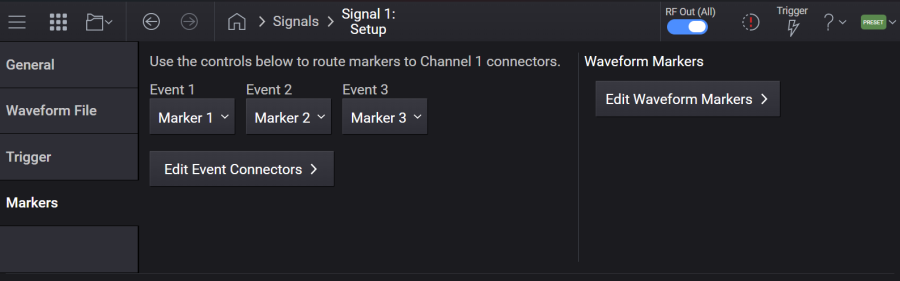
Routes a marker of signal<signal> to Event 1.
GUI Location | Signals > Signal Summary selection > Mode set to Waveform File or to Real-Time > Markers > Event 1 |
Preset | Marker 1 for signal 1 NONE for other signals |
Choices | None | Marker 1 | Marker 2 | Marker 3 | Marker 4 |
Refer to Events in the Connectors topic.
Routes a marker of signal<signal> to Event 2.
GUI Location | Signals > Signal Summary selection > Mode set to Waveform File or to Real-Time > Markers > Event 2 |
Preset | Marker 2 for signal 1 NONE for other signals |
Choices | None | Marker 1 | Marker 2 | Marker 3 | Marker 4 |
Refer to Events in the Connectors topic.
Routes a marker of signal<signal> to Event 3.
GUI Location | Signals > Signal Summary selection > Mode set to Waveform File or to Real-Time > Markers > Event 3 |
Preset | Marker 3 for signal 1 NONE for other signals |
Choices | None | Marker 1 | Marker 2 | Marker 3 | Marker 4 |
Refer to Events in the Connectors topic.
Accesses the Event Configuration screen.
Refer to Events in the Connectors topic.
Click this button to access the Marker Editor.
See also Marker Editing Using SCPI.
Marker Routing applies to Waveform File and Real Time signal modes.
Some Vector Modulation Signal Modes provide a mechanism to output a TTL-like signal synchronized with the modulation playback. Depending on the capability provided by the instrument, up to four markers can be provided. See Waveform Header.
Provided to allow programmatic compatibility with other Keysight Technologies signal generators.
SCPI Command | [:SOURce]:GROup<group>:SIGNal<signal>:WAVeform:MDEStination:ALCHold NONE [:SOURce]:GROup<group>:SIGNal<signal>:WAVeform:MDEStination:ALCHold? |
SCPI Example | GRO:SIGN:WAV:MDES:ALCH NONE GRO:SIGN:WAV:MDES:ALCH? |
Note | ALC Hold is NONE and not changeable, attempting to change the value generates the standard SCPI error. |
Preset | None |
Choices | None |
State Saved | Yes |
Backwards Compatibility SCPI | The following commands are not recommended. They are for the convenience of users with existing remote programs developed for earlier versions of the signal generator or ported from a similar product. [:SOURce]:RADio[1]:ARB:MDEStination:ALCHold Alias [:SOURce]:SIGNal[1]:WAVeform:MDEStination:ALCHold to :SOURce:GROup1:SIGNal1:WAVeform:MDEStination:ALCHold Alias [:SOURce]:SIGNal2:WAVeform:MDEStination:ALCHold to :SOURce:GROup2:SIGNal1:WAVeform:MDEStination:ALCHold Alias [:SOURce]:SIGNal[1]:CMODulation:MDEStination:ALCHold to :SOURce:GROup1:SIGNal1:WAVeform:MDEStination:ALCHold Alias [:SOURce]:SIGNal2:CMODulation:MDEStination:ALCHold to :SOURce:GROup2:SIGNal1:WAVeform:MDEStination:ALCHold Alias [:SOURce]:SIGNal[1]:NR5G:MDEStination:ALCHold to :SOURce:GROup1:SIGNal1:WAVeform:MDEStination:ALCHold Alias [:SOURce]:SIGNal2:NR5G:MDEStination:ALCHold to :SOURce:GROup2:SIGNal1:WAVeform:MDEStination:ALCHold |
Provided to allow programmatic compatibility with other Keysight Technologies signal generators.
SCPI Command | [:SOURce]:GROup<group>:SIGNal<signal>:WAVeform:MDEStination:PULSe NONE [:SOURce]:GROup<group>:SIGNal<signal>:WAVeform:MDEStination:PULSe? |
SCPI Example | GRO:SIGN:WAV:MDES:PULS None GRO:SIGN:WAV:MDES:PULS? |
Note | PULSe is NONE and not changeable, attempting to change the value generates the standard SCPI error. |
Preset | None |
Choices | None |
State Saved | Yes |
Backwards Compatibility SCPI | The following commands are not recommended. They are for the convenience of users with existing remote programs developed for earlier versions of the signal generator or ported from a similar product. [:SOURce]:RADio[1]:ARB:MDEStination:PULSe Alias [:SOURce]:SIGNal[1]:WAVeform:MDEStination:PULSe to :SOURce:GROup1:SIGNal1:WAVeform:MDEStination:PULSe Alias [:SOURce]:SIGNal2:WAVeform:MDEStination:PULSe to :SOURce:GROup2:SIGNal1:WAVeform:MDEStination:PULSe Alias [:SOURce]:SIGNal[1]:CMODulation:MDEStination:PULSe to :SOURce:GROup1:SIGNal1:WAVeform:MDEStination:PULSe Alias [:SOURce]:SIGNal2:CMODulation:MDEStination:PULSe to :SOURce:GROup2:SIGNal1:WAVeform:MDEStination:PULSe Alias [:SOURce]:SIGNal[1]:NR5G:MDEStination:PULSe to :SOURce:GROup1:SIGNal1:WAVeform:MDEStination:PULSe Alias [:SOURce]:SIGNal2:NR5G:MDEStination:PULSe to :SOURce:GROup2:SIGNal1:WAVeform:MDEStination:PULSe |
Remote command only.
Provided to allow programmatic compatibility with other Keysight Technologies signal generators.
SCPI Command | [:SOURce]:GROup<group>:SIGNal<signal>:WAVeform:PULSe:POLarity POSitive [:SOURce]:GROup<group>:SIGNal<signal>:WAVeform:PULSe:POLarity? |
SCPI Example | GRO:SIGN:WAV:PULS:POL POS GRO:SIGN:WAV:PULS:POL? |
Note | POLarity is POSitive and not changeable, attempting to change the value generates the standard SCPI error. |
Preset | POSitive |
Range | Positive |
State Saved | No |
Backwards Compatibility SCPI | The following commands are not recommended. They are for the convenience of users with existing remote programs developed for earlier versions of the signal generator or ported from a similar product. Alias [:SOURce]:SIGNal[1]:WAVeform:PULSe:POLarity to :SOURce:GROup1:SIGNal1:WAVeform:PULSe:POLarity Alias [:SOURce]:SIGNal2:WAVeform:PULSe:POLarity to :SOURce:GROup2:SIGNal1:WAVeform:PULSe:POLarity Alias [:SOURce]:SIGNal[1]:CMODulation:PULSe:POLarity to :SOURce:GROup1:SIGNal1:WAVeform:PULSe:POLarity Alias [:SOURce]:SIGNal2:CMODulation:PULSe:POLarity to :SOURce:GROup2:SIGNal1:WAVeform:PULSe:POLarity Alias [:SOURce]:SIGNal[1]:NR5G:PULSe:POLarity to :SOURce:GROup1:SIGNal1:WAVeform:PULSe:POLarity Alias [:SOURce]:SIGNal2:NR5G:PULSe:POLarity to :SOURce:GROup2:SIGNal1:WAVeform:PULSe:POLarity |
Provided to allow programmatic compatibility with other Keysight Technologies signal generators.
SCPI Command | [:SOURce]:GROup<group>:SIGNal<signal>:WAVeform:MDEStination:SYNC NONE|M1|M2|M3|M4 [:SOURce]:GROup<group>:SIGNal<signal>:WAVeform:MDEStination:SYNC? |
SCPI Example | GRO:SIGN:WAV:MDES:SYNC M1 GRO:SIGN:WAV:MDES:SYNC? |
Preset | Marker1 (M1) |
Choices | None | Marker1 | Marker2 | Marker3 | Marker4 |
State Saved | Yes |
Backwards Compatibility SCPI | The following commands are not recommended. They are for the convenience of users with existing remote programs developed for earlier versions of the signal generator or ported from a similar product. Alias [:SOURce]:SIGNal[1]:CMODulation:TRIGger:SYNC:MARKer to :SOURce:GROup1:SIGNal1:WAVeform:MDEStination:SYNC Alias [:SOURce]:SIGNal2:CMODulation:TRIGger:SYNC:MARKer to :SOURce:GROup2:SIGNal1: WAVeform:MDEStination:SYNC Alias [:SOURce]:SIGNal[1]:NR5G:TRIGger:SYNC:MARKer to :SOURce:GROup1:SIGNal1: WAVeform:MDEStination:SYNC Alias [:SOURce]:SIGNal2:NR5G:TRIGger:SYNC:MARKer to :SOURce:GROup2:SIGNal1: WAVeform:MDEStination:SYNC Alias [:SOURce]:SIGNal[1]:WAVeform:TRIGger:SYNC:MARKer to :SOURce:GROup1:SIGNal1: WAVeform:MDEStination:SYNC Alias [:SOURce]:SIGNal2:WAVeform:TRIGger:SYNC:MARKer to :SOURce:GROup2:SIGNal1: WAVeform:MDEStination:SYNC [:SOURce]:GROup[1]:SIGNal[1]:WAVeform:MDEStination:SYNC NONE|M1|M2|M3|M4 will be aliased to :ROUTe:CONNectors:RF1:EVENt1 NONE| S1M1| S1M2| S1M3| S1M4 [:SOURce]:GROup2:SIGNal[1]:WAVeform:MDEStination:SYNC NONE|M1|M2|M3|M4 will be aliased to :ROUTe:CONNectors:RF2:EVENt1 NONE| S1M1| S1M2| S1M3| S1M4 [:SOURce]:SIGNal[1]:WAVeform:TRIGger:SYNC:MARKer NONE|M1|M2|M3|M4 will be aliased to :ROUTe:CONNectors:RF1:EVENt1 NONE| S1M1| S1M2| S1M3| S1M4 [:SOURce]:SIGNal2:WAVeform:TRIGger:SYNC:MARKer NONE|M1|M2|M3|M4 will be aliased to :ROUTe:CONNectors:RF2:EVENt1 NONE| S1M1| S1M2| S1M3| S1M4 |
Click this button to access the Marker Editor.
See also Marker Editing Using SCPI.
Remote command only.
This is a command for compatibility with the N5181B/82B/83B MXG.
When set to on, Mode is set to Waveform File and vector modulation is enabled. It is off when Mode is not set to Waveform File or vector modulation is disabled.
SCPI Command | [:SOURce]:RADio:ARB[:STATe] ON|OFF|1|0 [:SOURce]:RADio:ARB[:STATe]? |
SCPI Example | :RAD:ARB 1 :RAD:ARB? |
Preset | OFF |
State Saved | No |
Remote command only.
Query only command. Returns the waveform quantum. Waveform length needs to be a multiple of this number.
SCPI Command | [:SOURce]:GROup<group>:SIGNal<signal>:WAVeform:INFormation:QUANtum? |
SCPI Example | GRO:SIGN:WAV:INF:QUAN? |
State Saved | No |
Notes | For N5186A the quantum is 1 |
Backwards Compatibility SCPI | The following commands are not recommended. They are for the convenience of users with existing remote programs developed for earlier versions of the signal generator or ported from a similar product. Alias [:SOURce]:SIGNal[1]:WAVeform:INFormation:QUANtum? to :SOURce:GROup1:SIGNal1:WAVeform:INFormation:QUANtum? Alias [:SOURce]:SIGNal2:WAVeform:INFormation:QUANtum? to :SOURce:GROup2:SIGNal1:WAVeform:INFormation:QUANtum? N51xxB: [:SOURce]:RADio[1]:ARB:INFormation:QUANtum? |
| Backwards Compatibility Notes | For N51xxB: Alias [:SOURce]:RADio[1]:ARB:INFormation:QUANtum? to [:SOURce]:GROup1:SIGNal1:WAVeform:INFormation:QUANtum? |
Remote command only.
Query only command.
Returns the minimum length of waveform segment. Waveform may not be played when its length is less than this number.
A segment is a part of waveform sequence. The minimum segment is the shortest segment that plays correctly. This is usually the same as the minimum waveform length as playing a "waveform" is internally the same as playing a sequence of one segment.
SCPI Command | [:SOURce]:GROup<group>:SIGNal<signal>:WAVeform:INFormation:SLENgth:MINimum? |
SCPI Example | GRO:SIGN:WAV:INF:SLEN:MIN? |
State Saved | No |
Notes | For N5186A, minimum is 128. |
Backwards Compatibility SCPI | The following commands are not recommended. They are for the convenience of users with existing remote programs developed for earlier versions of the signal generator or ported from a similar product. Alias [:SOURce]:SIGNal[1]:WAVeform:INFormation:SLENgth:MINimum? to :SOURce:GROup1:SIGNal1:WAVeform:INFormation:SLENgth:MINimum? Alias [:SOURce]:SIGNal2:WAVeform:INFormation:SLENgth:MINimum? to :SOURce:GROup2:SIGNal1:WAVeform:INFormation:SLENgth:MINimum? N51xxB: [:SOURce]:RADio[1]:ARB:INFormation:SLENgth:MINimum? |
| Backwards Compatibility Notes | For N51xxB: Alias [:SOURce]:RADio[1]:ARB:INFormation:SLENgth:MINimum? to [:SOURce]:GROup1:SIGNal1:WAVeform:INFormation:SLENgth:MINimum? |
Remote command only.
Query only command.
This command is provided for compatibility with earlier versions of instrument software. It returns segment count of the selected sequence file for Signal 1 of Group 1.
SCPI Command | [:SOURce]:RADio{1:1}:ARB:WAVeform:SEGMents? [MINimum|MAXimum] |
SCPI Example | :RAD:ARB:WAV:SEGM? |
Notes | Attempting to send command without a selected waveform file raises the error "Settings conflict; A waveform file must be selected to query the segment count." |
Additive white Gaussian noise (AWGN) is a basic noise node for thermal noise in communication channels. The modifiers denote specific characteristics:
Additive is added to any noise that might be intrinsic to the information system.
White has uniform to power across the frequency band for the information system. That is, the power spectral density is flat, so the auto correlation of the noise in the time domain is zero for any non-zero time offset.
Gaussian has a normal distribution in the time domain with an average time domain value of zero.
Sets the channel bandwidth over which the AWGN is applied. The channel bandwidth is the portion of the bandwidth specified by the bandwidth ratio.
GUI Location | Signals > General tab > Mode set to AWGN > AWGN tab > Channel Bandwidth |
SCPI Command | [:SOURce]:GROup<group>:SIGNal<signal>:AWGN:CBWidth <freq> [:SOURce]:GROup<group>:SIGNal<signal>:AWGN:CBWidth? |
SCPI Example | GRO:SIGN:AWGN:CBW 10 Hz GRO:SIGN:AWGN:CBW? |
Preset | 1 MHz |
State Saved | Yes |
Min | 1 Hz |
| Max | For BW, see Vector Modulation Bandwidth Limitations table. |
Resolution | 0.001 Hz |
Step Increment | 5 kHz |
Backwards Compatibility SCPI | The following commands are not recommended. They are for the convenience of users with existing remote programs developed for earlier versions of the signal generator or ported from a similar product. [:SOURce]:RADio:AWGN:RT:CBWidth Alias [:SOURce]:SIGNal[1]:AWGN[:RT]:CBWidth to :SOURce:GROup1:SIGNal1:AWGN[:RT]:CBWidth Alias [:SOURce]:SIGNal2:AWGN[:RT]:CBWidth to :SOURce:GROup2:SIGNal1:AWGN[:RT]:CBWidth |
Sets the power control to either of the following two modes:
Total : Selects the displayed instrument power for control.
Channel Noise: Selects the channel noise power for control. The channel noise power is settable from the front panel only when the Power Control mode is set to Channel Noise.
GUI Location | Signals > General tab > Mode set to AWGN > AWGN tab > Power Control Mode |
SCPI Command | [:SOURce]:GROup<group>:SIGNal<signal>:AWGN:POWer:CONTrol[:MODE] TOTal|NCHannel [:SOURce]:GROup<group>:SIGNal<signal>:AWGN:POWer:CONTrol[:MODE]? |
SCPI Example | GRO:SIGN:AWGN:POW:CONT TOT GRO:SIGN:AWGN:POW:CONT? |
Preset | TOT |
Choices | Total | Channel Noise |
Backwards Compatibility SCPI | The following commands are not recommended. They are for the convenience of users with existing remote programs developed for earlier versions of the signal generator or ported from a similar product. [:SOURce]:RADio:AWGN:RT:POWer:CONTrol[:MODE] Alias [:SOURce]:SIGNal[1]:AWGN[:RT]:POWer:CONTrol[:MODE] to :SOURce:GROup1:SIGNal1:AWGN[:RT]:POWer:CONTrol[:MODE] Alias [:SOURce]:SIGNal2:AWGN[:RT]:POWer:CONTrol[:MODE] to :SOURce:GROup2:SIGNal1:AWGN[:RT]:POWer:CONTrol[:MODE] |
Sets the flat bandwidth value of the stand-alone real-time noise.
GUI Location | Signals > General tab > Mode set to AWGN > AWGN tab > Flat Bandwidth |
SCPI Command | [:SOURce]:GROup<group>:SIGNal<signal>:AWGN:BANDwidth|BWIDth <freq> [:SOURce]:GROup<group>:SIGNal<signal>:AWGN:BANDwidth|BWIDth? |
SCPI Example | GRO:SIGN:AWGN:BAND 10 Hz GRO:SIGN:AWGN:BAND? |
Preset | 1 MHz |
State Saved | Yes |
Min | 1 Hz |
| Max | BW For BW, see Vector Modulation Bandwidth Limitations table. |
Resolution | 0.001 Hz |
Step Increment | 5 kHz |
Backwards Compatibility SCPI | The following commands are not recommended. They are for the convenience of users with existing remote programs developed for earlier versions of the signal generator or ported from a similar product. [:SOURce]:RADio:AWGN:RT:BANDwidth|BWIDth Alias [:SOURce]:SIGNal[1]:AWGN[:RT]:BANDwidth|BWIDth to :SOURce:GROup1:SIGNal1:AWGN[:RT]:BANDwidth Alias [:SOURce]:SIGNal2:AWGN[:RT]:BANDwidth|BWIDth to :SOURce:GROup2:SIGNal1:AWGN[:RT]:BANDwidth |
Displays the total noise power. This parameter is read-only and no SCPI commands are available.
GUI Location | Signals > General tab > Mode set to AWGN > AWGN tab > Total Noise Power |
| Notes | Total Noise Power is affected by the RF Channel Power, Amplitude Reference and Amplitude Offset. |
Preset | -100.00 dBm |
Min | Minimum value of Power when vector modulation is on or Power Control Mode is Total. |
Max | Maximum value of Power when vector modulation is on or Power Control Mode is Total. |
Resolution | 0.01 dB |
Sets the amount of Channel Bandwidth compared to the amount of Flat Bandwidth.
When Bandwidth Ratio is changed, Flat Bandwidth is updated. If Flat Bandwidth reaches its limit value, Bandwidth Ratio is clipped using that value.
GUI Location | Signals > General tab > Mode set to AWGN > AWGN tab > Bandwidth Ratio |
SCPI Command | [:SOURce]:GROup<group>:SIGNal<signal>:AWGN:RATio [:SOURce]:GROup<group>:SIGNal<signal>:AWGN:RATio? |
SCPI Example | GRO:SIGN:AWGN:RAT 10 GRO:SIGN:AWGN:RAT? |
Preset | 1.0 |
State Saved | Yes |
Min | 1.0 |
Max | If Flat Bandwidth reaches its limit value during updating Bandwidth Ratio, Bandwidth Ratio is clipped. min(100, (Maximum of Flat Bandwidth)/(Channel Bandwidth)) |
Resolution | 0.001 |
Step Increment | 1 |
Backwards Compatibility SCPI | The following commands are not recommended. They are for the convenience of users with existing remote programs developed for earlier versions of the signal generator or ported from a similar product. [:SOURce]:RADio:AWGN:RT:RATio Alias [:SOURce]:SIGNal[1]:AWGN[:RT]:RATio to :SOURce:GROup1:SIGNal1:AWGN[:RT]:RATio Alias [:SOURce]:SIGNal2:AWGN[:RT]:RATio to :SOURce:GROup2:SIGNal1:AWGN[:RT]:RATio |
Sets the power within the channel bandwidth. The instrument power is changed in relation to this setting when AWGN is selected. The channel noise power is settable from the front panel only when the Power Control mode is set to Channel Noise.
GUI Location | Signals > General tab > Mode set to AWGN > AWGN tab > Channel Noise Power |
SCPI Command | [:SOURce]:GROup<group>:SIGNal<signal>:AWGN:POWer:NOISe:CHANnel <ampl> [:SOURce]:GROup<group>:SIGNal<signal>:AWGN:POWer:NOISe:CHANnel? |
SCPI Example | GRO:SIGN:AWGN:POW:NOIS:CHAN -30 dBm GRO:SIGN:AWGN:POW:NOIS:CHAN? |
Preset | -100.79 dBm |
State Saved | Yes |
Min |
1.2 and 1.25 are, respectively, converted to approximately 0.79 dB and 0.97 dB. |
Max |
1.2 and 1.25 are, respectively, converted to approximately 0.79 dB and 0.97 dB. |
Resolution | 0.01 dB |
Step Increment | 5 dB |
Backwards Compatibility SCPI | The following commands are not recommended. They are for the convenience of users with existing remote programs developed for earlier versions of the signal generator or ported from a similar product. [:SOURce]:RADio:AWGN:RT:POWer:NOISe:CHANnel Alias [:SOURce]:SIGNal[1]:AWGN[:RT]:POWer:NOIse:CHANnel to :SOURce:GROup1:SIGNal1:AWGN[:RT]:POWer:NOIse:CHANnel Alias [:SOURce]:SIGNal2:AWGN[:RT]:POWer:NOIse:CHANnel to :SOURce:GROup2:SIGNal1:AWGN[:RT]:POWer:NOIse:CHANnel |
Remote command only.
This is a command for compatibility with N5181B/82B/83B MXG.
When set to on, Mode is set to stand-alone AWGN and vector modulation is enabled.
It is off when Mode is not set to stand-alone AWGN or when vector modulation is disabled.
SCPI Command | [:SOURce]:RADio:AWGN:RT[:STATe] ON|OFF|1|0 [:SOURce]:RADio:AWGN:RT[:STATe]? |
SCPI Example | :RAD:AWGN:RT 1 :RAD:AWGN:RT? |
Preset | OFF |
State Saved | No |
Remote command only.
This command enables or disables the waveform sweep function, when the signal generator is in the List sweep mode.
SCPI Command | [:SOURce][:RF<channel>]:RADio:LARB[:STATe] ON|OFF|1|0 [:SOURce][:RF<channel>]:RADio:LARB[:STATe]? |
SCPI Example | :RAD:LARB 1 :RAD:LARB? |
| Dependencies | When the Sweep Type is Step, this setting cannot be turned on and reports a setting conflict warning message. |
Preset | OFF |
| Coupling | When Waveform Sweep State is set to OFF, LARB State is set to OFF This command couples to Waveform Sweep State and List Sweep Enable. When LARB State is set to OFF, Waveform Sweep State is set to OFF. When LARB State is set to ON, Waveform Sweep State is set to ON and List Sweep State is turned ON. |
| Backwards Compatibility SCPI | N51xxB: [:SOURce]:RADio:LARB[:STATe] |
State Saved | Yes |
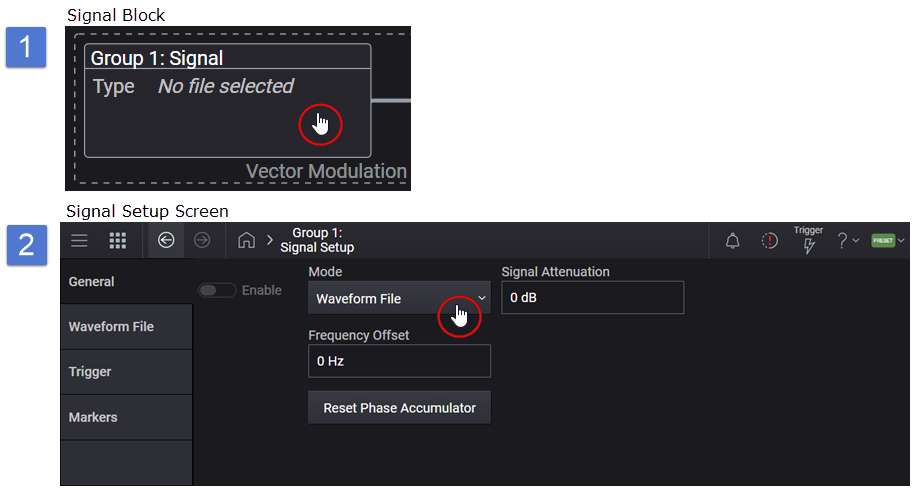
 Trigger button .