Open topic with navigation
ARB Waveform Memory
Support for Arb Memory Catalog
Browsing Arb Memory
File Name Variables
File Types and Directory Structures
File Location and Default Folders
MEMory:CATalog[:ALL]
MEMory:SIZE
MEMory:DATA:APPend
MEMory:DELete:ALL
MEMory:DELete
MEMory:DELete:LIST
MEMory:DELete:PTRain
MEMory:DELete:STATe
MEMory:DELete:STATe:CHANnel
MEMory:DELete:UFLT
MEMory:DELete:UFLT:CHANnel
MEMory:FREE[:ALL]?
MMEMory:CATalog?
MEMory:CATalog:STATe?
MEMory:CATalog:UFLT?
MMEMory:COPY
MMEMory:DATA
MMEMory:DELete:NVWFm
MMEMory:DELete:NVWFm:CHANnel
MMEMory:DELete:WFM
MMEMory:DELete
MMEMory:MOVE
Support for Arb Memory Catalog
Support for Arb Memory Catalog is available through the GUI and SCPI. In the context of Arb Memory Catalog, the following list indicates the expected behavior.
-
:MMEMORY:CATalog query returns only used and free memory sizes when it is queried with Arb memory MSUS that is, "SWFM<channel>" or "WFM<channel>".
-
:MMEMory:COPY and :MMEMory:MOVE cannot copy or move files from Arb Memory to non-volatile memory.
The primary use case is playing waveforms on non-volatile memory. When a non-volatile waveform is selected by the Waveform File setting, the waveform is uploaded to the Arb memory and played. If there is not enough free Arb Memory, then upload fails and the Arb memory needs to be cleared.
Arb memory is also utilized by various internal processes. Therefore, you may see files in this folder that you have not explicitly uploaded.
Browsing Arb Memory
The Arb Memory Catalog is accessible from various waveform selection locations in the GUI. The following features, which launch the file browser, include an Arb Memory tab that provides you a view of the files in Arb memory.
Example:
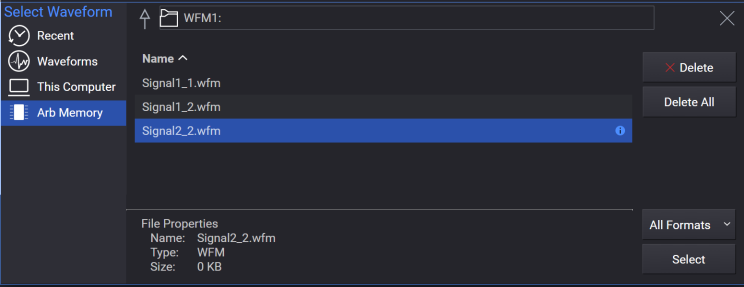
Viewing the contents of Arb memory in a non-independent configuration is not supported.

Size of Arb Memory
|
None
|
256 MSa
|
|
B2X, B5X, B9X
|
256 MSa
|
|
M05
|
512 MSa
|
|
M10
|
1 GSa
|
|
M20
|
2 GSa
|
File Name Variables
|
Format 1
|
"<file name>"
|
"Test_Data"
|
|
Format 2
|
"<msus:file name>"
|
"SEQ:Test_Data"
|
MSUS (Mass Storage Unit Specifier) Variable
The variable "<msus>" enables a command to be file type specific when working with user files. Some commands use it as the only command parameter, while others can use it in conjunction with a file name when a command is not file type specific. When used with a file name, it is similar to Format 2 in the table above. The difference is the file type specifier (msus) occupies its own variable and is not part of the file name syntax.
File Types and Directory Structures
|
SWFM<channel> - volatile secure waveform file
|
SWFM<channel>:
|
|
NVHDR - non-volatile arbitrary waveform header file
|
NVHDR:
|
|
NVMKR - non-volatile arbitrary waveform marker file
|
NVMKR:
|
|
NVWFM - non-volatile arbitrary waveform file
|
NVWFM:
|
|
SNVWFM - non-volatile arbitrary secure waveform file
|
SNVWFM:
|
|
NVCSVWFM - non-volatile CSV arbitrary waveform file
|
NVCSVWFM:
|
|
NVMKR<channel> - non-volatile arbitrary waveform marker file
|
NVMKR<channel>:
|
|
NVWFM<channel> - non-volatile arbitrary waveform file
|
NVWFM<channel>:
|
|
SNVWFM<channel> - non-volatile arbitrary secure waveform file
|
SNVWFM<channel>:
|
|
NVCSVWFM<channel> - non-volatile CSV arbitrary waveform file
|
NVCSVWFM<channel>:
|
|
STATE – state file (*.sgen)
|
STATE:
|
|
LIST - sweep list file
|
LIST:
|
|
SEQ - ARB sequence file
|
SEQ:
|
|
SEQ<channel> - ARB sequence file
|
SEQ<channel>:
|
File System and MSUS Path for arbitrary memory has suffix number from 1 to <channel> which represents what arb memory the file is related to. For example,
MEMory:DATA SWFM1, …
sends a waveform file to arb memory of Signal block 1.
Starting with A.02.00, MSUS for non-volatile memory can have a suffix number from 1 to <channel>. The user can save the data to the separate folder created for the specified channel number and can delete files in them using :MMEMory:DELete:NVWFM:CHAN<channel> and :MMEMory:DELete:SEQ:CHANnel<channel>.
File Location and Default Folders
The default folder which :MEMory and :MMEMory commands and queries access when MSUS is not used is as follows:
For N5185A/N5186A: Top level of filesystem.
When relative path is used, it is based on this folder. For example,
:MMEMory:DATA "UserFolder\data.wfm",...
saves data.wfm under:
For N5185A/N5186A: User Folder
Absolute paths start at the top level of the filesystem. Thus, this command is valid:
:MMEMory:DATA "UserData\data.wfm",...
Each MSUS has its folder and extension as shown in the table below.
For example, :MMEMory:DATA "SNVWFM:MyWaveform"...
creates MyWaveform.wfm under:
For N5186A: Waveforms
because the folder and extension associated with SNVWFM are Waveform and wfm respectively.
Note that file extension is not included in the parameter of the command when MSUS is used.
|
NVHDR - non-volatile arbitrary waveform header file
|
NVHDR:
|
Waveforms
|
whd
|
|
NVMKR - non-volatile arbitrary waveform marker file
|
NVMKR:
|
Waveforms
|
wmk
|
|
NVMKR<channel> - non-volatile arbitrary waveform marker file under predefined channel folder
|
NVMKR<channel>:
e.g. NVMKR2:
|
Waveforms\Channel<channel>
e.g. Waveforms\Channel2
|
wmk
|
|
NVWFM - non-volatile arbitrary waveform file
|
NVWFM:
|
Waveforms
|
wiq
|
|
NVWFM<channel> - non-volatile arbitrary waveform file under predefined channel folder
|
NVWFM<channel>:
|
Waveforms\Channel<channel>
|
wiq
|
|
SNVWFM - non-volatile arbitrary secure waveform file
|
SNVWFM:
|
Waveforms
|
wfm
|
|
SNVWFM<channel> - non-volatile arbitrary waveform file under predefined channel folder
|
SNVWFM<channel>:
|
Waveforms\Channel<channel>
|
wfm
|
|
NVCSVWFM - non-volatile arbitrary CSV waveform file
|
NVCSVWFM:
|
Waveforms
|
csv
|
|
NVCSVWFM<channel> - non-volatile arbitrary CSV waveform file under predefined channel folder
|
NVCSVWFM<channel>:
|
Waveforms\Channel<channel>
|
csv
|
|
SEQ - sequence file
|
SEQ:
|
Sequences
|
seq
|
|
SEQ<channel> - non-volatile sequence file under predefined channel folder
|
SEQ<channel>:
|
Sequences\Channel<channel>
|
seq
|
|
DUT – s1p for DUT Reflection
Coefficient
|
DUTFIXTURE:
|
Corrections
|
s1p
|
|
MTONE
|
MTONE:
|
Multitones
|
txt
|
|
N5185A/N5186A - LICENSE - license file
Note: Error raised if command attempted on other model numbers
|
LIC:
|
/var/opt/Keysight/licensing/licenses/other
|
lic
|
| LIST – List Sweep setting file |
LIST: |
ListSweeps |
lst |
Auto Folder Selection by Extension
When relative path is specified as file location on non-volatile memory, MMEM commands try to determine the destination folder from its extension as defined in the table below.
For example,
:MMEMory:DATA "MyWaveform.wfm",...
creates the waveform file under:
Waveforms
Whether absolute or relative path is provided, any file with .lic extension will be placed in the licensing folder.
Note that common extensions such as csv are not supported.
The following table shows extensions supported by Auto Folder Selection.
|
whd
|
Waveforms
|
|
wmk
|
Waveforms
|
|
wiq
|
Waveforms
|
|
wfm
|
Waveforms
|
|
sgen
|
States
|
|
s2p
|
Corrections
|
|
s1p
|
Corrections
|
|
uflat
|
Corrections
|
| lst |
ListSweeps |
MEMory:CATalog[:ALL]
Outputs a list of files that can be specified with MSUS. For example, files with a wfm extension in the Waveforms folder under:
The top level of filesystem
are returned as part of the result and sgen files in other folders are not included. The return data are in the following form:
<mem_used>,<mem_free>,"<file_listing>"
The signal generator returns the two memory usage parameters and as many file listings as there are files in the memory subsystem. Each file listing parameter is in the following form:
"<file_name,file_type,file_size>"
Refer to File Location and Default Folders for information on MSUS and Folder.
|
SCPI Command
|
:MEMory:CATalog[:ALL]?
|
|
SCPI Example
|
MEM:CAT?
|
| State Saved |
No |
MEMory:SIZE
Returns the size of the specified file, in bytes. If the file is not found, an error message is returned.
|
SCPI Command
|
:MEMory:SIZE? "<file_name>"
|
|
SCPI Example
|
MEM:SIZE? "myWaveform"
|
|
Notes
|
Value returned is -1 if the file does not exist or if the MSUS or directory is invalid, and raises the error -257,"File name error".
|
| State Saved |
No |
MEMory:DATA:APPend
Appends data to an existing file stored in signal generator memory.
-
"<file_name>" - This variable names the destination file and directory path.
-
<data_block> - This parameter represents the data and file length parameters. The data in the file is represented by the <data_block> variable. The file length parameters are used by the signal generator for allocating memory.
Data appended to Arb memory file types (e.g. SWFM<channel>, WFM<channel>) is quantized to 64 Bytes increments.
|
SCPI Command
|
:MEMory:DATA:APPend "<file_name>",<data_block>
|
|
SCPI Example
|
MEM:DATA:APP "SNVWFM:IQ_Data",#14Y9oL
|
| Notes |
When appending to Arb memory file types, an error is raised if appending data is not a multiple of 64 Bytes.
|
| State Saved |
No |
MEMory:DELete:ALL
Clears all non-volatile user files under the default folder.
|
SCPI Command
|
:MEMory:DELete:ALL
|
|
SCPI Example
|
MEM:DEL:ALL
|
| State Saved |
No |
MEMory:DELete
Clears the user file system of "<file_name>".
Refer to File Name Variables.
|
SCPI Command
|
:MEMory:DELete[:NAME] "<file_name>"
|
|
SCPI Example
|
MEM:DEL "SNVWFM:IQ_Data"
|
| State Saved |
No |
MEMory:DELete:LIST
Remote command only.
Deletes all List Sweep files in the ListSweeps folder.
This command doesn’t delete files in existing sub-folders of the ListSweeps folder.
|
SCPI Command
|
:MEMory:DELete:LIST
|
|
SCPI Example
|
:MEM:DEL:LIST
|
|
Notes
|
SCPI only
Momentary action
|
|
Preset
|
N/A
|
|
State Saved
|
No
|
|
Backwards Compatibility SCPI
|
N5182B:
:MEMory:DELete:LIST
|
MEMory:DELete:DMOD
Remote command only.
Applies to N5186A only.
Deletes all the DMOD files in:
This command preserves files in sub-folders.
| SCPI Command |
:MEMory:DELete:DMOD
|
| SCPI Example |
MEM:DEL:DMOD
|
| Backwards Compatibility SCPI |
N51xxB
:MEMory:DELete:DMOD
|
MEMory:DELete:MDMod
Remote
command only.
Applies to N5186A only.
Deletes all MDMod files in:
This command preserves files in sub-folders.
| SCPI Command |
:MEMory:DELete:MDMod
|
| SCPI Example |
MEM:DEL:MDM
|
| Backwards Compatibility SCPI |
N51xxB
:MEMory:DELete:MDMod
|
MEMory:DELete:MDMod:CHANnel
Remote command only.
Applies to N5186A only.
Deletes all MDMod files in:
This command preserves files in sub-folders.
| SCPI Command |
:MEMory:DELete:MDMod:CHANnel<channel>
|
| SCPI Example |
MEM:DEL:MDM:CHAN1
|
MEMory:DELete:MTONe
Remote
command only.
Applies to N5186A only.
Deletes all multitone files in:
This command preserves files in sub-folders.
| SCPI Command |
:MEMory:DELete:MTONe
|
| SCPI Example |
MEM:DEL:MTON
|
| Backwards Compatibility SCPI |
N51xxB
:MEMory:DELete:MTONe
|
MEMory:DELete:MTONe:CHANnel
Remote command only.
Applies to N5186A only.
Deletes all multitone files in:
This command preserves files in sub-folders.
| SCPI Command |
:MEMory:DELete:MTONe:CHANnel<channel>
|
| SCPI Example |
MEM:DEL:MTON:CHAN1
|
MEMory:DELete:PTRain
Remote
command only.
Deletes all pulse train files in:
This command preserves files in sub-folders.
| SCPI Command |
:MEMory:DELete:PTRain
|
| SCPI Example |
MEM:DEL:PTR
|
| Backwards Compatibility SCPI |
N51xxB
:MEMory:DELete:PTRain
|
MEMory:DELete:STATe
Remote
command only.
Deletes all state files in:
This command preserves files in sub-folders.
| SCPI Command |
:MEMory:DELete:STATe
|
| SCPI Example |
MEM:DEL:STAT
|
| Backwards Compatibility SCPI |
N51xxB
:MEMory:DELete:STATe
|
MEMory:DELete:STATe:CHANnel
Remote command only.
Deletes all state files in:
This command doesn’t delete the files in the sub-folders.
| SCPI Command |
:MEMory:DELete:STATe:CHANnel<channel>
|
| SCPI Example |
MEM:DEL:STAT:CHAN1
|
MEMory:DELete:UFLT
Remote
command only.
Deletes all user flatness correction files in:
This command preserves files in sub-folders.
| SCPI Command |
:MEMory:DELete:UFLT
|
| SCPI Example |
MEM:DEL:UFLT
|
| Backwards Compatibility SCPI |
N51xxB
:MEMory:DELete:UFLT
|
MEMory:DELete:UFLT:CHANnel
Remote command only.
Deletes all user flatness correction files in:
This command preserves files in sub-folders.
| SCPI Command |
:MEMory:DELete:UFLT:CHANnel<channel>
|
| SCPI Example |
MEM:DEL:UFLT:CHAN1
|
MEMory:FREE[:ALL]?
Remote
command only.
Query only command. Returns the free disk space in bytes available on
the non-volatile user file system.
| SCPI Command |
:MEMory:FREE[:ALL]?
|
| SCPI Example |
MEM:FREE?
|
| Backwards Compatibility SCPI |
N51xxB
:MEMory:FREE[:ALL]?
|
MEMory:DELete:SEQ
Deletes all sequence files in:
Sequences
This command does not delete the files in the sub-folders.
|
SCPI Command
|
:MEMory:DELete:SEQ
|
|
SCPI Example
|
MEM:DEL:SEQ
|
| State Saved |
No |
MEMory:DELete:SEQ:CHANnel
Deletes all sequence files in:
For N5186A: Sequences\Channel<channel>
The files in sub-folders are preserved.
|
SCPI Command
|
:MEMory:DELete:SEQ:CHANnel<channel>
|
|
SCPI Example
|
MEM:DEL:SEQ:CHAN1
|
| State Saved |
No |
Waveform RMS Header Field
Remote command only.
Sets the RMS (root mean square) in the specified header. The RMS is specified in normalized linear units with 1 as full scale on I or Q, therefore the largest RMS that can be specified is the square root of 2 (1.414213562). If this value is not specified in advance, then it will be calculated at waveform selection time. The calculation ignores two or more zero I/Q samples in a row.
If the waveform has long rise/fall times, a DC offset, or noise already added to it (for a bursted signal), the RMS calculation will be inaccurate for power setting purposes.
|
SCPI Command
|
:MEMory:WAVeform:HEADer:RMS "<file_name>",<value>|UNSPecified
:MEMory:WAVeform:HEADer:RMS? "<file_name>"
|
|
SCPI Example
|
:MEM:WAV:HEAD:RMS "file",0.33
:MEM:WAV:HEAD:RMS? "file"
|
|
Notes
|
If the value has never been explicitly specified, it will be UNSPecified.
|
|
Min
|
0
|
|
Max
|
1.414213562
|
|
Resolution
|
Precision of a 64-bit double (IEEE 754-2008 binary64).
|
| Backwards Compatibility SCPI |
N51xxB:
[:SOURce]:RADio[1]:ARB:HEADer:RMS
|
| Backwards Compatibility Notes |
For N51xxB:
Alias [:SOURce]:RADio[1]:ARB:HEADer:RMS to :MEMory:WAVeform:HEADer:RMS
|
Waveform Sample Rate Header Field
Remote command only.
This feature allows modification of the header field that specifies the sample rate of the waveform.
|
SCPI Command
|
:MEMory:WAVeform:HEADer:SAMPle:RATE "<file_name>",<sample_rate>|UNSPecified
:MEMory:WAVeform:HEADer:SAMPle:RATE? "<file_name>"
|
|
SCPI Example
|
:MEM:WAV:HEAD:SAMP:RATE "file",100MHZ
:MEM:WAV:HEAD:SAMP:RATE? "file"
|
|
Notes
|
If the value has never been explicitly specified, it will be UNSPecified.
|
|
Min
|
0 Hz
|
|
Max
|
6 GHz
|
|
Resolution
|
Precision of a 64-bit double (IEEE 754-2008 binary64). Usable resolution depends on instrument and feature that uses this value.
|
| Backwards Compatibility SCPI |
N51xxB:
[:SOURce]:RADio[1]:ARB:HEADer:SAMPle:RATE
|
| Backwards Compatibility Notes |
For N51xxB:
Alias [:SOURce]:RADio[1]:ARB:HEADer:SAMPle:RATE to :MEMory:WAVeform:HEADer:SAMPle:RATE
|
Waveform Header Description Field
Remote command only.
This feature allows you to edit the header field that includes the description of the currently selected waveform file.
|
SCPI Command
|
:MEMory:WAVeform:HEADer:DESCription "<file_name>","<string>"
:MEMory:WAVeform:HEADer:DESCription? "<file_name>"
|
|
SCPI Example
|
:MEM:WAV:HEAD:DESC "file","description"
:MEM:WAV:HEAD:DESC? "file"
|
|
Preset
|
"" |
| Backwards Compatibility SCPI |
N51xxB:
:MMEMory:HEADer:DESCription
|
| Backwards Compatibility Notes |
For N51xxB:
Alias :MMEMory:HEADer:DESCription to :MEMory:WAVeform:HEADer:DESCription
|
Waveform Header Unique Waveform ID Field
Remote command only.
Queries the unique waveform ID of the header field.
|
SCPI Command
|
:MEMory:WAVeform:HEADer:ID? "<file_name>"
|
|
SCPI Example
|
:MEM:WAV:HEAD:ID? "file"
|
| Notes |
Query only |
| Backwards Compatibility SCPI |
N51xxB:
:MMEMory:HEADer:ID?
|
| Backwards Compatibility Notes |
For N51xxB:
Alias :MMEMory:HEADer:ID? to :MEMory:WAVeform:HEADer:ID?
|
Header Clear
Remote command only.
Clears the header information from the selected waveform file. If it has an external header file, the header file will be deleted.
|
SCPI Command
|
[:SOURce]:GROup<group>:SIGNal<signal>:WAVeform:HEADer:CLEar
|
|
SCPI Example
|
:GRO:SIGN:WAV:HEAD:CLE
|
| Notes |
-
Attempting to clear header without a selected waveform file raises the error "Settings conflict; A waveform file must be selected to clear the waveform header."
-
Attempting to clear header with an arb memory file raises the error "-257, File name error;Operation not supported in Arb memory."
-
Attempting to clear header with unsupported file raises the error "File format invalid;<file name> has an extension that does not support clearing the waveform header."
-
Attempting to clear header with no header waveform file raises the error "File name not found; No waveform header file found for <file name>."
|
| Backwards Compatibility SCPI |
N51xxB:
[:SOURce]:RADio[1]:ARB:HEADer:CLEar
|
| Backwards Compatibility Notes |
For N51xxB:
Alias [:SOURce]:RADio[1]:ARB:HEADer:CLEar to [:SOURce]:GROup[1]:SIGNal[1]:WAVeform:HEADer:CLEar
|
MMEMory:CATalog?
Outputs a list of the files from the specified file system. The variable "<msus>" (mass storage unit specifier) represents a file system or folder path. The file systems and types are shown in File Types and Directory Structures.
The following table shows <msus> examples.
|
<msus>
|
Return
|
|
SNVWFM
|
Secure waveform files in SignalGenerator\Waveforms folder
|
|
NVWFM
|
Non-secure waveform files in SignalGenerator\Waveforms folder
|
|
SWFM1
|
Waveform segments in the Arb memory of the first channel
|
|
.\Waveforms
|
All files in SignalGenerator\Waveforms folder
|
Secure and non-secure waveforms are distinguished as different file
types on non-volatile memory and corresponding MSUSs, SNVWFM, and NVWFM
are associated with different file extensions. Meanwhile, the arb memory
file system of the instrument doesn’t distinguish waveform data types,
SWFM and WFM. These are treated as same waveform data on arb memory and
interchangeable.
The return data will be in the following form:
<mem used>,<mem free>,"<file listing>"
The signal generator will return the two memory usage parameters in
bytes and as many file listings as there are files in the specified file
system. Each file listing will be in the following format:
"<file name,file type,file size>"
When using an MSUS, the <file name> is without extension and the
<file type> contains the extension.
When MSUS is not used
(for example, when specifying a folder), the <file name> contains the extension
and the <file type> field is empty.
|
SCPI Command
|
:MMEMory:CATalog? "<msus>"
|
|
SCPI Example
|
MMEM:CAT? "SNVWFM:"
|
| State Saved |
No |
MEMory:CATalog:BINary?
Remote command only.
Applies to N5186A only.
Query only command. Returns a catalog of all binary files (.bin)
stored in nonvolatile memory.
The return data is in the following form:
<mem used>,<mem free>,"<file listing>"
| SCPI Command |
:MEMory:CATalog:BINary?
|
| SCPI Example |
MEM:CAT:BIN?
|
| Notes |
-
Searches channel independent and per channel directories.
-
Returns empty file list if no binary file exist.
-
File Format: "filename@MSUS, shortMSUS, size"
where MSUS and shortMSUS are BINARY.
|
| State Saved |
No |
| Backwards Compatibility SCPI |
N51xxB
:MEMory:CATalog:BINary?
|
MEMory:CATalog:DMOD?
Remote
command only.
Applies to N5186A only.
Query only command. Returns a catalog of all digital modulation
(DMOD) files (.dmod) stored in nonvolatile memory.
The return data is in the following form:
<mem used>,<mem free>,"<file listing>"
| SCPI Command |
:MEMory:CATalog:DMOD?
|
| SCPI Example |
MEM:CAT:DMOD?
|
| Notes |
-
Searches channel independent and per channel directories.
-
Returns empty file list if no dmod file exist.
-
File Format: "filename@MSUS, shortMSUS, size"
where MSUS and shortMSUS are DMOD.
|
| State Saved |
No |
| Backwards Compatibility SCPI |
N51xxB
:MEMory:CATalog:DMOD?
|
MEMory:CATalog:LIST?
Remote
command only.
Query only command. Returns a catalog of all list sweep files (.lst)
stored in nonvolatile memory.
The return data is in the following form:
<mem used>,<mem free>,"<file listing>"
| SCPI Command |
:MEMory:CATalog:LIST?
|
| SCPI Example |
MEM:CAT:LIST?
|
| Notes |
Searches channel-independent LIST directory only.
List sweep files are not channel-specific.
Returns empty file list if no list sweep files exist.
File Format: "filename@MSUS,shortMSUS,size" where MSUS and shortMSUS are LIST.
|
| State Saved |
No |
| Backwards Compatibility SCPI |
N51xxB
:MEMory:CATalog:LIST?
|
MEMory:CATalog:MDMod?
Remote command only.
Applies to N5186A only.
Query only command. Returns a list of arbitrary waveform multi
carrier digital modulation files.
The return data is in the following form:
"<file name,file type,file size>"
| SCPI Command |
:MEMory:CATalog:MDMod?
|
| SCPI Example |
MEM:CAT:MDM?
|
| Notes |
-
MDMOD files are channel specific and stored in per channel directories.
-
File Format: "filename@MSUS,shortMSUS,size"
where MSUS and shortMSUS are MDMOD.
|
| State Saved |
No |
| Backwards Compatibility SCPI |
N51xxB
:MEMory:CATalog:MDMod?
|
MEMory:CATalog:MTONe?
Remote command only.
Applies to N5186A only.
Query only command. Returns a list of arbitrary waveform multitone
files.
The return data is in the following form:
<mem used>,<mem free>,"<file listing>"
| SCPI Command |
:MEMory:CATalog:MTONe?
|
| SCPI Example |
MEM:CAT:MTON?
|
| Notes |
-
Multi-Tone files are channel specific and stored in per-channel directories.
-
File Format: "filename@MSUS,shortMSUS,size"
where MSUS and shortMSUS are MTONE.
|
| State Saved |
No |
| Backwards Compatibility SCPI |
N51xxB
:MEMory:CATalog:MTONe?
|
MEMory:CATalog:PTRain?
Remote command only.
Query only command. Returns all files of pulse train files in the
non-volatile storage.
The return data is in the following form:
<used_memory>,<free_memory>,<file_list>
| SCPI Command |
:MEMory:CATalog:PTRain?
|
| SCPI Example |
MEM:CAT:PTR?
|
| Notes |
Pulse train files are not channel specific.
Supports both binary and csv pulse train files.
File Format: "filename@MSUS,shortMSUS,size" where MSUS and shortMSUS are PTRAIN.
|
| State Saved |
No |
| Backwards Compatibility SCPI |
N51xxB
:MEMory:CATalog:PTRain?
|
MEMory:CATalog:SEQ?
Remote command only.
Applies to N5186A only.
Query only command. Returns list of arbitrary waveform sequence
files.
The return data is in the following form:
<mem used>,<mem free>,"<file listing>"
| SCPI Command |
:MEMory:CATalog:SEQ?
|
| SCPI Example |
MEM:CAT:SEQ?
|
| Notes |
-
Sequence files are channel-specific and stored in per-channel directories.
-
File Format: "filename@MSUS,shortMSUS,size"
-
where MSUS is SEQ, shortMSUS is SEQ.
|
| State Saved |
No |
| Backwards Compatibility SCPI |
N51xxB
:MEMory:CATalog:SEQ?
|
MEMory:CATalog:STATe?
Remote command only.
Query only command. Returns a list of state files.
The return data is in the following form:
<mem used>,<mem free>,"<file listing>"
| SCPI Command |
:MEMory:CATalog:STATe?
|
| SCPI Example |
MEM:CAT:STAT?
|
| Notes |
State files are channel-specific and stored in per-channel directories.
File Format: "filename@MSUS,shortMSUS,size"
where MSUS and shortMSUS are STAT.
|
| State Saved |
No |
| Backwards Compatibility SCPI |
N51xxB
:MEMory:CATalog:STATe?
|
MEMory:CATalog:UFLT?
Remote
command only.
Query only command. Returns list of user flatness correction
files.
The return data are in the following form:
<mem used>,<mem free>,"<file listing>"
| SCPI Command |
:MEMory:CATalog:UFLT?
|
| SCPI Example |
MEM:CAT:UFLT?
|
| Notes |
-
User flatness files are channel-specific and stored in per-channel directories.
-
File Format: "filename@MSUS,shortMSUS,size"
where MSUS and shortMSUS are UFLT.
|
| State Saved |
No |
| Backwards Compatibility SCPI |
N51xxB
:MEMory:CATalog:UFLT?
|
MMEMory:COPY
Makes a duplicate of the requested file. Refer to Support for Arb Memory Catalog.
Copy from Arb memory to non-volatile memory is NOT supported, e.g. copy from SWFMn to SNVWFM.
|
SCPI Command
|
:MMEMory:COPY "<file_name>","<file_name>"
|
|
SCPI Example
|
MMEM:COPY "SNVWFM:IQ_DATA@SNVWFM","SWFM1:Test_DATA"
|
| State Saved |
No |
|
Backwards Compatibility SCPI
|
:MEMory:COPY[:NAME]
!alias command
|
MMEMory:DATA
Do not transfer files larger than 200 MB. If you have a file larger than 200 MB, begin the transfer with this MMEM:DATA command and use the MMEMory:DATA:APPend command to transfer the remaining data; with no transfer exceeding 200 MB.
Loads data into signal generator memory using the <data_block> parameter and saves the data to a file designated by the "<file_name>" variable. The query returns the file contents of the file as a datablock.
-
"<file_name>" This variable names the destination file, including the directory path.
-
<data_block> This parameter represents the data and file length parameters. The data in the file is represented by the <data_block> variable.
Writing the waveform file automatically deletes the header and marker files and secure waveforms. Writing a secure waveform deletes the non-secure waveform, header and markers with the same name.
Queries for arb memory file type are NOT supported, e.g. SWFMn, WFMn.
|
SCPI Command
|
:MMEMory:DATA "<file_name>",<data_block>
:MMEMory:DATA? "<file_name>"
|
|
SCPI Example
|
MMEM:DATA "SNVWFM:IQ_Data",#210Qaz37pY9oL
MMEM:DATA? "SNVWFM:IQ_Data"
|
| State Saved |
No |
|
Backwards Compatibility SCPI
|
:MEMory:DATA
!alias command
|
MMEMory:DELete:NVWFm
Clears the user file system of all the files in the folder :
Waveforms
This command does not delete the files in the sub-folders.
|
SCPI Command
|
:MMEMory:DELete:NVWFm
|
|
SCPI Example
|
MMEM:DEL:NVWF
|
| State Saved |
No |
MMEMory:DELete:NVWFm:CHANnel
Clears the user file system of all the files in the folder:
Waveforms\Channel<channel>
This command does not delete the files in the sub-folders.
|
SCPI Command
|
:MMEMory:DELete:NVWFm:CHANnel<channel>
|
|
SCPI Example
|
MMEM:DEL:NVWF:CHAN1
|
| State Saved |
No |
MMEMory:DELete:WFM
Clears the user file system of all volatile arbitrary waveform files stored on the nth Arb memory module. This command clears both secure and non-secure waveform files on the selected volatile arb memory.
|
SCPI Command
|
:MMEMory:DELete:WFM<channel>
|
|
SCPI Example
|
MMEM:DEL:WFM
|
| State Saved |
No |
MMEMory:DELete
Clears the user file system of "<file_name>" with the option of specifying the file system separately.
If the optional variable "<msus>" is omitted, the file name needs to include the file system extension.
When deleting a waveform from non-volatile memory (NVWFM), the marker file associated with the waveform file will also be deleted.
|
SCPI Command
|
:MMEMory:DELete[:NAME] "<file_name>",["<msus>"]
|
|
SCPI Example
|
MMEM:DEL "MyWaveform","SNVWFM:"
|
| State Saved |
No |
MMEMory:MOVE
Renames the requested file in the memory catalog. Refer to Support for Arb Memory Catalog.
This command is only a rename command and works only with the same msus. This command does not support files on volatile (Arb) memory.
|
SCPI Command
|
:MMEMory:MOVE <src_file>,<dest_file>
|
|
SCPI Example
|
MMEM:MOVE "SNVWFM:OLD_DATA","SNVWFM:NEW_DATA"
|
| State Saved |
No |
|
Backwards Compatibility SCPI
|
:MEMory:MOVE
!alias command
|
CSV Export Column Separator
Remote command only.
Sets the column separator character to be used when exporting memory data to a CSV (ASCII) file.
-
TAB: Uses a tab character to separate columns.
-
SEMicolon: Uses a semicolon to separate columns.
-
COMMa: Uses a comma to separate columns.
-
SPACe: Uses a space character to separate columns.
|
SCPI Command
|
:MEMory:EXPort[:ASCii]:SEParator:COLumn TAB|SEMicolon|COMMa|SPACe
:MEMory:EXPort[:ASCii]:SEParator:COLumn?
|
|
SCPI Example
|
MEM:EXP:SEP:COL SEM
MEM:EXP:SEP:COL?
|
| Preset |
This is unaffected by a Preset but is set to COMMa on a "Restore System Settings to Default Values." |
| Range |
Tab|Semicolon|Comma|Space |
|
State Saved
|
Persistent, survives preset and power cycle but not saved in the instrument state. |
| Backwards Compatibility SCPI |
N51xxB:
:MEMory:EXPort[:ASCii]:SEParator:COLumn
|
CSV Export Decimal Separator
Remote command only.
Sets the decimal separator character to be used when exporting memory data to a CSV (ASCII) file. Available options for separator are:
|
SCPI Command
|
:MEMory:EXPort[:ASCii]:SEParator:DECimal DOT|COMMa
:MEMory:EXPort[:ASCii]:SEParator:DECimal?
|
|
SCPI Example
|
MEM:EXP:SEP:DEC COMM
MEM:EXP:SEP:DEC?
|
| Preset |
This is unaffected by a Preset but is set to DOT on a "Restore System Settings to Default Values." |
| Range |
DOT|COMMa |
|
State Saved
|
Persistent, survives preset and power cycle but not saved in the instrument state. |
| Backwards Compatibility SCPI |
N51xxB:
:MEMory:EXPort[:ASCii]:SEParator:DECimal
|
CSV Import Decimal Separator
Remote command only.
Sets the decimal separator character to be used when import memory data from a CSV (ASCII) file. Available options for separator are:
|
SCPI Command
|
:MEMory:IMPort[:ASCii]:SEParator:DECimal DOT|COMMa
:MEMory:IMPort[:ASCii]:SEParator:DECimal?
|
|
SCPI Example
|
MEM:IMP:SEP:DEC COMM
MEM:IMP:SEP:DEC?
|
| Preset |
This is unaffected by a Preset but is set to DOT on a "Restore System Settings to Default Values." |
| Range |
DOT|COMMa |
|
State Saved
|
Persistent, survives preset and power cycle but not saved in the instrument state. |
| Backwards Compatibility SCPI |
N51xxB:
:MEMory:IMPort[:ASCii]:SEParator:DECimal
|
CSV Import Column Separator
Remote command only.
Selects the column separator character used when importing data from a CSV (ASCII) file.
-
TAB: Uses a tab character to separate columns.
-
SEMicolon: Uses a semicolon to separate columns.
-
COMMa: Uses a comma to separate columns.
-
SPACe: Uses a space character to separate columns.
-
AUTO: Automatically determines the column separator during import.
|
SCPI Command
|
:MEMory:IMPort[:ASCii]:SEParator:COLumn TAB|SEMicolon|COMMa|SPACe|AUTO
:MEMory:IMPort[:ASCii]:SEParator:COLumn?
|
|
SCPI Example
|
MEM:IMP:SEP:COL TAB
MEM:IMP:SEP:COL?
|
| Preset |
This is unaffected by a Preset but is set to AUTO on a "Restore System Settings to Default Values." |
| Range |
Tab|Semicolon|Comma|Space|Auto |
|
State Saved
|
Persistent, survives preset and power cycle but not saved in the instrument state. |
Export CSV Pulse Train
Remote command only
Exports Pulse Train data to a file in CSV format.
The file is exported to the following directory.
PulseTrains
| SCPI Command |
:MEMory:EXPort[:ASCii]:PTRain "<file_name>"
|
| SCPI Example |
:MEM:EXP:PTR "ptrain.csv"
|
| State Saved |
No |
| Backwards Compatibility SCPI |
N51xxB:
:MEMory:EXPort[:ASCii]:PTRain
|
Import CSV Pulse Train
Remote command only,
Imports Pulse Train data from a file in CSV format.
The file is imported from the following directory.
PulseTrains
| SCPI Command |
:MEMory:IMPort[:ASCii]:PTRain "<file_name>"
|
| SCPI Example |
:MEM:IMP:PTR "ptrain.csv"
|
| State Saved |
No |
| Backwards Compatibility SCPI |
N51xxB:
:MEMory:IMPort[:ASCii]:PTRain
|
Load All Waveforms
Remote
command only.
Applies to N5186A only.
Loads all waveform files in the Waveforms folder to channel 1 arb
memory.
For N5186A: Waveforms
| SCPI Command |
:MMEMory:LOAD:WFM:ALL
|
| SCPI Example |
:MMEM:LOAD:WFM:ALL
|
| State Saved |
No |
| Backwards Compatibility SCPI |
N51xxB:
:MMEMory:LOAD:WFM:ALL
|
Clear Waveform Header
Remote
command only.
Applies to N5186A only.
Clears header information of the waveform file. If it has an external
header file, the header file will be deleted. Refer to File Name Variables.
Clearing the header from arb memory is not supported.
| SCPI Command |
:MMEMory:HEADer:CLEar "<file
name>"
|
| SCPI Example |
:MMEM:HEAD:CLE
"waveform.wiq"
|
| Notes |
Attempting to send
this command with an arb memory file raises the error "-257, File name
error;Operation not supported in Arb memory."
Attempting to
send this command with unsupported file raises the error "File format
invalid;<file name> has an extension that does not support
clearing the waveform header."
Attempting to send this
command with no header waveform file raises the error "File name not
found; No waveform header file found for <file name>." |
| State Saved |
No |
| Backwards
Compatibility SCPI |
N51xxB:
:MMEMory:HEADer:CLEar
|
State Comment
Remote command
only.
This command adds a descriptive comment to the saved state in the
specified <sequence\>_<register>.sgen file.
| SCPI Command |
:MEMory:STATe:COMMent <register #>,<sequence #>,"<comment>"
:MEMory:STATe:COMMent? <register #>,<sequence #>
|
| SCPI Example |
:MEM:STAT:COMM 7,3,"add comment"
:MEM:STAT:COMM? 7,3
|
| Min, Max |
0-99 registers, 0-9 sequences |
| Resolution |
1 |
| Backwards Compatibility SCPI |
N51xxB:
:MEMory:STATe:COMMent
|
Waveform Clipping
Remote
command only.
Applies to N5186A only.
This command sets the clipping level of the selected waveform segment
to a percentage of its highest peak.
- "<file name>" - The selected waveform file. See File Name Variables.
- IJQ|IORQ
- IJQ clips the composite I/Q waveform.
- IORQ clips I and Q separately. When this choice is enabled,
percentage values for both I and Q must be specified.
- <value> - The clipping value in percentage. For IORQ, this is
the value for I.
- [<value>] - The clipping value in percentage for Q. This is
required for IORQ.
| SCPI Command |
:MEMory:WAVeform:CLIPping "<file name>",IJQ|IORQ,<value>[,<value>]
|
| SCPI Example |
:MEM:WAV:CLIP "NVWFM:myFile1",IJQ,80
:MEM:WAV:CLIP "myFile2.wfm",IORQ,40,30
|
| Notes |
A value of 100 percent equates to no clipping. |
| Min |
10 |
| Max |
100 |
| Backwards Compatibility SCPI |
N51xxB:
[:SOURce]:RADio[1]:ARB:CLIPping
|
Waveform Licensed
Remote
command only.
Applies to N5186A only.
Query only. This command is provided for compatibility with earlier
versions of instrument software, checking whether a waveform file is
licensed.
- "<file name>" - The selected waveform file. See File Name Variables.
| SCPI Command |
[:SOURce]:RADio[1]:ARB:WAVeform:LICensed? "<file name>"
|
| SCPI Example |
:RAD:ARB:WAV:LIC? "NVWFM:myFile1",IJQ,80
|
Waveform Scaling
Remote
command only.
Applies to N5186A only.
This command is provided for compatibility with earlier versions of
instrument software, it scales the designated waveform file. The peak
value of the waveform is detected and the whole waveform is scaled such
that the peak value is at the specified percentage of full scale.
- "<file name>" - The selected waveform file. See File Name Variables.
- <value> - The scaling value in percentage.
| SCPI Command |
[:SOURce]:RADio[1]:ARB:SCALing? "<file name>",<value>
|
| SCPI Example |
:RAD:ARB:SCAL? "NVWFM:myFile1",50
|
| Min |
10 |
| Max |
100 |
Generate Sine Waveform
Remote command only.
Applies to N5186A only.
Creates a sine wave waveform file and saves it in the
volatile waveform memory.
- “<file name>”- This variable names the file used to save the
generated sine wave data, it should not contain any directory
information. The default name is SINE_TEST_WFM.
- <osr> - This variable sets the oversample ratio, which must be
an even number and ≥ 4. The <osr> variable is expressed in
samples. If the oversample ratio is < 60 (the minimum number of
samples or I/Q points required for a waveform), multiple waveform
periods are generated to create a waveform file with ≥ 60 samples. The
number of periods created is 60 ÷ <osr>(quotient will round up to
an integer value). A waveform with an oversample ratio ≥ 60 has one
period. The default value is 60.
- <scale> - This variable sets the scale factor for the
waveform. The scale factor is a real number from zero to one. The
default value is 1.0.
- I|Q|IQ - Selects I, Q, or I and Q paths for the waveform data. Sine
wave data is generated and applied to the I path if the I path is
selected; Q data are set to zeros. Sine data is generated and applied to
the Q path if the Q path is selected; I data are set to zeros. If the I
and Q paths are selected, sine wave data are applied to the I and Q
paths. The default value is IQ.
- <phase deg> -Selects the phase angle of the waveform data.
Sine wave data is generated and the phase angle in degrees is applied to
the sine wave. The default value is 0.0.
| SCPI Command |
:MEMory:WAVeform:GENerate:SINE ["<file name>"],[<osr>],[<scale>],[I|Q|IQ],[<phase deg>]
|
| SCPI Example |
:MEM:WAV:GEN:SINE "Sine_Wave",60,.5,IQ,100
:MEM:WAV:GEN:SINE
|
| Backwards Compatibility SCPI |
N51xxB:
[:SOURce]:RADio[1]:ARB:GENerate:SINE
|