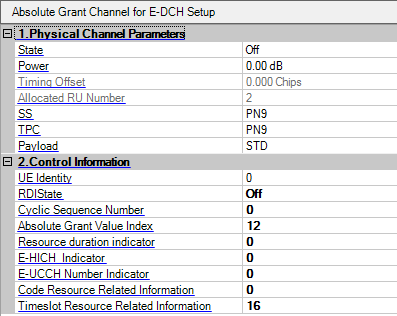
Choices: On | Off
Default: Off
Sets the state of the E-AGCH.
Range: -60.00 db to 0.00 db
Default: 0.00 db
Sets the power of the E-AGCH relative to others.
Range: -8.000 to 8.000 Chips
Default: 0.000 Chips
Set the timing offset of the channel (uplink channel only).
Displays the number of resource units allocated to E-AGCH.
Choices: PN9 | PN15 | Pattern | 0, 1 Text File
Default: PN9
Sets the SS value of E-AGCH.
Choices: PN9 | PN15 | Pattern | 0, 1 Text File
Default: PN9
Sets the TPC value of the E-AGCH.
Choices: STD | PN9 | PN15 | Pattern | 0, 1 Text File
Default: STD
Sets the physical channel payload of E-AGCH.
Range: 0 to 65535
Default: 0
Sets the UE Identity.
Choices: On | Off
Default: Off
Sets the state of the resource duration indicator.
Range: 0 to 7
Default: 0
Sets the E-AGCH cyclic sequence number.
Range: 0 to 31
Default: 12
Sets the E-AGCH absolute grant power value.
Range: 0 to 7
Default: 0
Sets the E-AGCH resource duration indicator value.
Range: 0 to 3
Default: 0
Sets the E-HICH indicator.
Range: 0 to 7
Default: 0
Sets the number of E-UCCH channels.
Range: 0 to 31
Default: 0
Sets E-AGCH code resource related information.
Range: 0 to 31
Default: 0
Sets E-DCH time slot resource related information.
The Resource Unit Setup table enables you to configure the resource unit for each channel.