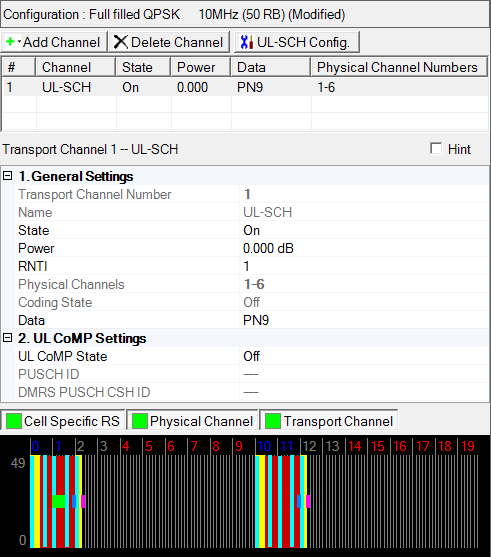
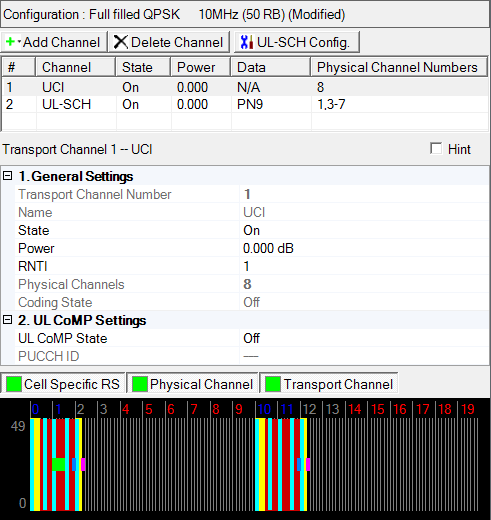
This Transport Channel Uplink configuration has several different possible channel setups (e.g. DL-SCH and UCI). The screen shot below shows the parameter choices for a UL-SCH channel. In the N7625C Signal Studio software, click a different channel to view that channel's parameter choices. The links for all of the channel's parameters and their descriptions are listed in the UL-SCH table and the UCI table below.
|
2. UL CoMP Settings |
|
|---|---|
|
2. UL CoMP Settings |
|
|---|---|
|
|
|
Before adding a transport channel as described below, delete any existing transport channel, physical channel, or resource block collection that occupies the resource blocks that your new transport channel will occupy. If you add a new transport channel without first deleting a conflicting channel or resource block collection, a "code conflicted" error occurs when you generate the waveform.
To add a new transport channel, click the Add Channel button and select UL-SCH or UCI to add an uplink channel.
The Configure UL-SCH window or Configure UCI window opens that enables you to configure the new uplink shared channel. For the Subframe Number parameter, you can enter a range, for example 1-5. The software adds the new channel above the currently selected channel in the list. The software assigns a channel identifying number to the new channel that corresponds to its position in the list and increments the identifying numbers of subsequent channels in the list.
Similarly, if you delete the selected channel using the Delete Selected Channel(s) button , the software adjusts the identifying numbers of the subsequent channels according to their new positions in the list.
You can make changes to an already configured UL-SCH or UCI channel by selecting the channel and clicking the UL-SCH Configuration button . This button opens the Configure UL-SCH window or Configure UCI window for the selected channel.
Displays the number of the selected transport channel.
Displays the name of the selected transport channel.
UL-SCH = Uplink Shared Channel
Choice: Off | On
Default: On
Double-click or use the drop-down menu to turn the channel on or off.
Range: -60.000 to 20.000 dB
Default: 0.000 dB
Enter a power level in dB for the selected channel. See Power Settings (Uplink) for a description of how the software applies your power setting.
Range: 0 to 65535
Default: 0
Enter a value for the Radio Network Temporary Identifier (RNTI). See 3GPP TS 36.211.
Displays the number(s) of the physical channel(s) associated with the selected transport channel.
Displays the coding state (off or on).
Use the Data Source Selection dialog box to select , , or to use for the data.
Choice: On | Off
Default: Off
Double-click or use the drop-down menu to turn the state On or Off.
|
|
On |
|
PUSCH ID and DMRS PUSCH CSH ID are available to set a value |
|
|
Off |
|
PUSCH ID and DMRS PUSCH CSH ID are read only |
See 3GPP TS 36.211 and 36.311 for more information.
Range: 0 to 509
Default: 0
Coupling: Read only value unless UL CoMP State is set to On
Enter a value for the PUSCH Identity (ID) that is used for the virtual cell ID.
See 3GPP TS 36.211 and 36.311 for more information.
Range: 0 to 509
Default: 0
Coupling: Read only value unless UL CoMP State is set to On
Enter a value that is used in the initialization of the cyclic shift hopping for the generation of the DMRS PUSCH pseudo random sequence. This is used for the virtual cell ID.
See 3GPP TS 36.211 and 36.311 for more information.
Choice: On | Off
Default: Off
Double-click or use the drop-down menu to turn the state On or Off.
|
|
On |
|
PUCCH ID is available to set a value |
|
|
Off |
|
PUCCH ID is read only |
See 3GPP TS 36.211 and 36.311 for more information.
Range: 0 to 509
Default: 0
Coupling: Read only value unless UL CoMP State is set to On
Enter a value for the PUCCH Identity (ID) that is used for the virtual cell ID.
See 3GPP TS 36.211 and 36.311 for more information.