:FUNCtion Parameters Commands
Use the :FUNCtion:PARameters commands to select specific operator attributes for a function operator.
The :FUNCtion:PARameters commands define the basic function. When you click on your function in the Functions dialog box, a setup dialog opens that allows you to configure your function. If a dialog does not appear, then there are no commands in the :FUNCtion:PARameters that apply to the operator. For additional commands, refer to the :FUNCtion subsystem.
Operators are identified by their function assignment number (1 through 64) which is included in the FUNCtion{1:64}:PARameters command. The following figure shows a Gaussian operator assigned to Function 1. Commands in this subsystem allow you to select the Gaussian operator's filter cutoff frequency. Before configuring an operator, assign the operator to a function using the commands found in the :FUNCtion subsystem.
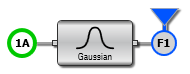
To create and configure a function:
- Use the
:FUNCtion:FOPeratorcommand (:FUNCtion subsystem) to create the function. - Use the
:FUNCtion:PARameterscommands to configure your function.