:NETWorks:TRACe Commands
Use the :NETWorks:TRACe commands to create charts for displaying S-parameter file or transfer function file characteristics. This includes specifying the waveform content window in which to display the trace. Up to 128 traces can be defined. These commands control the graphical user interface's S-Parameter/Transfer Function Viewer. To learn important information about content windows and window axis scaling, see: Waveform Content Windows.
Waveform data for S-parameter files or transfer function files are written in traces, which are then displayed in and scaled to waveform content windows. Use the :NETWorks:TRACe subsystem for tasks such as:
- Creating a trace
- Assigning an S-parameter file parameter or transfer function file parameter to the trace
- Selecting a color for the displayed trace
- Displaying the trace
Trace Position and Scaling
A trace's X and Y-axis position and scaling is linked to and set from the :GRAPh subsystem. On these traces, the X-axis (time) position and scaling is linked to and set from the :TIMebase subsystem. In other words, the time settings on all time-domain windows are set and controlled from the :TIMebase subsystem. For that reason, you can only query X and Y-axis position and scaling in the :NETWorks:TRACe commands.
Window Legend
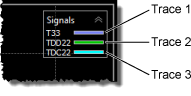
Each waveform content window includes a legend which identifies the trace as shown in this picture. Up to 128 traces can be defined. To show or hide the legend use the following commands:
:DISPlay:WINDow:TDLegendcommand for time-domain content windows (Time-Ohms, Time-Volts, and Time-%):DISPlay:WINDow:FDLegendcommand for frequency-domain content windows (Decibels (Hz), Degrees (Hz), Seconds (Hz), Impulse Response, and Step Response)
Example 1
The following sequence of commands shows how to create 3 traces to display an S-parameter (S11), each in three different content windows.
                // Create Trace 1 (S11)
:NETWorks:TRACe4:PARameter S1_1
:NETWorks:TRACe4:OPERator MAGNitude  //  Display in Decibels (Hz) content window.
:NETWorks:TRACe4:COLor TCOLor4
:NETWorks:TRACe4:DISPlay ON

// Create Trace 2 (S11)
:NETWorks:TRACe5:PARameter S1_1
:NETWorks:TRACe5:OPERator PHASe  //  Display in Degrees (Hz) content window.
:NETWorks:TRACe5:COLor TCOLor5
:NETWorks:TRACe5:DISPlay ON

// Create Trace 3 (S11)
:NETWorks:TRACe6:PARameter S1_1
:NETWorks:TRACe6:OPERator GDELay  //  Display in Seconds (Hz) content window.
:NETWorks:TRACe6:COLor TCOLor6
:NETWorks:TRACe6:DISPlay ON
Example 2
To place markers on S-parameter traces, identify the trace in the :MARKers subsystem by trace number. For example:
:NETWorks:TRACe3:PARameter S2_1
:NETWorks:TRACe3:OPERator GDELay
:NETWorks:TRACe3:CWINdow SHERtz2
:NETWorks:TRACe3:DISPlay ON
:MARKers:MARKer1:SOURce TRACe3
:MARKers:MARKer1:TYPE MXMarker  //  Turn on marker
…