Sin(x)/x Operator
 The Sin(x)/x, or sinc(x), operator can be used to filter an input waveform.
The default filter cutoff frequency is 7.5 GHz. Since some real-time oscilloscopes use a sinc(x) brick wall filter, you can use this filter to observe how the signal would appear on such an oscilloscope. Due to an increase in ringing, this filter tends to increase an eye diagram's height.
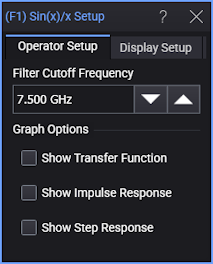
The Show Transfer Function, Show Impulse Response, or Show Step Response options automatically load the operator's network into Freq-Mag, Impulse Response, or Step Response chart windows (like you can do with de-embedding transfer functions — see S-Parameter/Transfer Function Viewer).
The Sin(x) / x operator requires a single-valued waveform, as opposed to an eye diagram. Be sure that your trigger setup results in a single-valued waveform at the input to this operator.
Jitter measurements can be made on the Sin(x) / x operator's output waveform.
Display Setup
Each operator's setup includes a Setup section that has the selections that are shown in the following generic setup dialog box. Use these settings to control the display of the operator's output waveform, including turning the display on or off. Use the Name field to display an identifying name to the waveform which can be helpful for screen captures or when multiple waveforms are displayed. The settings also include the output waveform's color, scaling, and signal type. The scaling Automatic selection allows the output waveform to track changes to the scaling of the input waveform. This is the setting that you would normally want to use.
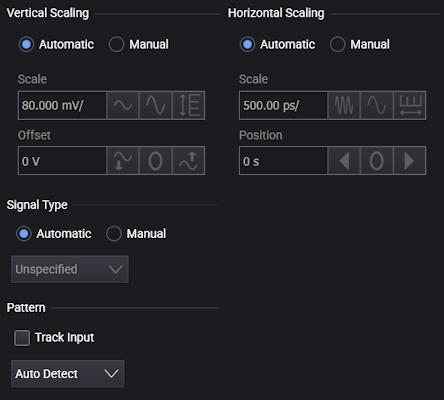
The signal Pattern can be used for BER (Bit Error Ratio), SNDR (Signal to Noise and Distortion Ratio), and other measurements. You can specify the math function has the same pattern as the input waveform (Track Input), Auto Detect the pattern, choose a Known Pattern from a list, or specify your own pattern using a Pattern File.