Bandwidth Limit
For De-embedding, and Deconvolution network setups, bandwidth limiting minimizes the effects caused by noise that occurs above the frequency where the signal is mostly attenuated.
Normally, if you are adding loss (for example, applying the loss of a cable), you do not need to apply bandwidth limiting. However, if you are applying gain (for example, removing the loss of a cable), you may need to use the de-embedding bandwidth limit.
Bandwidth limiting is independent of waveform transformations and is applied to measured or simulated waveforms. It is implemented using a FIR filter that has a size (time span) determined by the filter's corner frequency.
In the De-embedding Setup dialog box, the Bandwidth Limit drop-down list has these selections:
-
None — No additional bandwidth limiting filter is applied with de-embedding.
-
Brickwall — Specifies a Brick-Wall response for the bandwidth limit filter. This response has a sharp roll-off.
-
Bessel — Specifies a 4th order Bessel response for the bandwidth limit filter. This response has a more gradual roll-off.
To achieve the 4th order Bessel response, the maximum bandwidth you can specify is about 2/3 of the maximum bandwidth you could specify with the Brick-Wall filter. Also with the Bessel filter, the brick-wall response takes over at what would be the brick-wall filter's maximum bandwidth. Therefore, you can have a combination of roll-off responses with this selection.
-
Butterworth — Specifies a 4th order Butterworth response for the bandwidth limit filter. This response has a roll-off that is between the Brick Wall and Bessel responses.
To achieve the 4th order Butterworth response, the maximum bandwidth you can specify is about 80% of the maximum bandwidth you could specify with the Brick-Wall filter. Also with the Butterworth filter, the brick-wall response takes over at what would be the brick-wall filter's maximum bandwidth. Therefore, you can have a combination of roll-off responses with this selection.
-
Bandpass — This option is used with the Phase Noise analysis application. Because you do not have control over the slope of the transition from the pass band to the rejected bands, this option has limited usefulness as a general-purpose bandpass filter.
The corner frequency field is limited by the bandwidth set for the input channel or waveform (see Channels Setup). However, for the de-embedding bandwidth limit filter, you are able to specify lower corner frequencies.
Also note that you can select a different filter type for the de-embedding bandwidth limit filter than is selected for the input channel.
Using De-embedding Bandwidth Limit
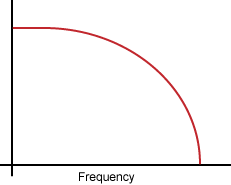
Ideally, you would like to transmit a signal through a channel component (cable, fixture, or probe) whose frequency response was flat over the full bandwidth of the signal, so that every frequency component of the signal was equally represented. In practice, the signal attenuates at higher frequencies as shown in this simplified graph.
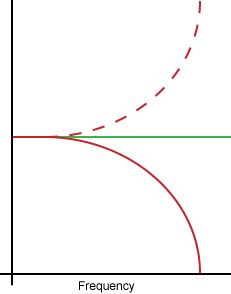
Some applications attempt to remove or correct this insertion loss in the channel using a correction transfer function, which becomes the inverse of the channel's insertion loss. This is represented by the dashed line in the following graph. The product of the peaked correction transfer function response and the channel response yields a flat frequency spectrum shown by the green line.
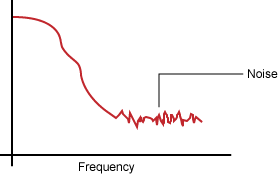
The following graph shows a more realistic frequency response graph. Above a certain frequency (or bandwidth) there is very little signal and mostly noise. Applying a correction using waveform signal processing as described above, may excessively amplify the noise. Bandwidth limiting minimizes this noise gain by attenuating the resulting waveforms above the frequency where there is mostly noise.