Measurement Histogram Configuration
Use the Measurement Histograms dialog box to turn on and configure up to four histograms. Select Histogram On to turn on the selected histogram. The histogram default state is off. You can also open this dialog box by clicking the setup (gears icon) button on the measurement histogram results chart.
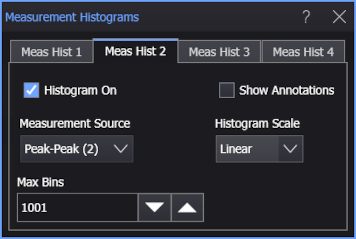
Measurement Source
Selects the measurement the histogram will operate on.
Max Bins
You can control the resolution of histogram plot and statistics by changing the number of bins used in the histogram. A bin is the width of one of the histogram bars.
An odd number of bins is preferred so that floating-point values in the middle of the dynamic range ((top + bottom) / 2) do not land on a bin boundary. Default, minimum, maximum, lower, and higher values are all set to an odd number of bins.
Show Annotations
Shows the Total Hits and Hits/Acq values on the histogram plot. When Measure All is selected for a measurement, there can be multiple hits per acquisition.
Histogram Scale
Selects a Linear or Log vertical scale for the histogram plot.