Save Waveform After Limit
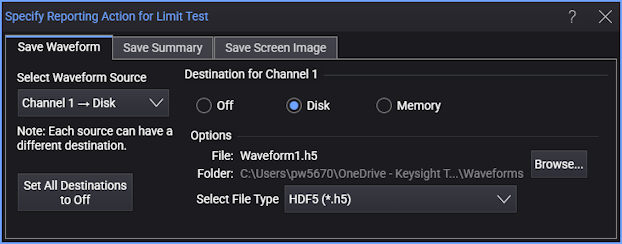
In the "Specify Report Action for Limit Test" dialog box, the Save Waveform tab lets you save a waveform for a limit test.
A saved waveform contains the vertical and horizontal scaling information you can use to rescale the waveform.
-
Select Waveform Source — Selects a waveform source (input channel, function, or memory) that is available to save at the time the limit test is stopped.
-
Destination for <Waveform Source> — For each waveform source, select Off (not saved), Disk (saved to disk), or Memory (saved to waveform memory).
A waveform memory can contain only one waveform at a time. Use the waveform memory option when you are looking for only one failure during the limit test. You can specify a different destination for each waveform source. For example, you can save channel 1 to an external memory device and channel 2 to a memory.
-
Set All Destinations to Off — Selects Off for all waveform sources.
-
Destination Memory — When Memory is selected, this drop-down list lets you select the waveform memory.
-
Browse... — When Disk is selected, this button opens a dialog box where you can specify the name of the file to which the waveform is saved.
-
Select File Type — Selects the format of the waveform data file. The format choices are the same as when manually saving a waveform. See Save Waveform Files.