Save Waveform Files
Use this dialog box tab to save single-valued waveform data to a file. The default user data folder for saving waveform files is \Waveforms. Your saved files can be imported into Infiniium's waveform memory by clicking File > Waveform Memory. This works for all Waveform file types.
When a waveform name (also called a label) is edited, the custom name is saved along with the waveform data to *.h5, *.txt, and *.csv format waveform files. When a waveform file with a custom name is loaded into a waveform memory, the custom name is used for the waveform memory.
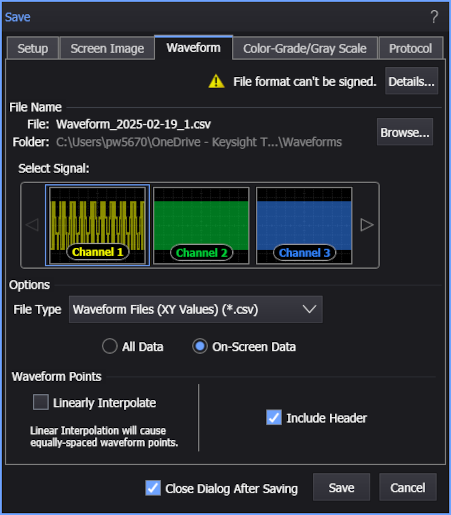
To save waveform data to a file
-
If more than one source signal is shown in the dialog box, select the signal that you want to save. Valid sources can be:
- Channel (if gray scale or color grade display mode is on)
- Math function
-
Click Browse... if you don't want to use the default file name or folder.
-
Select any available options.
All file types let you choose All Data or just the On-Screen Data.
All file types let you select Linearly Interpolate to enforce equal spacing of waveform data points. In cases where data is missing for sample locations, linear interpolation is used to fill-in the missing data values. File types that include Y data only and X origin and X increment values instead of X data have equally spaced waveform data points by definition.
-
Click Save to save the file.
File Names
After a default setup, the file name assigned to a waveform file takes the form Waveform_2017-04-08_1.h5. As you can see in this example, the incremented number "_1" is automatically appended after the date field. With each subsequent file save, this number is incremented. Appending an auto-generated number helps to prevent the accidental writing over of an existing file.
If you click Browse..., you can replace this automatically generated name with any name that you like. For example, my_file.h5. In this case, the first file saved will be my_file.h5. If you have cleared Close Dialog After Saving, the next file will have the characters "_1" appended as in my_file_1.h5. This autonumber will automatically be increased on each subsequent save. If you select Close Dialog After Saving, the default file name reverts back to the form Waveform_<date><autonumber> as described at the beginning of this section.
If you enter a file name that has an arbitrary number appended, for example this_file_57.h5, Infiniium will detect this and save the subsequent file as this_file_58.h5.
Available File Types
| Waveform Type | File Name Extension |
|---|---|
| Waveform Files (Y Values) (.txt) | .txt |
| Waveform Files (XY Values) (.csv) | .csv |
| HDF5 (.h5) | .h5 |
| BIN (.bin) | .bin |
| MATLAB (.mat) | .mat |
Waveform data file formats are described in Formats.