Mask Test Limits
To limit the number of waveforms or unit intervals (UI) that are mask tested:
- Click Setup in the mask test results content window.
- In the Mask Test Setup dialog box, select the Limits tab.
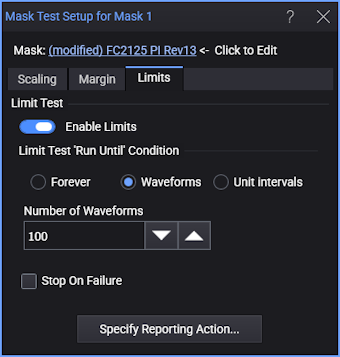
-
Enable Limits — Enable or disables the mask test limits.
Enabling immediately starts the test. To start after you close the dialog box, use the Stop, Single, and Run acquisition controls on the menu bar.
-
Limit Test 'Run Until' Condition — Select whether the mask test will run Forever or until a number of Waveforms or a number of Unit Intervals are tested.
After selecting Waveforms or Unit Intervals, use the Number of Waveforms or Number of Unit Intervals field to enter the number that will stop the test.
-
Stop On Failure — Stops making acquisitions on a failure.
-
Specify Reporting Action... — Opens a dialog box with tabs for each type of action that can be taken when the limit is reached. See Reporting Actions.
(To apply measurement limit testing to a mask measurement result, in the mask test results content window, select the specific result and click Limits. See Measurement Limits.)