Peak-Peak Amplitude
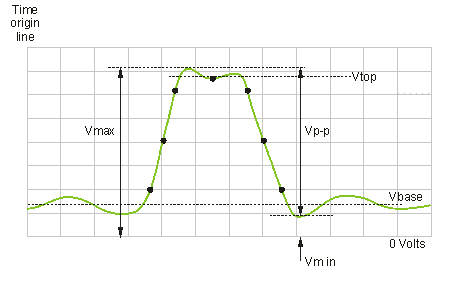
 Peak-Peak Amplitude measures pulse waveforms. Two annotation labels are placed on the waveform. The instrument positions one label at the absolute maximum voltage or power of the waveform and the other label at the absolute minimum voltage or power of the waveform. Since the maximum and minimum values are calculated over the display, waveform, or region, you will notice that the labels track the results across the display, waveform, or region. Peak-Peak Amplitude is a measure of the difference between Vmax and V
min of a displayed pulse waveform. The entire display is used to make the measurement:
Peak-Peak Amplitude measures pulse waveforms. Two annotation labels are placed on the waveform. The instrument positions one label at the absolute maximum voltage or power of the waveform and the other label at the absolute minimum voltage or power of the waveform. Since the maximum and minimum values are calculated over the display, waveform, or region, you will notice that the labels track the results across the display, waveform, or region. Peak-Peak Amplitude is a measure of the difference between Vmax and V
min of a displayed pulse waveform. The entire display is used to make the measurement:
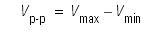
where:
V max is the voltage or power of the absolute maximum value of the waveform and V min is the voltage or power of the absolute minimum value of the waveform.
To measure
- Click the toolbar's Amplitude tab.
- Click the More buttons to locate the Peak-Peak Amplitude button.
- Click the button.
- Select the Region in which to make the measurement:
- Displayed Waveform — is what you see in the waveform window (which can be a zoomed-in view of the complete waveform).
- Entire Waveform — specifies the complete waveform.
- Region N — If regions are enabled for the selected signal, you can select one of those regions.
SCPI Command
:MEASure:VERTical:VPP