FFT Delta Frequency
 The FFT Delta Frequency measurement measures the difference in frequency between two peaks of an FFT function waveform. See FFT Operator.
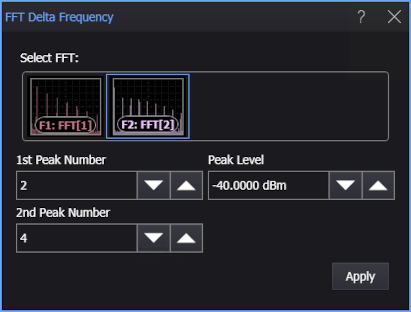
You can choose peaks by using these controls (when you add or edit the measurement):
-
1st Peak Number — Defines which of the peaks, counting from the left of the display, you want to make FFT measurements on. A peak must exceed the Peak Level threshold to be counted as a peak.
-
2nd Peak Number — Defines the second peak used for the delta FFT measurements.
-
Peak Level — Defines the threshold an FFT peak must cross to be considered a peak. The default Peak Level is -40 dBm.
To measure
-
Click the toolbar's FFT tab.
-
If necessary, click the toolbar's More buttons to locate the FFT Delta Frequency button.
-
Click the button.
-
In the FFT Delta Frequency dialog box, select the FFT function waveform on which to make the measurement.
-
Enter the 1st Peak Number, 2nd Peak Number, and Peak Level options to identify the peaks you want to measure.
-
Click Apply.
SCPI Command
:MEASure:FFT:FDFRequency