FFT Frequency
 The FFT Frequency measurement measures the frequency of a peak on an FFT function waveform. See FFT Operator.
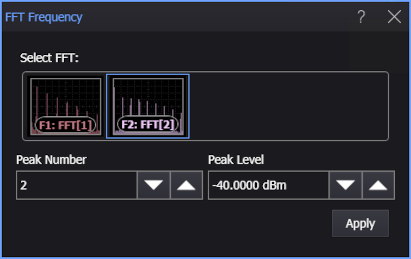
You can choose a peak by using these controls (when you add or edit the measurement):
-
Peak Number — Defines which of the peaks, counting from the left of the display, you want to make FFT measurements on. A peak must exceed the Peak Level threshold to be counted as a peak.
-
Peak Level — Defines the threshold an FFT peak must cross to be considered a peak. The default Peak Level is -40 dBm.
To measure
-
Click the toolbar's FFT tab.
-
If necessary, click the toolbar's More buttons to locate the FFT Frequency button.
-
Click the button.
-
In the FFT Frequency dialog box, select the FFT function waveform on which to make the measurement.
-
Enter the Peak Number and Peak Level options to identify the peak you want to measure.
-
Click Apply.
SCPI Command
:MEASure:FFT:FFRequency