FFT Occupied Bandwidth
 The FFT Occupied Bandwidth measurement measures the range of frequency that contains the specified percentage of power of the FFT on screen. To set up FFT function waveforms, see FFT Operator.
When adding or editing the measurement, you have this option:
-
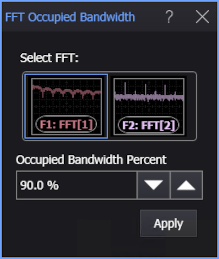
Occupied Bandwidth Percent — Specifies the percentage of power of the FFT on screen.
To measure
-
Click the toolbar's FFT tab.
-
If necessary, click the toolbar's More buttons to locate the FFT Occupied Bandwidth button.
-
Click the button.
-
In the FFT Occupied Bandwidth dialog box, select the FFT function waveform on which to make the measurement.
-
Enter the Occupied Bandwidth Percent.
-
Click Apply.
SCPI Command
:MEASure:FFT:FOBandwidth