FFT Power Spectral Density
 Measures the power of the FFT within the band specified referenced to 1 Hz. Multiple bands may be measured simultaneously using multiple measurements. To set up FFT function waveforms, see FFT Operator.
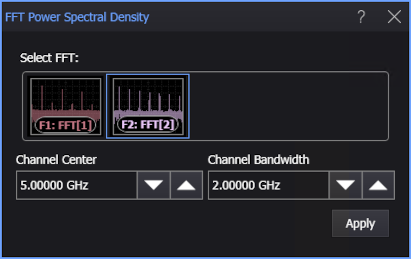
You can specify the frequency band using these controls (when you add or edit the measurement):
-
Channel Center — Specifies the center frequency used for the measurement.
-
Channel Bandwidth — Specifies the width of the FFT frequency band.
To measure
-
Click the toolbar's FFT tab.
-
If necessary, click the toolbar's More buttons to locate the FFT Power Spectral Density button.
-
Click the button.
-
In the FFT Power Spectral Density dialog box, select the FFT function waveform on which to make the measurement.
-
Enter the Channel Center and Channel Bandwidth options to specify the frequency band you want to measure.
-
Click Apply.
SCPI Command
:MEASure:FFT:FPSDensity