Total Harmonic Distortion (THD)
 The Total Harmonic Distortion measurement measures the magnitude of the fundamental frequency and as many harmonics as are on the screen. To set up FFT function waveforms, see FFT Operator.
THD is calculated using the following formula:

Where:
- Xn = voltage or current of each harmonic.
- X1 = fundamental frequency voltage or current value.
The fundamental frequency of the input signal can be input manually as a parameter, or it can be automatically determined based on the first peak above a certain magnitude threshold (similar to other FFT measurements).
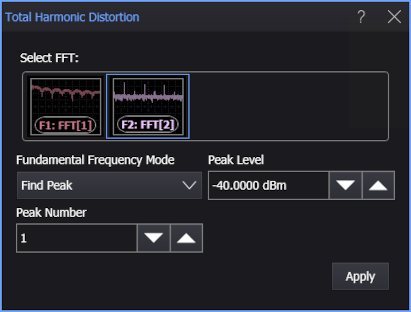
When adding or editing the measurement, you have these options:
-
Fundamental Frequency Mode — Specifies the how the fundamental frequency is specified for the measurement:
-
Find Peak — Lets the oscilloscope determine the fundamental frequency given the magnitude threshold specified in the Peak Level field and the number specified in the Peak Number field.
-
Manual — Lets you enter the fundamental frequency in the Fundamental Frequency field.
-
To measure
-
Click the toolbar's FFT tab.
-
If necessary, click the toolbar's More buttons to locate the Total Harmonic Distortion button.
-
Click the button.
-
In the Total Harmonic Distortion dialog box, select the FFT function waveform on which to make the measurement.
-
Select the Fundamental Frequency Mode and use the remaining controls to specify the fundamental frequency.
-
Click Apply.
SCPI Command
:MEASure:FFT:THDistortion