PAM Rise/Fall Times
 PAM Rise/Fall Times measures rise times and fall times for each of the possible level-to-level transitions in the PAM signal.
For example in PAM4, there are six possible rising edge level-to-level transitions (0-1, 0-2, 0-3, 1-2, 1-3, and 2-3) and six possible falling edge level-to-level transitions (1-0, 2-0, 3-0, 2-1, 3-1, and 3-2).
To measure
- Click Auto Scale in the menu toolbar.
- Adjust the time scale so that all the possible level-to-level transitions are displayed.
- Click the toolbar's PAM tab.
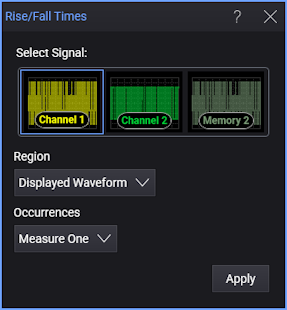
- On the toolbar, locate and click the Rise/Fall Times button.
- Select the Region in which to make the measurement:
- Displayed Waveform — is what you see in the waveform window (which can be a zoomed-in view of the complete waveform).
- Entire Waveform — specifies the complete waveform.
- Region N — If regions are enabled for the selected signal, you can select one of those regions.
- Select the number of Occurrences to measure per acquisition:
- Measure One — makes one measurement per acquisition using edges closest to the timebase reference.
- Measure All — makes as many measurements per acquisition as possible using all edges in the acquisition. In this case, the measurement closest to the timebase reference is the "current" measurement (and is the one with annotations).
If the time span is too narrow, the measurement results panel displays Edge? for the level-to-level transitions that are not displayed. Increase the time span.
SCPI Command
:MEASure:PAM:RFTime