Last Updated: August 29, 2007
The Spectrum Monitor (SMON) can be used to locate, identify and measure transmitted signals from a wireless device.
The Spectrum Monitor is intended to be used for indication only. The Spectrum Monitor does not have the same level accuracy specifications as other measurements provided by the test set, and should therefore not be used when parametric accuracy is required (for example, calibration of a wireless device). It is recommended that you use the other measurements when you require accurate parametric measurements.
This parameter sets the measurement span for Spectrum Monitor measurements.
SCPI command: SETup:SMONitor:FREQuency:SPAN[?]
This parameter sets the resolution bandwidth for Spectrum Monitor measurements.
SCPI commands: SETup:SMONitor:BANDwidth[:RESolution][?] | SETup:SMONitor:BWIDth[:RESolution][?]
This parameter sets the multi-measurement count for Spectrum Monitor measurements.
SCPI command: SETup:SMONitor:COUNt[:SNUMber][?]
This parameter sets the trigger state to single trigger mode or continuous trigger mode for Spectrum Monitor measurements.
SCPI command: SETup:SMONitor:CONTinuous[?]
This parameter sets the trigger source for Spectrum Monitor measurements.
SCPI command: SETup:SMONitor:TRIGger:SOURce[?]
This parameter sets the trigger delay in seconds for Spectrum Monitor measurements.
SCPI command: SETup:SMONitor:TRIGger:DELay[?]
This parameter sets the timeout value in seconds for Spectrum Monitor measurements.
SCPI command: SETup:SMONitor:TIMeout[:TIMe][?]
This parameter sets the crest factor for the Dynamic Power, RF Channel, and Spectrum Monitor measurements. Changing the setting within this measurement setup automatically changes it for the other measurements. The crest factor allows the test set to range correctly and therefore helps prevent over-ranging. The higher the crest factor the less likely that an over-range will occur, however the dynamic range is decreased.
SCPI command: SETup:GPMeas:CFACtor[:SELected][?]
This result provides the integrity indicator for the Spectrum Monitor. Normal indicates that the Spectrum Monitor completed successfully without error and the result is accurate. For details of other integrity indicators, see Measurement Integrity Indicator.
SCPI command: FETCh:SMONitor:INTegrity?
SCPI command: FETCh:SMONitor[:ALL]?, FETCh:SMONitor:TRACe?
SCPI command: FETCH:SMONitor:TRACe:FREQuency?
SCPI command: FETCh:SMONitor:TRACe:PARameters?
SCPI command: FETCh:SMONitor:TRACe:PEAKs?
SCPI commands: FETCh:SMONitor:AMARkers[:LIST]? , FETCh:SMONitor:MARKer([1]|2|3|4|5)?
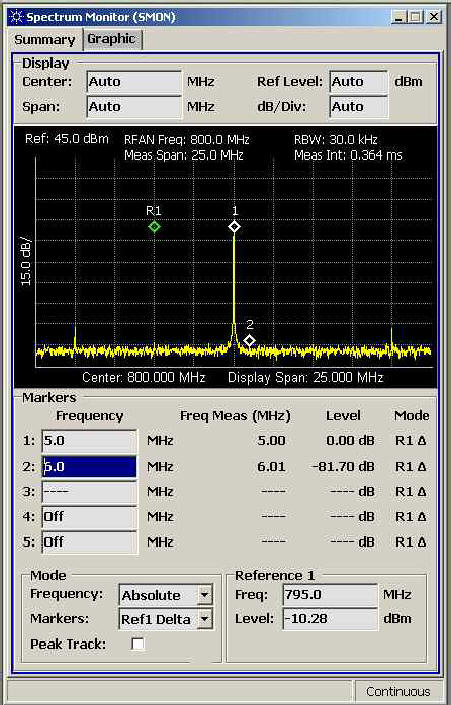
A summary of the results are available on the Spectrum Monitor Summary tab as shown below.
You can choose to set the display parameters
manually or automatically. To change between Auto and Manual, either right-click
the parameter and chose Switch to Auto or Switch to Manual from
the pop-up menu, or press the On/Off (Auto/Manual) key.
When Auto is selected the display setup is updated
when new manual results are available, therefore it is not updated if
you are using the test set remotely or if Display
Tracking is off.
The
Center and Span parameters
allow you to define the center frequency and the frequency span of the
display. If you set either of them to Auto the
other automatically changes to Auto.
SCPI commands: CALCulate:SMONitor:SCALe:FREQuency:AUTO[?],
CALCulate:SMONitor:SCALe:FREQuency:MCENter[?],
CALCulate:SMONitor:SCALe:FREQuency:MSPan[?]
The Ref
Level and dB/Div parameters allow you to
define the reference level and the scale of the division's of the display
in dB. If you set either of them to
Auto
the other automatically changes to Auto.
SCPI commands: CALCulate:SMONitor:SCALe:AMPLitude:AUTO[?],
CALCulate:SMONitor:SCALe:AMPLitude:MPDivision[?],
CALCulate:SMONitor:SCALe:AMPLitude:MRLevel[?]
These parameters set the state and frequency
for the five markers in the Spectrum Monitor. If you are using one of
the delta marker modes, these parameters set the offset frequency of the
delta markers.
SCPI commands: CALCulate:SMONitor:MARKer([1]|2|3|4|5):SFREQuency[?],
CALCulate:SMONitor:MARKer([1]|2|3|4|5):STATe[?],
CALCulate:SMONitor:MARKer([1]|2|3|4|5):FREQuency[?],
CALCulate:SMONitor:AMARkers:STATe[?]
Mode
Frequency mode sets the frequency mode for Spectrum Monitor measurements. The following frequency modes are available:
In Absolute frequency mode, frequency results and settings for all post-processed parameters are provided in absolute frequencies units.
In
Relative frequency mode, frequency results and settings are provided as
offsets from the expected RF frequency. For example, 0 Hz represents the
frequency content at the expected frequency.
SCPI command: CALCulate:SMONitor:FREQuency:MODe[?]
Markers mode sets the marker mode for all five markers in Spectrum Monitor measurements. The following marker modes are available:
In Normal marker mode, markers are independently positioned and marker measurement displays are independent. Marker frequency settings and measurements conform to the current frequency mode setting.
In Reference 1 Delta marker mode (Ref1 Delta), marker settings and measurements are relative to the current Marker 1 Reference (if any). The Marker 1 Reference is set when this state is entered by sampling the current value of Marker 1. If Marker 1 has no valid value, then the Marker 1 reference is set to NAN.
In
Marker 1 Delta marker mode (M1 Delta), Marker
1 behaves in the same way as in Normal mode. However,
Markers 2 through 5 are entered and displayed relative to the dynamic
value of Marker 1.
SCPI command: CALCulate:SMONitor:AMARkers:MODe[?]
The
Peak Track parameter, when selected, instructs
the Spectrum Monitor to perform peak tracking for all markers.
Selecting the Markers to Peaks softkey performs
a peak search and sets the marker frequencies to the five highest peak
values, in order of peak magnitude with Marker 1 being set to the highest
value.
If not enough peaks are found in the trace for all five markers, the
remaining markers are set to NAN.
SCPI commands: CALCulate:SMONitor:AMARkers:PTRack[?],
CALCulate:SMONitor:AMARkers:PEAK,
CALCulate:SMONitor:MARKer([1]|2|3|4|5):PEAK
Reference
1 sets the Freq
(frequency) and Level of the Reference 1 marker. These parameters
are only applicable when the Markers mode
is set to Ref1 Delta.
SCPI commands: CALCulate:SMONitor:MARKer:REFerence:FREQuency[?],
CALCulate:SMONitor:MARKer:REFerence:LEVel[?]
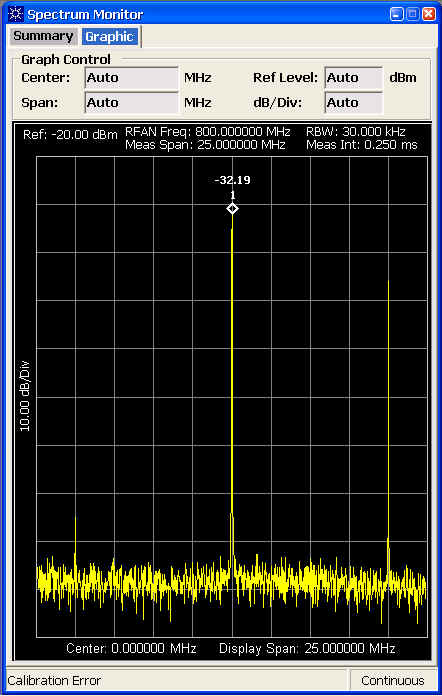
The Graphic tab displays a larger version of the display which is also shown on the Summary tab. It also has a number of the same parameters that allow you to control the display. Changing the parameters on either tab automatically changes them on the other.
Typically, the Spectrum Monitor performs autoranging. If the measured signal is within +3 dB and -3 dB of the expected input level with ≤ 4 dB crest factor then autoranging is not performed and the fastest measurement time is achieved.
Triggering choices available for the Spectrum Monitor are Immediate, Rise, and External.
Related Topic: Programming the Spectrum Monitor (SMON)