8. Real-time Noise Setup
The following figure is a composite of all supported instruments, so some parameters may not apply to your instrument.
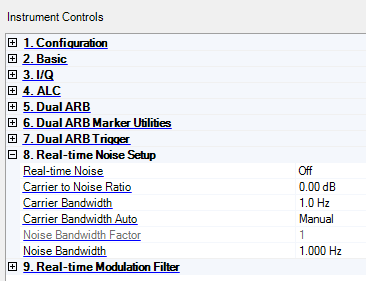
If an instrument does not have Real-time Noise capabilities, the noise effect does not work.
Real-time Noise
Choice: On | Off
Default: Off
Double-click or use the drop-down menu to enable or disable adding real-time, non-repeating additive white Gaussian noise (AWGN) to the carrier being modulated by the waveform being played.
-
On – enables the addition Real-time Noise.
-
Off – disables the addition of Real-time Noise.
Carrier to Noise Ratio
Range: –100 dB to 100 dB
Default: 0 dB
Enter the noise power to be applied to a waveform. The carrier power is defined as the total modulated signal power before noise power is added. The noise power is the in-channel noise power. A positive value makes C larger than N.
Carrier Bandwidth
Range: 0.001 to 80.000 MHz
Default: 1.0 Hz
Displays the carrier bandwidth. This is the same as the bandwidth of the target carrier.
Carrier Bandwidth Auto
Choice: Auto | Manual
Default: Manual
Sets whether the Carrier Bandwidth is automatically set by the software or set manually using the Carrier Bandwidth parameter.
When set to Auto, the carrier bandwidth is as follows:
-
3.84 MHz (single carrier signal)
-
3.84 MHz x Number-of-Carriers (multi-carrier signal)
Noise Bandwidth Factor
Range: 1–2
Default: 1
Displays the flat noise bandwidth factor for the applied real-time noise.
When the Sample Clock is < 50 MHz, the Noise Bandwidth Factor adjusts the RF flat noise bandwidth to be either at least 0.8 times the sample rate for a bandwidth factor of 1, or 1.6 times the sample rate if the bandwidth factor is 2.
When the Sample Clock is > 50 MHz, noise cannot be enabled if the Noise Bandwidth Factor is 2. Any oversampling in a waveform will effectively make the noise bandwidth be that many times wider than the signal bandwidth.
The Noise Bandwidth is calculated as follows:
The noise bandwidth is at least 0.8 * [ARB Sample Clock] * [Noise Bandwidth Factor]
This parameter is not available with all instrument model numbers and may be grayed out.
Noise Bandwidth
Range: 0.001 to 100.000 MHz
Default: 1.0 Hz
Set or change the noise bandwidth (MHz).
This parameter is not available with all instrument model numbers and may be grayed out.