Step 6 - Equipment Setup and Connection
Installation Steps: 1 2 3 4 5 6 7
Connect to ESG, PSG, or MXG/MXG ATE signal generators
-
Ensure the signal generator is turned off.
-
Connect the signal generator to a computer using one of the following methods for instrument control:
-
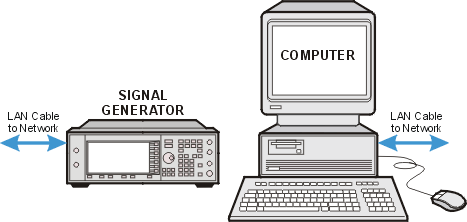
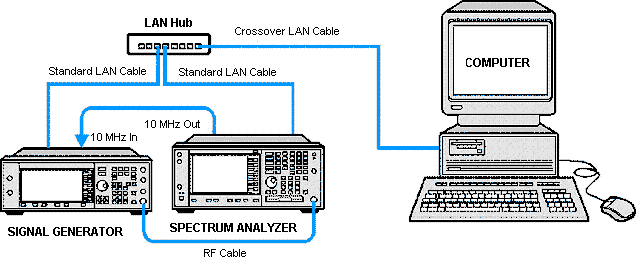
LAN Network—connect both the signal generator and the computer to an external LAN network using standard LAN cables.
-
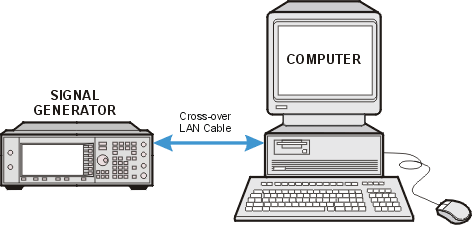
Crossover LAN—connect the signal generator directly to the computer using a crossover LAN cable. (You will need to configure your PC.)
Connect to PXB
If you are using the PXB as the controller, proceed to Installation Step 7.
-
Ensure the PXB is turned off.
-
Connect the PXB to the computer using one of the following methods for instrument control. See the PXB's online documentation for GPIB and LAN configuration information.
-
LAN Network— both the PXB and the computer using standard LAN cables.
-
Crossover LAN— the PXB directly to the computer (You will need to configure your PC and the PXB.)
-
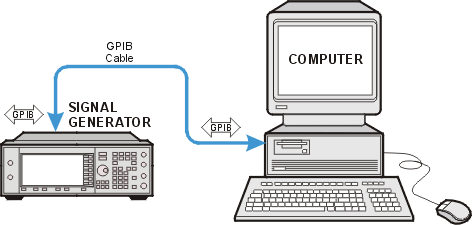
GPIB—connect the PXB directly to the computer using a GPIB cable.
Related Topics
Instrument Problems
Interface Problems
Software Problems