Pattern Symbol Sequence Setup (FlexDCA)
 Clicking Output Pattern opens the Pattern Symbol Sequence dialog which allows you to specify the pattern symbol sequence for source waveform patterns on channels, differential channels, waveform memories, and functions.
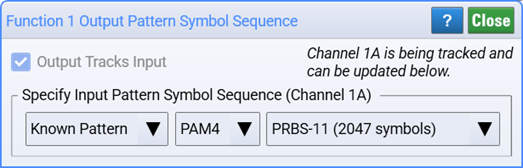
Starting in release A.08.40, when a chain of multiple functions is configured and the Output Pattern Symbol Sequence settings Output Tracks Input is on, the following occurs. If you change the pattern symbol sequence on any function in the chain as well as the input waveform (channel, differential, or waveform memory) the setting is changed on all other functions in the chain as well as the input waveform.
Normally, you would want to use the default setting Output Tracks Input with Auto Detect selected. However, if your signal has a large amount of distortion or eye closure, you may get better equalizer performance by specifying the pattern.
To specify the pattern:
- In the channel, differential channel, or waveform memories setup dialog, click the Pattern button to open the Pattern Symbol Sequence Setup dialog.
- Change to drop-down selection from Auto Detect to either Known Pattern or Pattern File as shown in the following figure.
- Auto Detect is the default selection that automatically detects information about the source waveform's pattern.
- Known Pattern allows you to select from a list of known patterns.
- Pattern File allows you to import setting for a custom BERT pattern file.
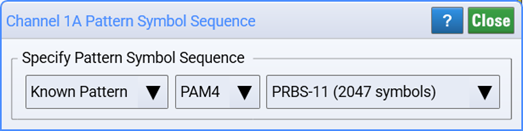
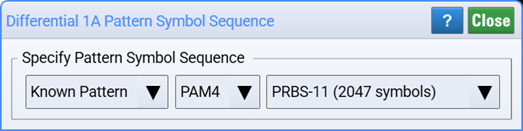
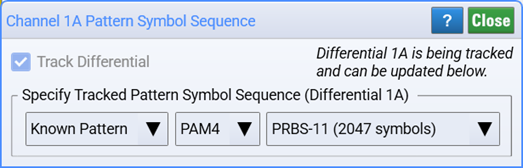
Depending on the format of the input waveform, the following known pattern symbol sequences are available to specify:
Known Pattern Symbol Sequences (NRZ)
- PRBS-7 (127 symbols)
- PRBS-7 (128 symbols)
- PRBS-9 (511 symbols)
- PRBS-9 (512 symbols)
- PRBS-11 (2047 symbols)
- PRBS-11 (2048 symbols)
- PRBS-13 (8191 symbols)
- PRBS-13 (8192 symbols)
- PRBS-15 (32767 symbols)
- PRBS-15 (32768 symbols)
- K28.5 (20 symbols)
- SSPR (32762 symbols)
Known Pattern Symbol Sequences (PAM4)
- PRBS-7 (127 symbols)
- PRBS-7 (128 symbols)
- PRBS-9 (511 symbols)
- PRBS-9 (512 symbols)
- PRBS-11 (2047 symbols)
- PRBS-11 (2048 symbols)
- PRBS-13 (8191 symbols)
- PRBS-13 (8192 symbols)
- PRBS-15 (32767 symbols)
- PRBS-15 (32768 symbols)
- Linearity (160 symbols)
- SSPRQ (65535 symbols)
Known Pattern Symbol Sequences (PAM6/8)
- PRBS-7 (127 symbols)
- PRBS-7 (128 symbols)
- PRBS-9 (511 symbols)
- PRBS-9 (512 symbols)
- PRBS-11 (2047 symbols)
- PRBS-11 (2048 symbols)
- PRBS-13 (8191 symbols)
- PRBS-13 (8192 symbols)
- PRBS-15 (32767 symbols)
- PRBS-15 (32768 symbols)
Tracking
Be default, the output pattern of all Waveform Signal Processing operators tracks the input waveform's pattern. With tracking, if you change the either the specified output pattern or input pattern the corresponding input or output pattern is automatically changed to match; the settings are linked. On most operators, you can disable the Output Tracks Input setting to specify a output pattern does not have to match the input pattern.
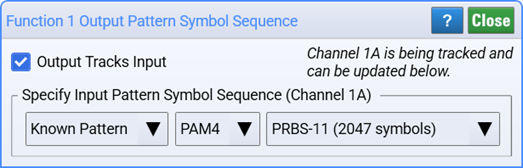
With the following operators tracking cannot be disabled and the Output Tracks Input setting is grayed out:
- Reference Rx
- TDECQ Equalizer
- Decision Feedback Equalizer (DFE)
- Linear Feed Forward Equalizer
- Pulse Fit
The following figure shows three operators. When tracking is on for all three operators, the output pattern of each operator is tracking channel 1A. However, if tracking is disabled for Function 2's output pattern:
- Function 1 tracks channel 1A,
- Function 2 no longer tracks the source waveform 1A, and
- Function 3 now tracks Function 2.

Signal Type
When the channel's Pattern setting is set to Known Pattern or a Pattern File, the Signal Type setting (NRZ, PAM4, PAM6, or PAM8) in the Advanced tab of Channel and Differential Channel dialogs are no longer selectable. They are automatically set to match the signal type of the pattern.