:MEASure:PAM:RMS
Command Syntax
:MEASure:PAM:RMS
Query Syntax
:MEASure:PAM:RMS?
Description
Measures the RMS amplitude of the selected amplitude levels (for example, 0, 1, 2, 3 of a PAM4 signal). The signal must be displayed as a single-valued waveform. Before sending this command, select the actual level to be measured using the :MEASure:PAM:RMS:LEVel child command. To measure all the levels on a signal, you must send this command once for each level as there is no command for simultaneously measuring all levels. The query form of the command returns the measured value. On NRZ signals, this measurement measures the zero and one levels.
The amplitude of the selected level is calculated by:
- Identify one of each of the longest "n" logic levels on a PAMn signal or two levels on an NRZ signal.
- For each level, measure the RMS value of each data point over time.
- For each level, determine the average RMS value of all of the level's data points.
Setting the Timespan
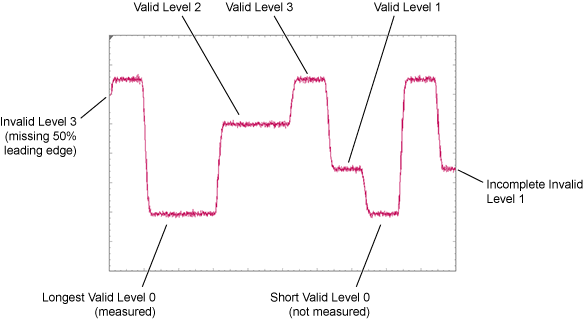
You must set Infiniium's timespan wide enough so that each logic level is visible on the screen. For example, for a PAM4 signal this would be four levels (0, 1, 2, 3) and for an NRZ signal this would be two levels (0, 1). Failure to set the timespan wide enough results in an error. Consider the following items when setting the timespan:
- If multiple identical levels are displayed, the level that is present for the longest time will be selected for measurement. For example, if two logic levels are shown on the waveform, with one being 100 ps and the other being 150 ps, the 150 ps level is selected to be measured.
- To be considered a measurable level, the level must include at least 50% of the leading and trailing edges.
Related Commands
Example Command Sequence
:CHANnel1:SIGNal:TYPE PAM4  //  Specify signal type.
:SYSTem:AUToscale
:MEASure:PAM:RMS:SOURce CHANnel1
:MEASure:PAM:RMS:LEVel LEVel3  //  Select logic level to be measured.
:MEASure:PAM:RMS
:MEASure:PAM:RMS?  //  Return measured value.