:MTESt Subsystem
The Mask Test (MTESt) subsystem commands and queries control mask testing. To query mask test results, use the :MTESt commands in the :MEASure Subsystem.
Mask testing compares waveforms with the boundaries of a mask. Any portion of a waveform (sample) that falls within the boundaries of the mask or mask margin is recorded as a failure. Many standard masks, defined according to telecom and datacom standards, are available for use. Or, you can create your own masks. Use the :MTESt:LOAD command to load a mask file. Mask files have the .mskx or .msk extensions.
Example of a Mask with Margins Applied
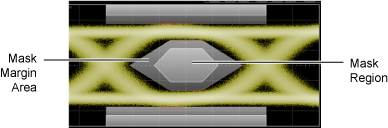
A specific testing database is used for mask testing which is a different memory area than the waveform record for each channel. The database is 521 points high by 751 points wide and is used for histograms, mask testing, and color grade-gray scale displays. Behind each database point is a counter which is incremented each time a pixel is hit by data from a displayed waveform, color-grade memory, or function. The maximum count (saturation) for each counter is unlikely to occur as it is greater than 2 giga-hits. You can query the peak (highest) number of hits recorded by any of the database counters using the :MEASure:EYE:PEAK query.
The database continues to build until Infiniium stops acquiring data or the source is turned off. Data acquisition stops when the power is cycled, the :ACQuire:STOP or :ACQuire:SINGle commands are issued, after a specified number of waveforms or samples are acquired, or as another instrument is plugged in. You can clear the database by sending the :ACQuire:CDISplay command, cycling the power, or turning off the source.
To avoid erroneous data, clear the display after you change setup conditions or device under test (DUT) conditions and acquire new data before extracting measurement results.
Example Command Sequence
This sequence of commands sets up a mask test with an waveform acquisition limit test to capture 200 waveforms from a channel.
*CLS
:SYSTem:DEFault
*OPC?
…  //  Your code to synchronize execution timing.
:ACQuire:RUN
:SYSTem:AUToscale
*OPC?
…  //  Your code to synchronize execution timing.
:MTESt2:LOAD:FNAMe "C:\Program Files\Keysight\Infiniium\Demo\Masks\SONET_SDH\002.48832 - STM016_OC48.mskx"    //  Define and Load Mask
:MTESt2:LOAD
:ACQuire:CDISplay    //  Setup Acquisition Limit and acquire data
:LTESt:ACQuire:CTYPe:WAVeforms 200
:LTESt:ACQuire:STATe ON
:ACQuire:RUN
*OPC?
…  //  Your code to synchronize execution timing.
:MTESt2:MARGin:STATe ON    //  Setup Mask Margin
:MTESt2:MARGin:METHod AUTO
:MTESt2:MARGin:AUTO:METHod HRATio
:MTESt2:MARGin:AUTO:HRATio 5e-5
:MEASure:MTESt2:HREGion1?    //  Query Mask Test Result

…  //  Your code to read measurement result.
:MEASure:MTESt2:HREGion2?
…  //  Your code to read measurement result.
:MEASure:MTESt2:HREGion3?
…  //  Your code to read measurement result.
:MEASure:MTESt2:MARGin?
…  //  Your code to read measurement result.
:MEASure:EYE:AMPLitude
:MEASure:EYE:AMPLitude?
…  //  Your code to read measurement result.
:MEASure:EYE:RTIMe
:MEASure:EYE:RTIMe?
…  //  Your code to read measurement result.
:MEASure:EYE:FTIMe
:MEASure:EYE:FTIMe?
…  //  Your code to read measurement result.
:LTESt:ACQuire:STATe OFF    //  Turn off Acquisition Limit