Front Panel Vertical Scale and Offset Controls
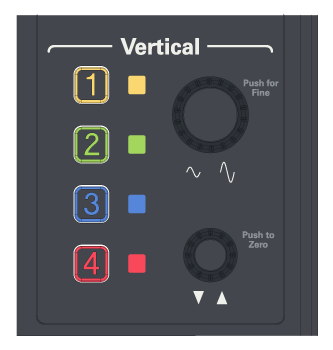
Oscilloscopes have front-panel vertical scale and offset controls which provide the same function as the vertical scale and offset controls in the Infiniium user interface (see Vertical Scale and Offset).
The vertical scale and offset knobs can be assigned to any oscilloscope input channel. Push the channel key ([1], [2], etc.) to select a channel. The channel LED will light, identifying which channel the knobs control.
Turn the vertical scale knob to adjust the sensitivity of the currently selected channel (see Channels Setup).
Push the vertical scale knob to toggle between coarse adjustment (1-2-5 sequence) or fine adjustment.
Turn the offset knob to adjust the vertical position of the waveform on the display screen without modifying the waveform itself. The offset value represents an absolute value on the display.
Push the offset knob to set the vertical offset to zero.