Changing the Mask Test Setup
To change the mask test setup, click Setup in the mask test results content window. The Mask Test Setup dialog box opens.
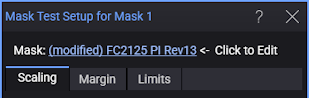
- Mask: — Click the link to change the mask file being used. (This is the same link that appears in the mask test results content window.)
- Scaling — Use this tab to specify how a mask is positioned and scaled against the eye diagram or waveform. See Mask Test Scaling.
- Margin — Use this tab to apply margins to the loaded mask. See Mask Test Margin.
- Limits — Use this tab to limit the number of waveforms or unit intervals (UI) that are mask tested. See Mask Test Limits.